PIX-95 www.amano.com 1-800-253-9836 pg. 4
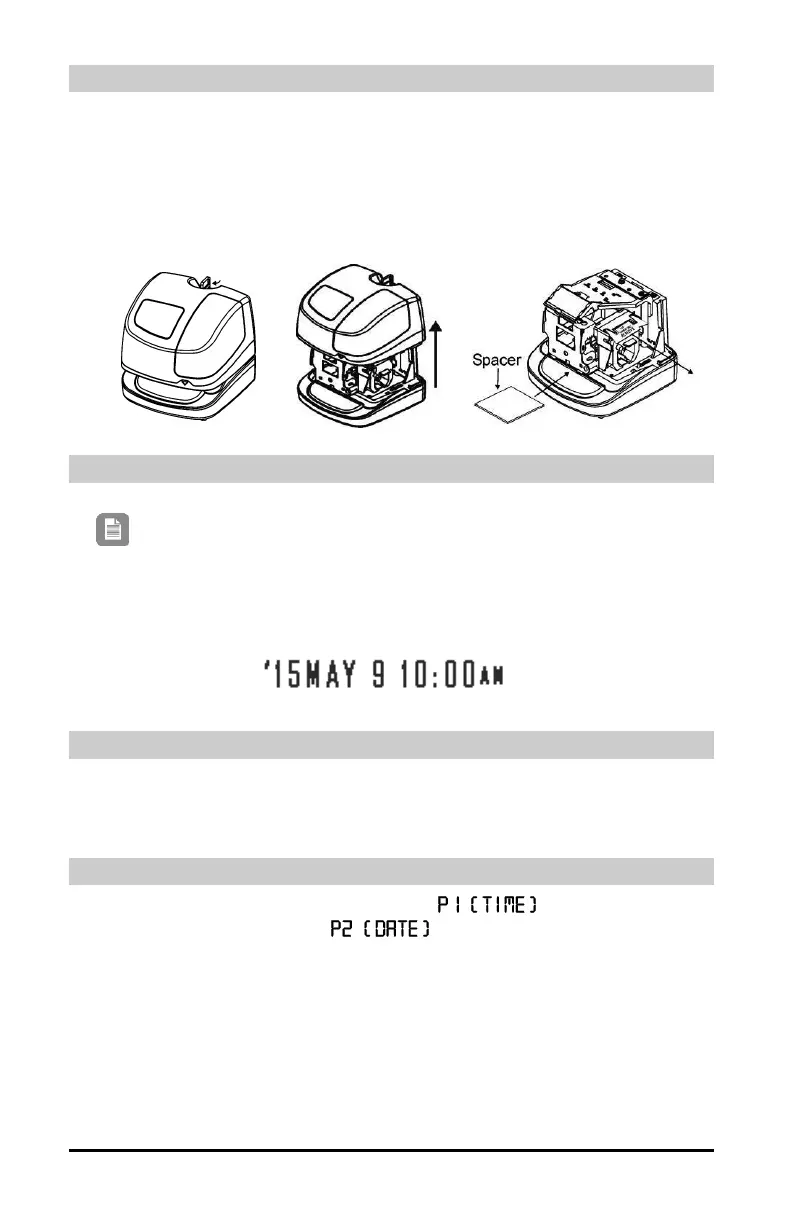
Removing the Cover and Packing Material
1. Plug the clock in (power up).
2.Insert the key provided and make a quarter turn clockwise to unlock the cover.
3.Lift the cover to remove.
4.Remove the cardboard spacer located above the ribbon cartridge by pulling
straight out.
5. Remove the spacer between the Ribbon Cartridge and the Printer Carriage.
Making a Test Print
1. Make sure the PIX-95 is plugged in.
2. Insert a piece of paper or time card into the PIX-95. The clock will
automatically print YEAR, MONTH, DATE and TIME with AM or PM.
3. If the imprint is satisfactory, the PIX-95 is ready for use.
Setting the Time (If Displayed Time is Incorrect)
1. Unlock and remove the cover.
2. Press the HOUR button until the correct hour appears.
3. Press the MINUTE button until the correct minute appears.
.
Setting the Year, Month and Date (If Incorrect)
1. Press and hold the PROGRAM button until appears, then press
the CHANGE button to select
, then press the ENTER button.
2. Press the CHANGE button to select correct YEAR, then press the ENTER
button.
3. Press the CHANGE button to select correct MONTH, then press the ENTER
button.
4. Press the CHANGE button to select correct DATE, then press the ENTER
button twice.
5. Press the PROGRAM button to exit
Note: Your clock is preset with the correct year, month and
date. The hour may need to be set to your location.


 To Next Page