PIX-95 www.amano.com 1-800-253-9836 pg. 8
Wall Mounting
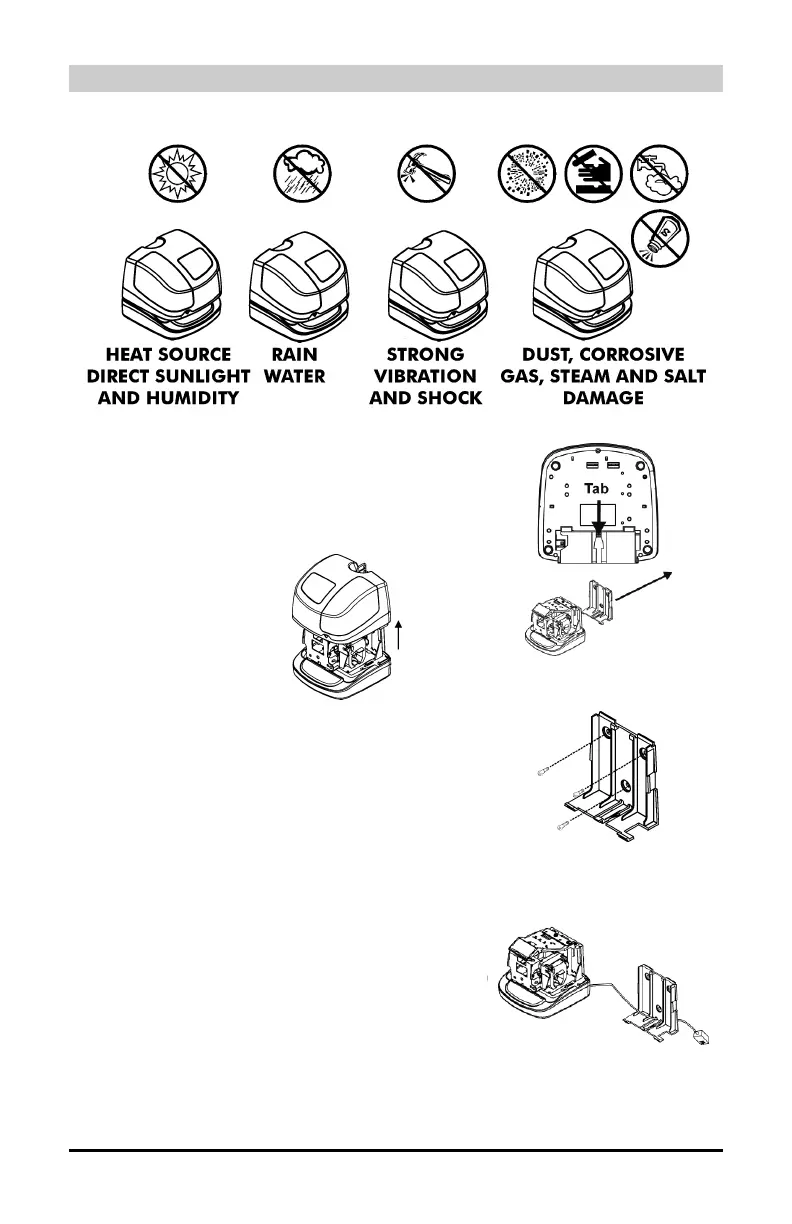
Placement considerations:
1. Insert the key provided and make a quarter
turn clockwise to unlock the cover.
2. Remove the Cover and then remove the
Back Plate by pressing the tab on the
bottom of the clock as shown in the right-
hand figure.
3. Using the Back Plate as a template, mark
the lower mounting hole on the wall.
4. Mount the plate using a #10 wood screw
(or equivalent) in the center mounting hole.
5. Level the Back Plate and mark the location
of the two upper mounting holes. Secure to
the wall using #10 wood screws (or
equivalent).
6. Feed the AC Power Adapter cable through
one of the holes in the Back Plate.


 To Next Page