PIX-95 www.amano.com 1-800-253-9836 pg. 5
Changing the Print Style
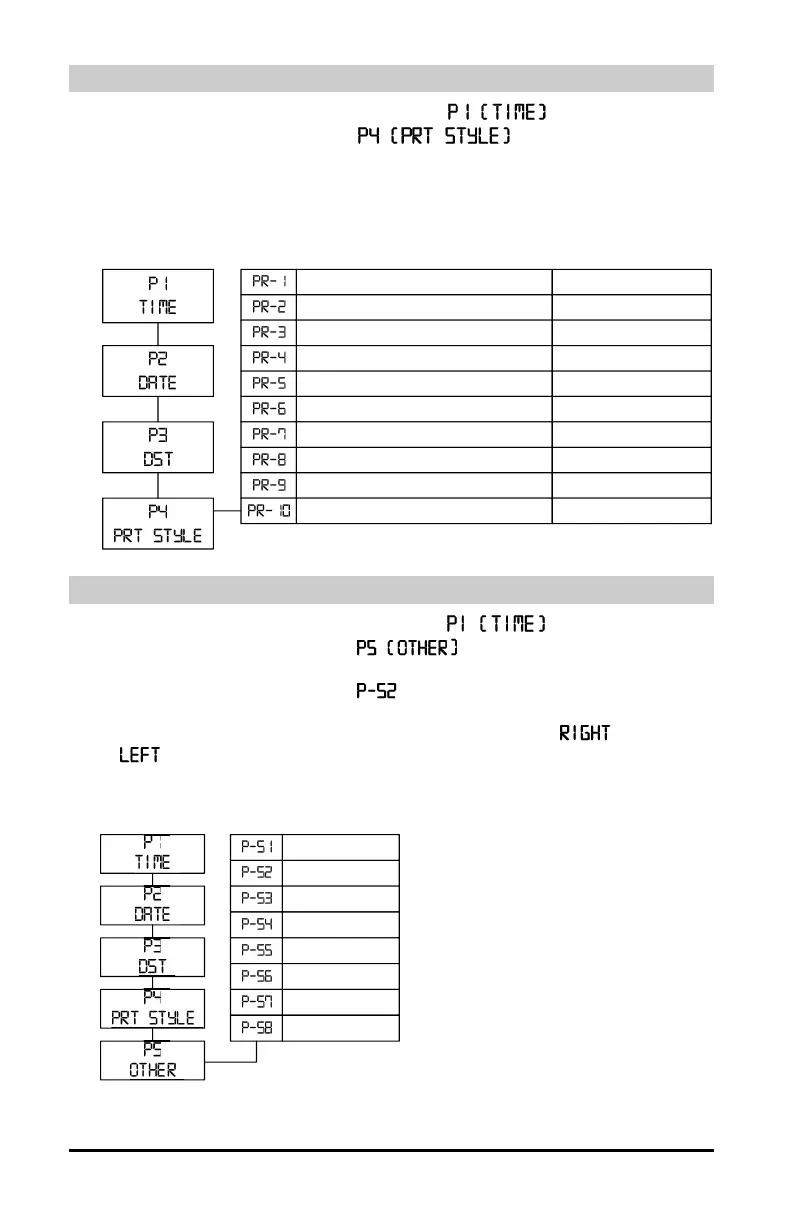
1. Press and hold the PROGRAM button until appears
2. Press the CHANGE button until
appears, then press the
3. The display will flash the current setting. Press the CHANGE button until the
desired print style code appears (see diagram).
4. When the display flashes the correct setting, press the ENTER button and
press the PROGRAM button to exit.
Changing the Print Direction
1. Press and hold the PROGRAM button until appears.
2. Press the CHANGE button until
appears. Press the ENTER
button.
3. Press the CHANGE button until flashes in the display. Press the
ENTER button.
4. Press the CHANGE button until the correct print direction (Right Side)
or
(Left Side) flashes in the display, then press the ENTER button.
5. Press the PROGRAM button to exit.
2 digit year, month, date 12hr, 60
th
/hr ‘15JAN27 2:25PM
2 digit year, month, dat e 24hr, 60
th
/hr
2 d igit ye ar, month, date 24hr, 100
th
/hr
2 digit year, month, date 24hr, 10
th
/hr
2 digit y ear, month, date 24hr, 60
th
/hr,S ec
4 digit year, month, dat e 12hr, 60
th
/hr
4 digit year, month, dat e 24hr, 60
th
/hr
4 d igit year, mont h, date 24hr, 100
th
/hr
2 d igit year, mont h, date 6 digit counter
mont h, date 24hr, 60
th
/hr 6 digit counter
‘15JAN27 14:25
‘15JAN27 14.42
‘15JAN27 14.4
‘15JAN27 14:25 36s
‘2015JAN27 2:25PM
‘2015JAN27 14:25
‘2015JAN27 14.42
‘15JAN27 012345
JAN27 14:25 012345
LANGUAGE
PRINT DIR
PAPE R DET
LEAD ZERO
NUM BER ING
DST BEGIN
DST END
DISP HOUR


 To Next Page