5
6
One-handed free from flight.
FLIGHT CONTROLS
While you’re learning to fly your helicopter, it is best to start with a large room until you get used to
the basic controls.
HELICOPTER WARNING AND SAFETY PRECAUTIONS
The helicopter blades revolve at high speeds and can cause damage to the user, spectators, and
animals. Stand away from the helicopter to reduce the risk of getting into the flight path. Warn
spectators that you will be flying your helicopter so that they are aware of its position. Before flight,
inspect the rotor blades to make certain that the blades are securely fastened to the helicopter.
WARNINGS
• Choking/Cutting Hazard. Small Parts/Sharp Rotor Blades.
• Keep hands, hair, and loose clothing away from the propeller when the power switch is turned to
the ON position.
• Turn off the transmitter and helicopter power switches when not in use.
•
The charging cable is for charging the helicopter’s Li-poly battery. Do not use it to charge any other battery.
• New alkaline batteries are recommended for maximum performance.
• Parental supervision recommended when flying the helicopter.
UNDERSTANDING HELICOPTER TRIM ADJUSTMENTS
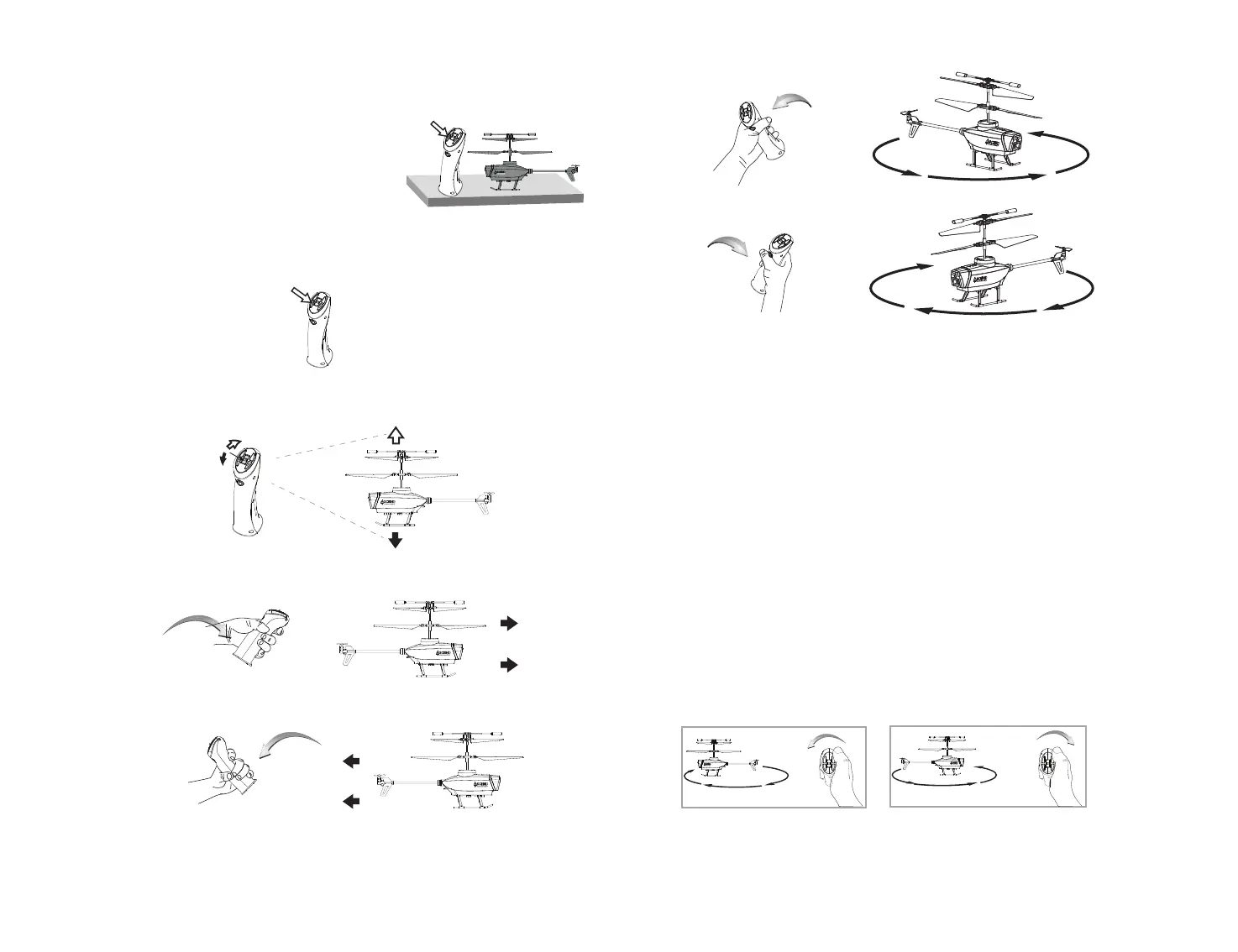
During flight, if your helicopter is excessively rotating clockwise (to the right), press and hold the
TRIM button while tilting the remote control to the left. The remote control will beep once to
indicate that a trim adjustment has been made. You can adjust multiple times until the helicopter
stops rotating and maintains normal flight (see diagram F).
During flight, if your helicopter is excessively rotating counterclockwise (to the left), press and hold
the TRIM button while tilting the remote control to the right. The remote control will beep once to
indicate that a trim adjustment has been made. You can adjust multiple times until the helicopter
stops rotating (see diagram G). If the issue persists, try repeating the process several times until
resolved. Sometimes, you may need to adjust the left and right trim to ensure the helicopter flies
straight and responds accurately to control commands.
Push the throttle to increase the speed of the main rotor, and pull the throttle to decrease the speed
of the main rotor. The helicopter will rise or descend accordingly.
Tilt the controller forward to make the helicopter move forward.
Tilt the controller to the left, and the helicopter will spin counterclockwise.
Tilt the controller to the right, and the helicopter will spin clockwise.
Tilt the controller backward to make the helicopter move backward.
SPEED
TRIM
SPEED
TRIM
SPEED
TRIM
If over-rotating to the right...
If over-rotating to the left...
SPEED
TRIM
SPEED
TRIM
If the helicopter becomes unstable during the course of
flying, you may need to calibrate the internal gyros. To do
this place the helicopter on a flat level surface. press and hold
the Calibrate button. The LEDs on the helicopter will flash
quickly and then remain solid, this indicates your drone has
been recalibrated (see diagram E).
CALIBRATING THE HELICOPTER
AUTOMATICALLY TAKE OFF / LAND
Make sure you have properly synced The helicopter.
• Simply press the “start/land” button on the top of controller, your helicopter will automatically take off.
• To stop or land the helicopter just press the “START/LAND” button again and the helicopter will descend and
land automatically.
E
F G


 To Next Page