CONTENTS:
(1) upper rotor blade set x 1 (3) connecting rods x 2
(2) bottom rotor blade set x 1 (4) screwdriver x 1
HOVER HAWK PROPELLER SYSTEM
Your helicopter propeller system is a precision instrument that may need repair or replacement from
time to time for optimal flight function. Crash landing from high-speed aerial flights may damage
your helicopter rotor blades or connecting rods.
TROUBLESHOOTING:
If your helicopter loses its ability to fly correctly, inspect the propeller system carefully for the
following two common issues:
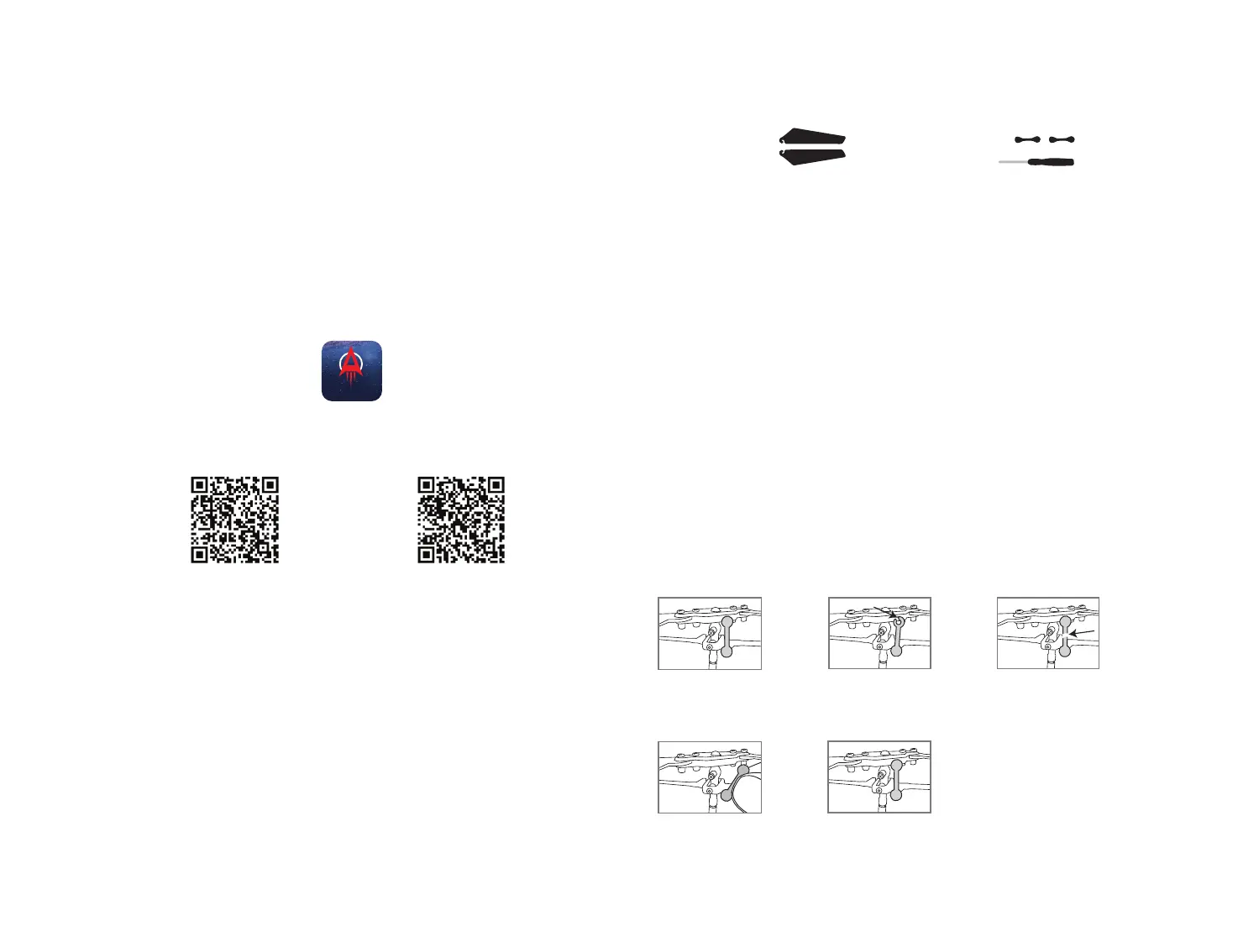
1. Replacing The Connecting Rod: The connecting rod is a small “handcuff” style device that
stabilizes the “upper” rotors. There is two connecting rods on the upper rotor. Please see Diagram 1.
If a connecting rod is broken or missing simply replace it by removing the existing broken unit and
replacing it with a new one. You may have to use slight pressure when reattaching both ends of the
new connecting rod. Make sure that the new connecting rod is secured and locked in place. See
Diagram 2. Make sure there is no damage to the actual blade or arm that holds the connecting rod in
place. If there is, you must replace the entire blade system.
2. Replacing The Upper and Bottom rotor blades: The rotor is subject to damage as you learn to
properly fly and control your helicopter. If after a crash your helicopter has loss of control or flies
erratically you should carefully inspect your entire propeller system for any sign of damage. Most
common are cracked or chipped blade, broken connecting rod, and frozen balance bar (this is when
the balancing bar and blade are jammed and can not move freely up and down).
7 8
Diagram 1
REPLACING CONNECTING RODS
There is two connecting
rods on the upper rotor.
Diagram 2
Proper connection
Replacing connecting rod
Broken connecting rod
Broken connecting rod
PART REPLACEMENT INSTRUCTIONS
If you’re still encountering difficulties downloading the HOVER HAWK App, please contact
our customer service department at www.amaxbrands.com
* Apple® devices require the use of iOS 10.0 or higher.
ANDROID™ devices require the use of OS 4.2.2 or higher.
Apple
®
iOS
Android OS
ICON
CAMERA VIDEO AND PHOTO STREAMING SETUP
Your HOVER HAWK comes equipped with an on-board digital camera that takes both video and still photographs and
streams them to your mobile device.
WHAT YOU WILL NEED TO GET STARTED USING YOUR CAMERA
1. One Apple or Android Smart phone* (Phone not included).
2. The HOVER HAWK App successfully downloaded and installed on your mobile device.
Note instructions on using the App are in the application tutorial
3. To Download the HOVER HAWK App, scan the appropriate QR code below which will link to the App on
either the Android Play Store or Apple Store.
4. After the HOVER HAWK App is installed, it should create an icon on your screen (see icon below). Click the
icon to run the App and make sure that it has installed correctly on your device. If not, please delete and
repeat the process again.
5. Follow the “TUTORIAL” for instructions on connecting/pairing your HOVER HAWK to the App and using
the App for recording film and still photos.
HOVER HAWK
HOVER HAWK


 To Next Page