Need help?
Do you have a question about the Amazfit Bip S Lite and is the answer not in the manual?
Provides links to the detailed user manual and usage video for feature access.
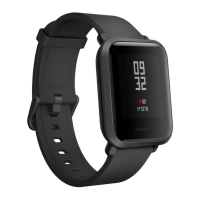
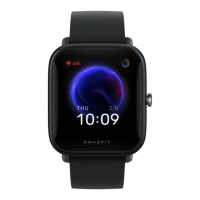
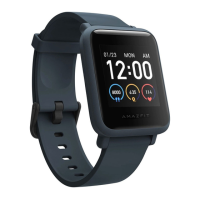
The Amazfit Bip S Lite is a wearable device designed to offer a range of health and activity tracking functionalities, with a focus on user-friendly operation and extended battery life. Its design incorporates a transflective, always-on display, which contributes to its power efficiency and visibility in various lighting conditions.
The primary functions of the Amazfit Bip S Lite revolve around activity tracking, health monitoring, and smart notifications. For activity tracking, the device is equipped with a finely tuned algorithm for step counting. This algorithm is designed to identify motion patterns characteristic of walking, using a threshold to determine if a motion's size and subsequent acceleration measurement qualify as a step. This intelligent filtering helps in distinguishing genuine steps from other arm movements, though factors like hand shaking or moving arms can sometimes lead to overcounting, while walking on very soft surfaces or without arm movement might result in undercounting.
Sleep tracking is another core feature, providing detailed insights into sleep patterns. The watch automatically detects sleep status and records the duration of various sleep stages, including deep sleep, light sleep, awake times, REM (if supported by the specific device model), and naps. It also monitors sleep breathing quality. Sleep detection relies on a combination of "body movement" and "heart rate" data. Minimal body movement and a low heart rate during sleep are indicative of deep sleep, while vigorous movement and a high heart rate suggest light sleep. The device can differentiate between night sleep and naps, with specific criteria for recording each. Night sleep data is displayed if sleep lasts more than 20 minutes and occurs between 00:00 AM and 8:00 AM. Naps are recorded if sleep lasts over 20 minutes outside this window. If a user wakes up during a nap for less than 60 minutes, the awake time is integrated into the nap data; if awake for more than 60 minutes, the nap is considered interrupted and displayed as multiple naps. The Zepp app provides a comprehensive overview of historical sleep data, allowing users to view trends by day, week, month, or year. While useful for personal health insights, it's important to note that the sleep tracking feature is not a diagnostic tool for sleep disorders like sleep apnea.
Heart rate monitoring is a continuous function, with the device automatically measuring and recording heart rate throughout the day at a set frequency. An alert system is in place to notify users if a predefined heart rate alert value is reached, provided there's no significant activity in the preceding 10 minutes. During detected activities, the device automatically increases its heart rate detection frequency to ensure accurate data recording during workouts.
Stress monitoring is also integrated, with the device measuring stress levels every five minutes to show daily fluctuations. A higher success rate for stress measurement is achieved when the user is at rest.
The watch also offers basic smart functionalities, such as controlling music played or streamed on a connected phone. It's important to clarify that the Amazfit Bip S Lite does not have the capability to download music files directly to the watch; it acts as a remote control for the phone's music application.
The Amazfit Bip S Lite is designed for ease of use, with several features enhancing the user experience. The transflective, always-on display is a key aspect, ensuring that time and other information are always visible without needing to activate the screen. The display utilizes auto-brightness, which adjusts when the wrist is lifted, further contributing to its energy efficiency. The side button primarily serves to restart the device when held for ten seconds; navigation to apps is typically done by swiping left on the screen.
Pairing the device with a phone involves installing the Zepp app (available on App Store/Google Play). Users log into an existing account or create a new one, then navigate to "Profile" > "Add device" > "Watch" > "Amazfit Bip S" to initiate the pairing process. Bluetooth must be enabled on the phone for successful connection.
For optimal accuracy in tracking, particularly for sleep and heart rate, proper wearing of the watch is crucial. It should be fastened securely on the wrist, in contact with the skin, especially during sleep. Excessive wrist movement while asleep should be avoided, as it can interfere with sensor readings and lead to inaccurate data. Wearing the watch on the non-dominant wrist is recommended for better data integrity. For sleep tracking, a minimum duration of 20 minutes is required for the watch to detect and record sleep data effectively.
The Zepp app serves as the central hub for managing device settings, viewing detailed health data, and accessing historical records. It allows users to enable or disable features like "Assisted sleep monitoring" and provides a comprehensive overview of all tracked metrics.
Maintenance of the Amazfit Bip S Lite primarily involves charging and proper handling. The device is charged using a dedicated charging cradle, which connects to a USB power adapter or USB port. It is recommended to use a power adapter rated 5V and above 500mA. Users are advised not to attempt to replace the device's built-in battery themselves or force open the battery compartment, and only the official charging base should be used.
For software-related issues or to understand specific features, a detailed user manual and usage video are provided. These resources offer comprehensive instructions on setting up, operating, and troubleshooting the device. If features are not accessible or seem to be malfunctioning, consulting these guides is the first step. For instance, if sleep tracking accuracy is a concern, users can check the Zepp app to confirm if "Assisted sleep monitoring" is enabled and try toggling it off and on again.
The device is designed to be durable for everyday wear, but care should be taken to avoid damage. The band is designed to fit wrists up to 8 inches, and if the band is broken, it may indicate that the wrist is too large for the watch. The transflective display, while robust, should be protected from excessive impact or scratches. Regular cleaning of the watch and band can help maintain hygiene and ensure optimal sensor contact with the skin.
 General
| Display Size | 1.28 inches |
|---|---|
| Resolution | 176 x 176 pixels |
| Battery Life | Up to 30 days |
| Water Resistance | 5 ATM |
| Connectivity | Bluetooth 5.0 |
| Compatibility | Android 5.0 or iOS 10.0 and above |
| Strap Material | Silicone |
| Display Type | Transflective Color TFT |
| Sensors | 3-axis acceleration sensor |
| Activity Tracking | Steps, distance, calories, heart rate, sleep |
| Notifications | App alerts |
| Sports Modes | 8 sports modes (Treadmill, Outdoor Running, Walking, Indoor Cycling, Outdoor Cycling, Yoga, Cricket, Free Training) |

 To Next Page