Technical Information
47
MBRELL
-
-
Precision Induction Heating
To Configure Your Computer
The following is one way to configure the serial port of your computer; you may have
your own devices or means of making the communications connection.
Do this... Observe...
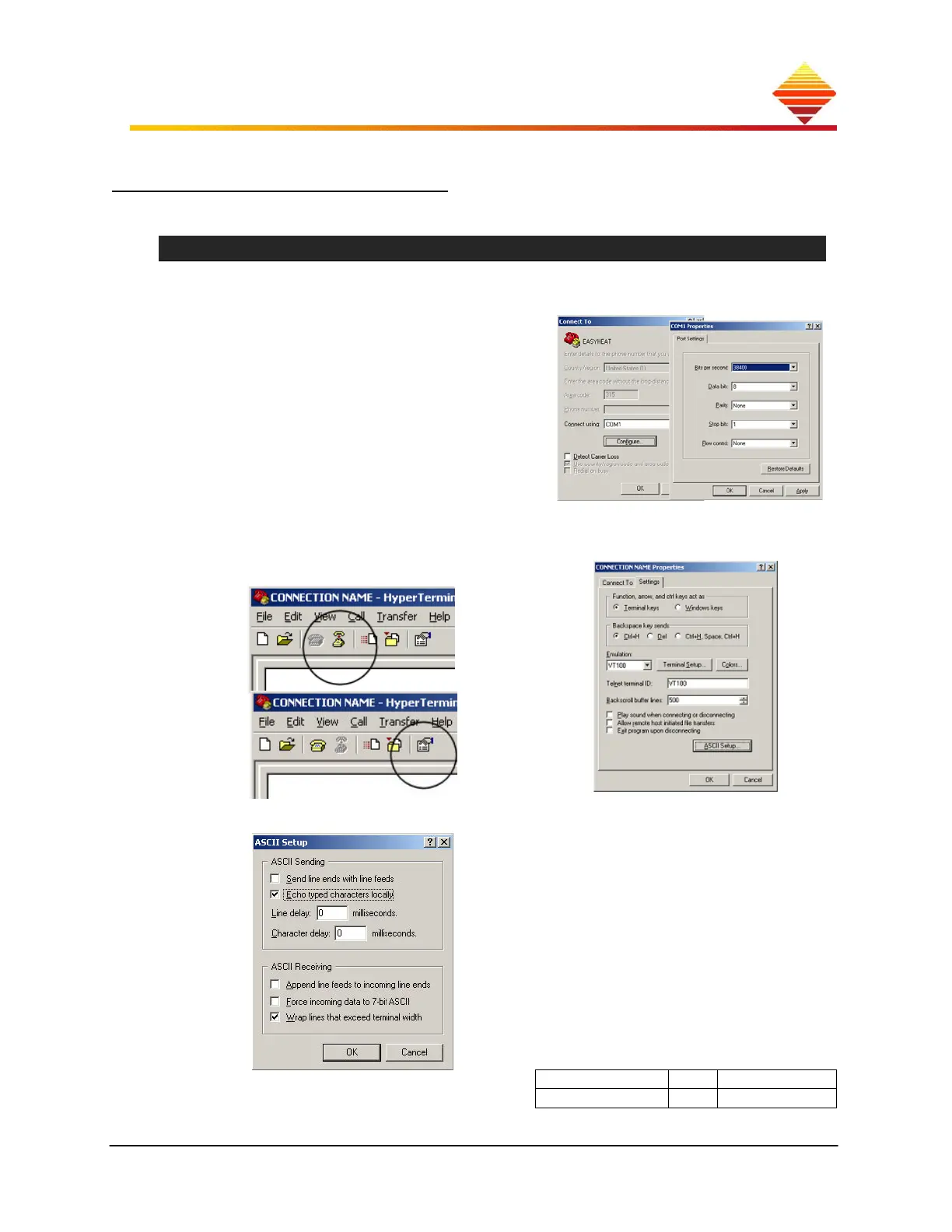
launch HyperTerminal from Programs > Accessories > Communication (or other
serial communication application).
enter a ‘connection name’ such as
EASYHEAT then select:
COM1 (or appropriate for your device)
38400 baud (or appropriate for your
device)
8 data bits; parity = none; stop bits = 1
flow control NONE
click OK
Click Disconnect (upper image)
Click Properties (lower)
Select Settings; set like this
Select ASCII setup; set like this: Select File >> Save to keep
these changes
attach the converter kit (9 –
pin D-submin or USB) to the
selected comm. port of your PC
attach RJ-45 modular plug
of converter to rear of
EASYHEAT
follow steps to install driver
for converter
(some units) ensure converter settings →
Data device type Comm Mode
DCE SIM TxON/RxON



 To Next Page