Technical Information
58
Precision Induction Heating
MBRELL
®
-
-
Follow these steps to change taps at the work head:
Do this... Observe...
STOP
unit is Ready
turn off AC power switch at rear AC power LED is not lighted
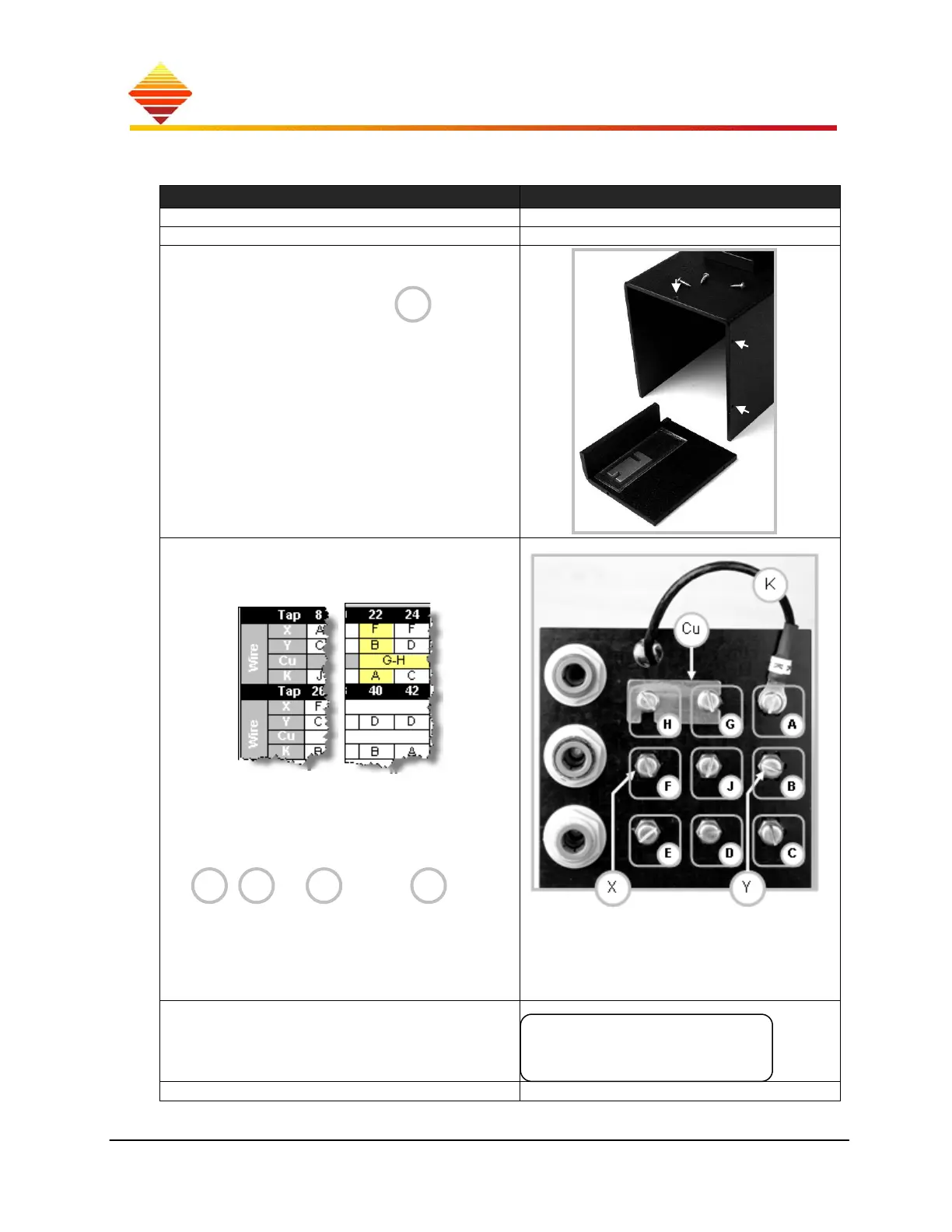
use Philips screwdriver to remove 3 work head
cover screws (arrows)
note envelope containing tabs for use in
some tap settings
view work head from wiring-side (shown)
determine present setting from previous table
above (example = TAP 22)
depending on the message, select the TAP on
the chart which is numerically higher or lower
that the present setting
use slotted screw driver, loosen the wire(s)
, and or tab(s) to be
moved
re-install the wire(s) and tab(s) as required by the
table for the TAP you’ve selected
ensure unused screws are tight
replace work head cover with 3 screws
Navigate to Menu Selection > Heat Station
select ►Modify Tap
select the new tap setting
returns to Home zone
if * persists, follow instructions ...until heating without *
Cu
CuY X
K
Choose Menu
►Modify Tap



 To Next Page