EN
Plugs
Between the power
supply and aView
Ø5.5mm DC jack connector
7 interchangeable types 1. Model NEMA 5 AC grounded power plug
2. Australian configuration: AS3112, AC grounded power plug
3. UK configuration: BS1363, AC grounded power plug
4. European configuration: CEE 7, AC grounded power plug
5. Danish configuration: 2 – 5a, AC grounded power plug
6. Swiss configuration: Type J, AC grounded power plug
7. Brazil configuration: Type N, AC grounded power plug
Contact Ambu for further information.
8. Trouble Shooting
If problems occur with the aView monitor, please use this trouble-shooting guide to identify
the cause and correct the error.
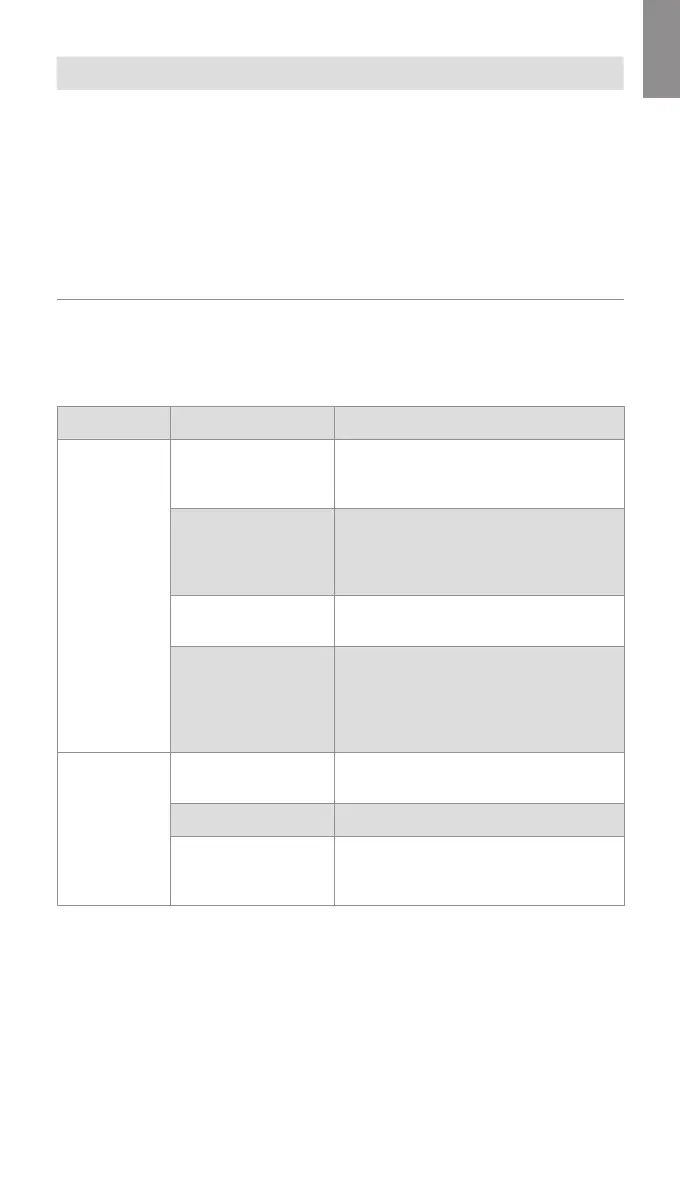
Problem Possible cause Recommended action
No live image
on the screen
but User
Interface is
present on the
display or the
image shown
isfrozen.
An Ambu visualization
device is not connected
to aView.
Connect an Ambu visualization device to
the blue or green port on aView.
aView and the Ambu
visualization device
have communication
problems.
Restart aView by pressing the power
button for at least 2 seconds. When aView is
off restart by pressing the power button
once more.
The Ambu visualization
device is damaged.
Replace the Ambu visualization device with
a new one.
A recorded image is
shown in the yellow
filemanagement tab.
Return to live image by pressing the blue
Live image tab or restart aView by pressing
the power button for at least 2 seconds.
When aView is off restart by pressing power
button once more.
Low picture
quality.
Light reflecting on
the aView screen.
Move aView to a position where no direct
light influences the screen.
Dirty/damp screen. Wipe the screen with a clean cloth.
Brightness and
contrast settings
not optimal.
Adjust the contrast and brightness using the
designated menu on aView.
13



 To Next Page