79
5.4.1.2.2 Snapshot
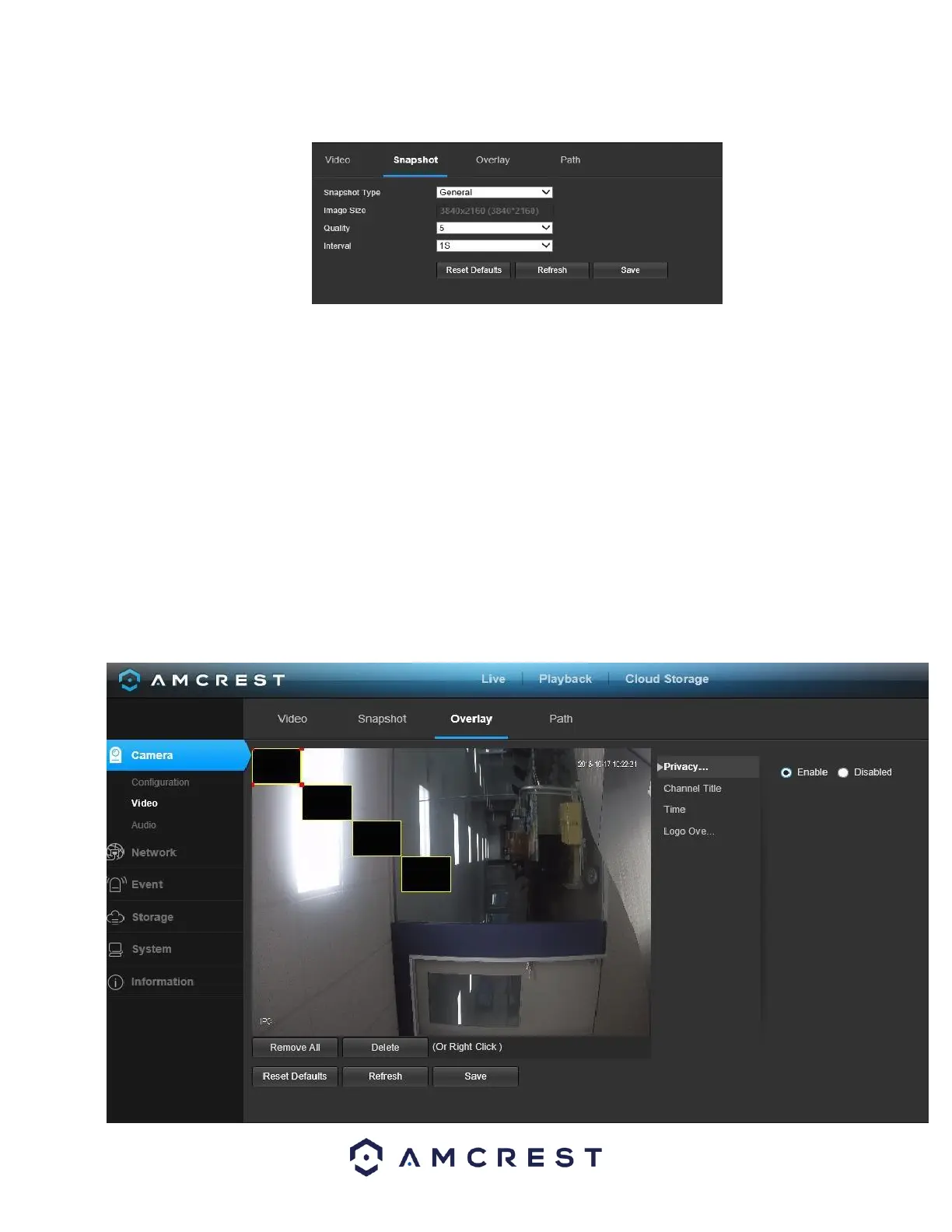
Below is a screenshot that shows the Snapshot tab in the Video menu item:
Below is an explanation for each of the fields on the Snapshot tab in the Video menu item:
• Snapshot Type: This dropdown box allows the user to select a snapshot mode. There are two snapshot modes:
• General: Snapshots are taken as scheduled.
▪ Event: Snapshots occur when a motion detection alarm or tampering alarm is triggered
• Image Size: This dropdown box shows the image size. By default, the screenshot size is the same size as the video feed’s
resolution.
• Quality: This dropdown box allows the user to select image quality. Quality is adjusted on a scale of 1-6.
• Interval: This is to set snapshot frequency. The value ranges from 1 to 7 seconds. The maximum setting for a customized interval is
3600s/picture.
To reset to default settings, click the Reset Defaults button. To refresh the page, click the Refresh button. To save the settings, click
the Save button.
5.4.1.2.3. Overlay
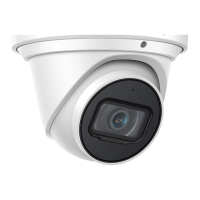
Below is a screenshot that shows the Overlay tab in the Video menu item:


 To Next Page