89
Below is an explanation of the fields in the Multicast settings screen:
• Enable: This checkbox allows the user to enable Multicast functionality.
• Multicast Address: This field allows the user to enter a multicast address.
• Port: This field allows the user to enter a multicast port.
To reset to default settings, click the Reset Defaults button. To refresh the page, click the Refresh button. To save the settings, click
the Save button.
5.4.2.9. QoS
QoS stands for Quality of Service and it refers to the overall performance of a computer network, particularly the performance
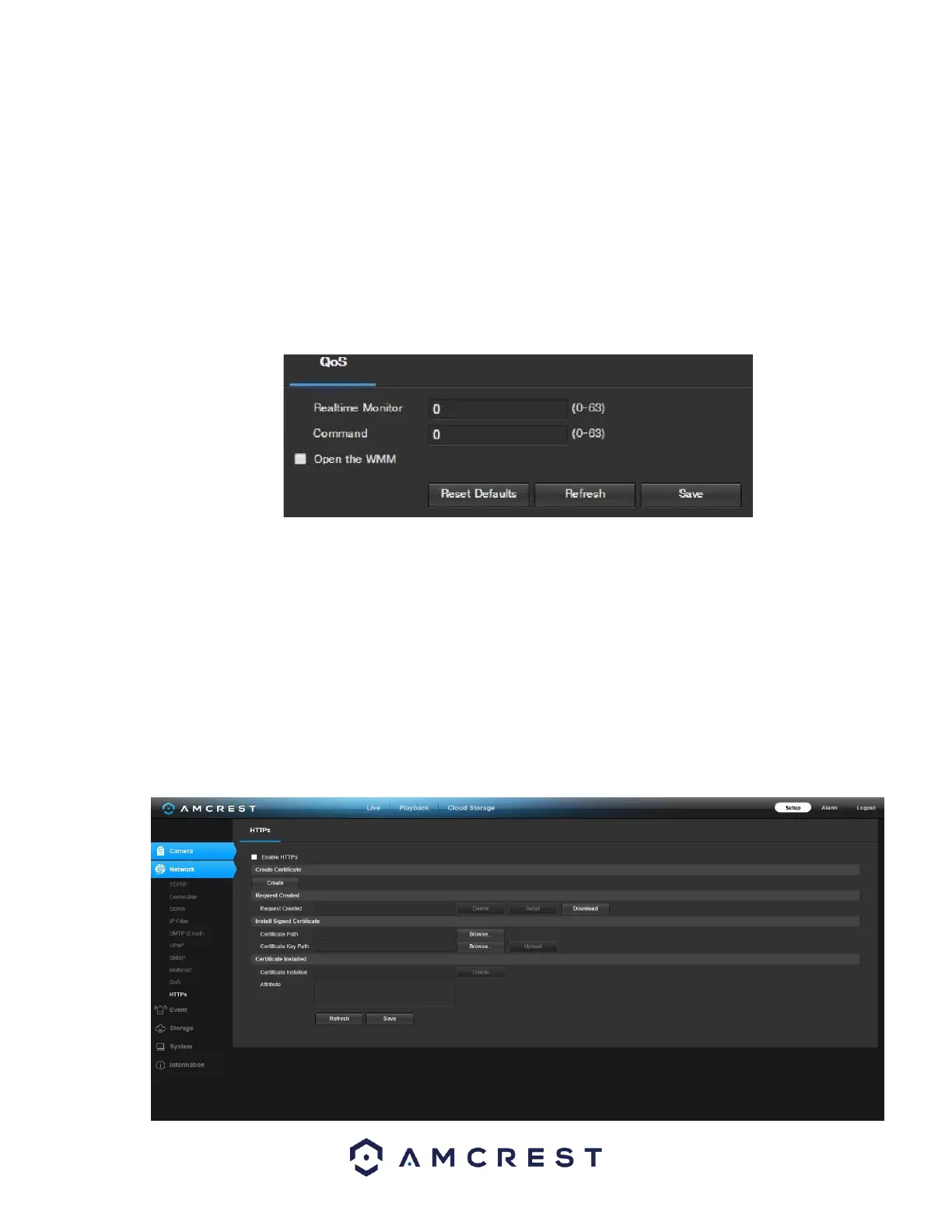
seen by the users of the network. Below is a screenshot of the QoS screen:
Below is an explanation of the fields on the QoS screen:
• Realtime Monitor: This field allows the user to enter in a priority value for real time monitoring packets. The range is between 0-
63.
• Command: This field allows the user to enter in a priority value for command packets. The range is between
063.
To reset to default settings, click the Reset Defaults button. To refresh the page, click the Refresh button. To save the settings, click
the Save button.
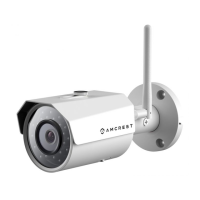
5.4.2.10. HTTPS
This menu allows the user to enable and create HTTPS certificates. Below is a screenshot of this menu:














 To Next Page