22
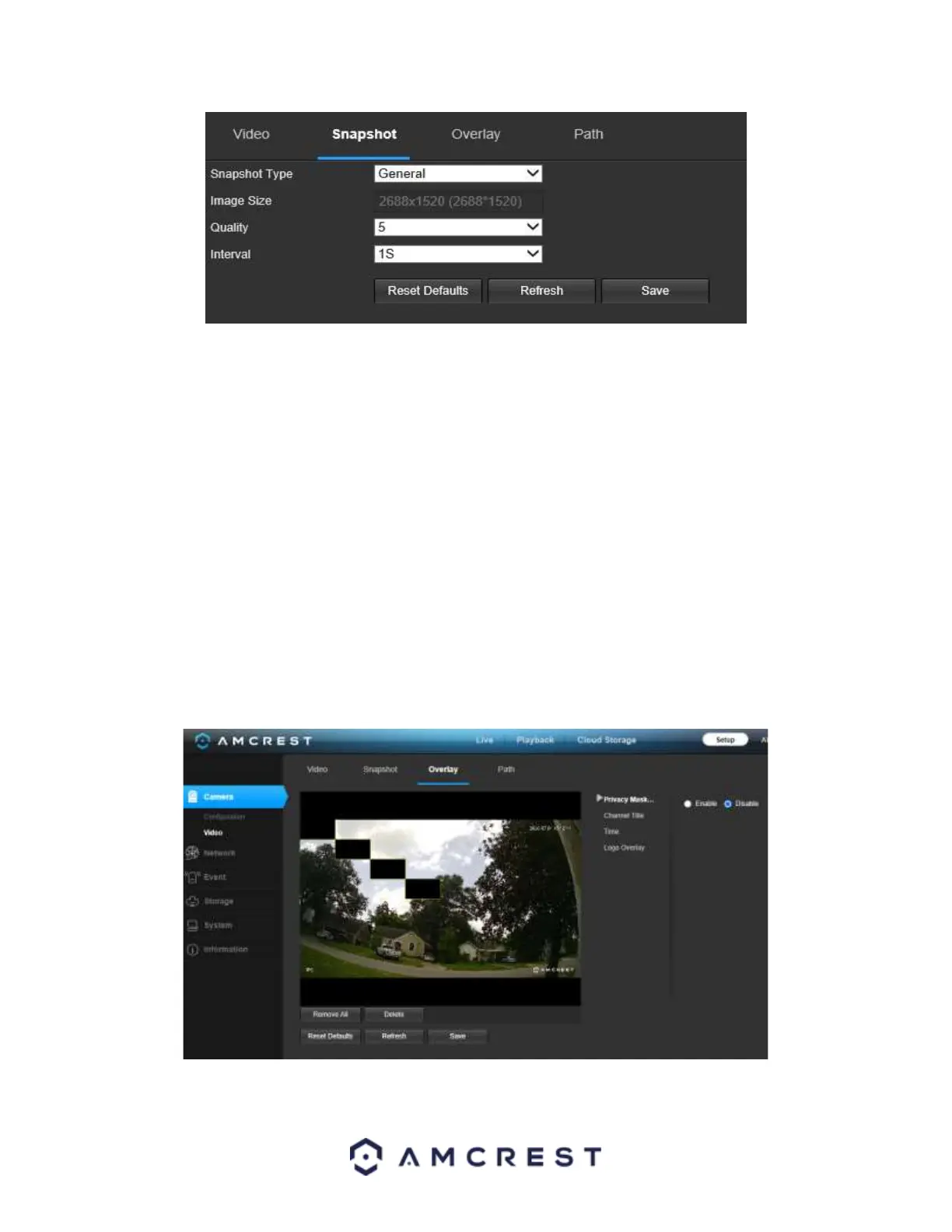
Below is an explanation for each of the fields on the Snapshot tab in the Video menu item:
• Snapshot Type: This dropdown box allows the user to select a snapshot mode. There are two snapshot modes:
General: Snapshots are taken as scheduled.
▪ Event: Snapshots occur when a motion detection alarm or tampering alarm is triggered
• Image Size: This dropdown box shows the image size. By default, the screenshot size is the same size as the video
feed’s resolution.
• Quality: This dropdown box allows the user to select image quality. Quality is adjusted on a scale of
1-6 (Best).
• Interval: This is to set snapshot frequency. The value ranges from 1 to 7 seconds. The maximum setting for a
customized interval is 3600s/picture.
To reset to default settings, click the Reset Defaults button. To refresh the screen, click on Refresh. To save the
settings, click the Save button.
Overlay
Below is a screenshot that shows the Overlay tab in the Video menu item:
The menu on the left allows the user to select which overlay to modify. Privacy Masking, Channel Title, Time, and
Text Overlay can all be modified in this menu.


 To Next Page
 Loading...











