EasyManua.ls Logo

AMD ATI Radeon HD 4800 Series - User Manual

AMD ATI Radeon HD 4800 Series
28 pages
Print Icon
To Next Page IconTo Next Page
Loading...
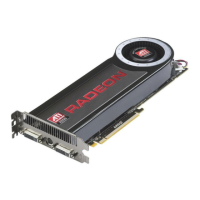
ATI Radeon HD 4800 Series
User Guide
Part Number: 137-41521-10

Table of Contents

Questions and Answers

  • X
    xandersonAug 19, 2025
    What to do if my computer beeps and the boot process stops with AMD ATI Radeon HD 4800 Video Card?
    • M
      mckeechristopherAug 19, 2025
      If your computer beeps and the boot process stops, ensure that the AMD Video Card is properly connected to both the internal power supply and the motherboard.
  • C
    Christine DavisAug 21, 2025
    What to do if the computer boots but there is no display on AMD ATI Radeon HD 4800?
    • R
      Richard PottsAug 21, 2025
      If the computer boots up but there is no display, verify that the monitor is properly connected to both the computer and a power supply. Also, if your motherboard has on-board graphics capabilities, you may need to disable them.
  • G
    gdavisAug 23, 2025
    Why is ATI CrossFireX currently unavailable for my AMD ATI Radeon HD 4800 Video Card?
    • L
      Linda GonzalezAug 23, 2025
      If ATI CrossFireX is currently unavailable, check that the AMD Video Cards are installed correctly and that the interconnect cable is also correctly installed. Close all running 3D applications. If the problem persists, reinstall the ATI Catalyst Control Center and drivers.
  • A
    Alison CannonAug 26, 2025
    What to do if my computer does not boot up properly with AMD ATI Radeon HD 4800 Video Card?
    • B
      Brady LevineAug 26, 2025
      If the computer does not boot up properly with the AMD Video Card, verify that the installation instructions were followed correctly. Make certain that the graphics card is properly connected to the power supply and the motherboard. If using Windows operating system, restart your computer in Safe Mode. Also, check the system configuration utility for interrupt assignments.
  • A
    Alexis OlsonAug 28, 2025
    What to do if the screen goes blank during software installation on Windows Vista with AMD ATI Radeon HD 4800?
    • T
      Thomas RobinsonAug 28, 2025
      If you encounter a blank screen during software installation on a PC with the Windows Vista OS, wait 20–30 minutes to ensure the software has finished installing, and then restart the computer.
  • R
    Randy JohnstonAug 30, 2025
    Why is there no display on the TV with AMD ATI Radeon HD 4800 Video Card?
    • K
      keithcombsAug 30, 2025
      If there is no display on the TV when using your AMD Video Card, make sure the TV is set to YPbPr input and that the HDTV component video adapter is properly connected.
  • S
    sharrisSep 1, 2025
    Why is card reversal recommended for my AMD Video Card?
    • A
      Amber JacksonSep 1, 2025
      If the primary AMD Video Card is not installed into the primary PCIe slot, a recommendation message to reverse the graphics card positions may appear.
  • D
    daniellelozanoSep 4, 2025
    Why are the colors on the TV display incorrect with AMD ATI Radeon HD 4800 Video Card?
    • M
      Miguel TurnerSep 4, 2025
      If the colors on the TV display are incorrect when using an AMD Video Card, ensure that the connections between the component video adapter and the HDTV are correct.
  • D
    Darlene BeckerSep 6, 2025
    Why is my AMD Video Card CRT display green?
    • M
      Michael OwensSep 6, 2025
      To resolve a green CRT display, restart the computer with only the CRT monitor connected.
  • D
    Dale LiSep 9, 2025
    Why is the entire display not visible with AMD Video Card?
    • M
      Michael MerrittSep 9, 2025
      If the entire display is not visible when using an AMD Video Card, and if the component input device supports it, try 720p mode.

Summary

Important Safety Instructions

General Safety Guidelines

Read, retain, heed all warnings, and ground appropriately for safe operation.

Grounding and Antenna Safety

Instructions for proper grounding, TV tuner antenna, and storm precautions.

Installation

Installation Overview

Provides a high-level overview of graphics card installation procedures.

Recording Serial and Part Numbers

Instructions for documenting essential product identification numbers before installation.

Uninstalling Old Drivers

Steps to remove previous graphics drivers for Windows XP and Vista.

Installing Graphics Card

Detailed steps for physically installing the graphics card into the computer.

Installing ATI Catalyst Software

Guide to installing the graphics card drivers and control software.

Display Configuration

How to set up and adjust display settings and resolutions.

ATI Radeon HD 4800 Series Connections

Illustrates and describes the available video output ports on the graphics card.

Display Adapters and Supported Connections

Information on optional adapters and connection types for displays.

ATI CrossFireX Technology

ATI CrossFireX Introduction

Explains the technology and benefits of using multiple GPUs.

Installing ATI CrossFireX Graphics Cards

Step-by-step guide for physically installing multiple graphics cards.

Enabling ATI CrossFireX

Instructions on activating the CrossFireX feature via software.

Reference and Support

System Requirements

Lists the necessary hardware and software specifications for the graphics card.

ATI CrossFireX Requirements

Specific hardware needs for implementing ATI CrossFireX configurations.

ATI Catalyst Control Center Usage

Covers overview, starting, and accessing help for the control center software.

Graphics Card Installation Troubleshooting

Addresses common issues encountered during hardware installation.

Troubleshooting ATI CrossFireX

Provides solutions for problems related to multi-GPU configurations.

HDTV;HDTV Adapter Troubleshooting

Provides solutions for problems with TV and HDTV connections.

Customer Care Information

Information on how to get support and register your product.

FCC and Industry Canada Compliance

Details FCC, Industry Canada, and CE compliance information.

Electrical Safety and WEEE Compliance

Covers electrical safety standards and the WEEE directive.

MIC and BSMI Certification

Details MIC and BSMI certification information for the product.

AMD ATI Radeon HD 4800 Series Specifications

General IconGeneral
Process Technology55 nm
DirectX Support10.1
Shader Model4.1
Memory Interface256-bit
Transistors956 million
Texture Units40
ROPs16
InterfacePCIe 2.0 x16
CrossFireX SupportYes
Max Resolution2560 x 1600
OpenGL Support3.3
Stream Processors800
Memory TypeGDDR5
Memory Size512 MB
Core Clock Speed750 MHz
Memory Clock Speed900 MHz
Memory Bandwidth115.2 GB/s
GPU ArchitectureTeraScale 2

Related product manuals