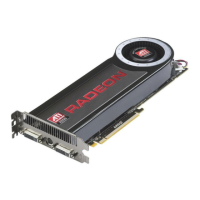
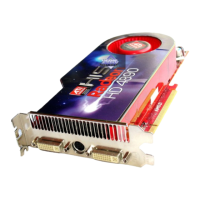
The ATI Radeon HD 4890 is a graphics card designed for use in personal computers, primarily aimed at high-performance gaming and multimedia applications. Manufactured by Advanced Micro Devices, Inc. (AMD), this device leverages ATI CrossFireX™ Technology to enhance graphics processing capabilities.
Function Description:
The primary function of the ATI Radeon HD 4890 is to process and render graphics for display on a monitor or other display devices. It is designed to deliver a high-performance visual experience, particularly for 3D games and demanding graphics applications. The card supports various display configurations, including CRT analog displays, LCD digital displays, TV displays, and HDTV displays, offering flexibility in connecting to different output devices.
A key feature of this graphics card is its support for ATI CrossFireX™ Technology. This technology allows two or more Graphics Processing Units (GPUs) to work together in a single computer, enabling enhanced graphics performance for up to two displays. This setup is particularly beneficial for high-performance gaming platforms. The ATI Catalyst™ Control Center software automatically detects valid ATI CrossFireX configurations and loads the appropriate user interface, simplifying the setup process. When ATI Catalyst™ A.I. is enabled, the software automatically selects the optimal rendering mode for applications, further optimizing performance.
The card also integrates with the ATI Catalyst Control Center software, which provides users with comprehensive control over graphics settings. This software allows for fine-tuning of graphics settings, enabling or disabling connected display devices, and changing desktop orientation. It offers different views (Basic, Advanced, Custom) to cater to various user preferences and skill levels, with many features providing previews of changes before they are applied.
Important Technical Specifications:
- Graphics Slot: Requires a motherboard with one PCIe x16 lane graphics slot.
- Processor Compatibility: Compatible with AMD Athlon™ or Intel® Pentium® 4 CPUs.
- System Memory: Requires a minimum of 1 GB RAM.
- Optical Drive: A CD-ROM or DVD-ROM drive is necessary for installing the accompanying software.
- Power Supply: A 550 watt or better power supply is required, equipped with two 2x3 PCIe power connectors. AMD strongly recommends using certified power supplies, and a list of these can be found on their website.
- Connections: The ATI Radeon HD 4890 graphics card typically features DVI-I connections and a Video Out connection.
- Display Adapters (Optional): To connect to display devices not directly supported by the card's native connections, optional adapters such as DVI-to-VGA, DVI-to-HDMI™, and 7-pin HDTV output cables can be used.
- Supported Display Configurations:
- CRT analog display: VGA connection (requires DVI-I connection and DVI-I-to-VGA adapter).
- LCD digital display: DVI-I connection.
- TV display: DVI connection and DVI-to-HDTV adapter and cables, or 7-pin HDTV output cable.
- HDTV display: DVI connection, DVI connection and DVI-to-HDTV adapter and cables, DVI connection and DVI-to-HDMI adapter and HDMI cable, or 7-pin HDTV output cable.
Usage Features:
- Installation Flexibility: The installation process is outlined for both replacing an existing graphics card and installing the first graphics card in a PC, with clear step-by-step instructions.
- Driver Management: Users are guided through uninstalling old graphics drivers (for Windows XP and Windows Vista) before installing the new card, ensuring a clean and conflict-free setup.
- Software Suite: The card comes with a software suite that includes the ATI Catalyst Control Center. This suite is essential for operating the card and taking advantage of its full feature set. The installation wizard offers "Express" and "Custom" installation options, allowing users to choose the level of software components to install.
- CrossFireX Configuration: For multi-GPU setups, the ATI Catalyst Control Center provides specific interfaces for enabling and configuring ATI CrossFireX on both Windows XP and Windows Vista. It allows users to select the display GPU and the desired GPU combinations for rendering.
- Display Customization: The ATI Catalyst Control Center enables users to configure display settings such as screen resolution, color depth, and refresh rates. It also supports multi-monitor configurations, allowing users to extend their Windows desktop across multiple displays.
- Help System: The ATI Catalyst Control Center includes a comprehensive in-program help system, offering information on features, concepts, troubleshooting, and software version details. Users can access help via F1 key, Help Contents, Search Help, or by visiting AMD's website.
Maintenance Features:
- Driver Updates: Users are advised that if the installer fails or if software conflicts arise, the latest software can be downloaded from ati.amd.com/support/driver.html, ensuring access to updated drivers and improved compatibility.
- Troubleshooting Guides: The manual provides troubleshooting tips for common issues such as the graphics card not fitting, computer beeping on boot, no display on power-up, improper boot-up, and no display after boot-up. It also offers specific troubleshooting for ATI CrossFireX and HDTV/HDTV adapter problems.
- Customer Care: AMD offers customer care services, including online/mail support and telephone support for US & Canada, to assist with product issues. Users are encouraged to register their product to activate customer care. The support aims to resolve issues, determine product defects, and verify warranty status.
- Safety Guidelines: The manual includes important safety instructions, such as proper grounding, unplugging the system during storms, and avoiding contact with power lines during outdoor antenna installation. It also warns against static electricity and advises waiting a few minutes after turning off the computer before touching graphics cards, as they can get hot.
- Compliance Information: The product adheres to international compliance standards, including FCC, Industry Canada, CE, Electrical Safety (UL, CSA, EN), VCCI Class B, KCC, and BSMI, ensuring it meets regulatory requirements for various regions. This information is crucial for understanding the product's safe and legal operation worldwide.
- WEEE Directive Compliance: The product is manufactured by Advanced Micro Devices, Inc. in compliance with the Waste Electrical and Electronic Equipment (WEEE) Directive, indicating its adherence to environmental regulations regarding electronic waste.

 Need help?
 General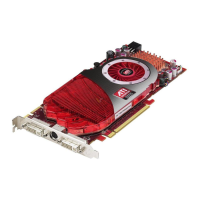





 To Next Page