
 Need help?
Do you have a question about the AMD radeon R9 295X2 and is the answer not in the manual?
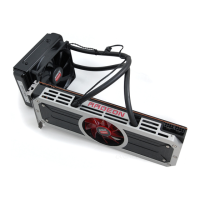
Overview of the AMD Radeon R9 295X2 graphics card and its liquid cooling solution.
Recommended system specifications for installing the AMD Radeon R9 295X2 graphics card.
Instructions for noting down serial and part numbers for registration and support.
Steps for installing the graphics card and associated software.
Detailed procedure for physically installing the AMD Radeon R9 295X2 graphics card.
Guidance on installing necessary drivers and configuration software for the graphics card.
Identifies the display output ports available on the AMD Radeon R9 295X2 graphics card.
Explains the use and types of adapters for connecting displays to the graphics card.
General guidance on connecting displays and multi-display configurations.
Step-by-step procedure for connecting a display to the graphics card using an adapter.
Explanation of AMD CrossFire technology for enhanced graphics performance.
Instructions for installing a second graphics card for AMD CrossFire.
Steps to enable and configure AMD CrossFire technology using Catalyst Control Center.
Overview of the AMD Control Center software for configuring graphics settings.
Methods for launching the AMD Control Center application in Windows and Linux.
How to access and use the context-sensitive help system for Control Center.
Covers installation issues, display problems, and HDTV adapter troubleshooting.
Information on contacting AMD customer support and warranty details.
Details worldwide compliance standards like FCC, CE, WEEE, and others.
 General
| GPU Model | Radeon R9 295X2 |
|---|---|
| Manufacturing Process | 28nm |
| ROPs | 128 |
| Base Clock | 1018 MHz |
| Memory Size | 8 GB |
| Memory Type | GDDR5 |
| Memory Bandwidth | 640 GB/s |
| OpenGL Support | 4.6 |
| CrossFire Support | Yes |
| Power Connectors | 2 x 8-pin |
| TDP | 500 W |
| Stream Processors | 5632 |
| Texture Units | 352 |
| Memory Clock | 1250 MHz |
| Memory Interface | 512-bit |
| DirectX Support | DirectX 12 |
| Cooling | Liquid Cooling |





 To Next Page