
 Need help?
Do you have a question about the AMD Radeon R7 260X and is the answer not in the manual?
Minimum system requirements for installing the graphics card.
Instructions for recording serial and part numbers for registration.
Steps to install the graphics card and associated software.
Detailed steps for physically installing the graphics card into the computer.
Information on installing and downloading AMD drivers and configuration software.
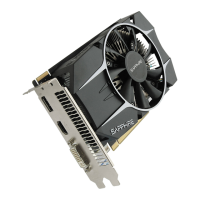
Details on the display connectors available on the graphics card.
Options for attaching displays and supported configurations.
Procedure for connecting displays using adapters.
Steps to adjust display settings and resolution.
Explanation of AMD CrossFire technology for enhanced performance.
Step-by-step guide for installing multiple graphics cards for CrossFire.
How to enable and set up AMD CrossFire using the Control Center software.
Introduction to the AMD Control Center software features and functions.
Methods for launching the AMD Control Center application.
How to access and use the built-in help system for the Control Center.
Tips and solutions for common issues encountered with the graphics card.
Information on how to get support and contact AMD Customer Care.
Details on worldwide compliance and regulatory information for the product.
 General
| GPU Architecture | GCN 1.1 |
|---|---|
| GPU | Bonaire |
| Stream Processors | 896 |
| Core Clock | 1100 MHz |
| Memory Size | 2 GB |
| Memory Type | GDDR5 |
| Memory Bus | 128-bit |
| Memory Clock | 1625 MHz |
| Memory Bandwidth | 104 GB/s |
| Compute Units | 14 |
| Texture Units | 56 |
| ROPs | 16 |
| TDP | 115 W |
| Shader Model | 5.0 |
| Process Size | 28 nm |
| Transistors | 2.08 billion |
| Die Size | 160 mm² |
| Power Connectors | 1x 6-pin |
| Outputs | HDMI, DisplayPort |
| OpenCL | OpenCL 1.2 |
| OpenGL Support | OpenGL 4.3 |







 To Next Page