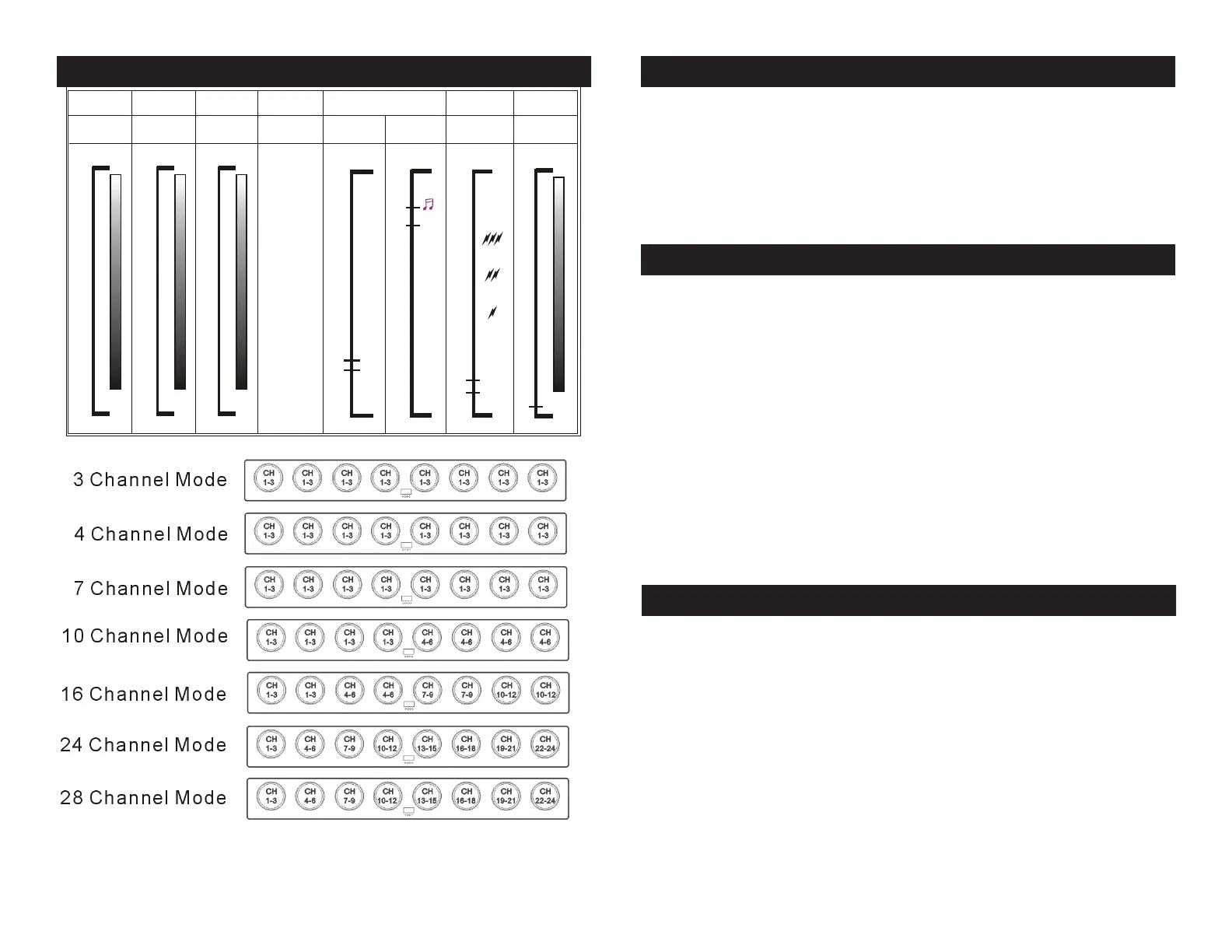
Ch1
Ch2
Ch3
Ch4
Ch5
Ch6
Ch7
Red
Green
Blue
Marcos/
Program
R GB Mix/Color
F ade Speed
Strobe
Master
Dimmer
0
0
25 5
10 0%
0
0
25 5
10 0%
0
0
25 5
10 0%
0
25 5
1 5
O pe n
1 6
S low
F as t
M arco Speed/
S ound
W h e n C H 4 = 02 9 ~255
0
S low
2 4 3
25 5
F as t
S ound
2 4 2
Marco S peed
W h e n C H 4 = 0 0 0 ~02 8
0
R GB Mix
C olor F ade S peed
S low
F as t
15
16
0
00 0 -0 01
25 5
10 0%
000-028 Auto Fade
029-056 Show 1
057-085 Show 2
086-113 Show 3
114-141 Show 4
142-170 Show 5
171-198 Show 6
199-226 Show 7
227-241 Show 8
242-255 Show 9
00 2
25 5
DMX 512 Conguration
©American DJ Supply® - www.americandj.com - Mega Pixel LED Instruction Manual Page 14©American DJ Supply® - www.americandj.com - Mega Pixel LED Instruction Manual Page 13
Mega Pixel LED DMX Values and Functions Mega Pixel LED Cleaning
Due to fog residue, smoke, and dust cleaning the internal and exter-
nal optical lenses must be carried out periodically to optimize light
output.
1. Use a soft cloth to wipe down the outside casing.
Cleaning frequency depends on the environment in which the fixture
operates (i.e. smoke, fog residue, dust, dew).
Listed below are a few common problems the user may encounter,
with solutions.
Unit not responding to DMX:
1. Check that the DMX cables are connected properly and are
wired correctly (pin 3 is “hot”; on some other DMX devices
pin 2 may be ‘hot’). Also, check that all cables are connected
to the right connectors; it does matter which way the inputs
and outputs are connected.
Unit does not respond to sound:
1. Quiet or high pitched sounds will not activate the unit.
If problems are not resolved; Contact American DJ® for service.
1-800-322-6337
Mega Pixel LED Trouble Shooting
First unplug the power. The fuse holder is located next to the power
inlets. Using a flat-head screw driver unscrew the fuse holder. Remove
the bad fuse and replace with a new one.
Mega Pixel LED Fuse Replacement




 To Next Page