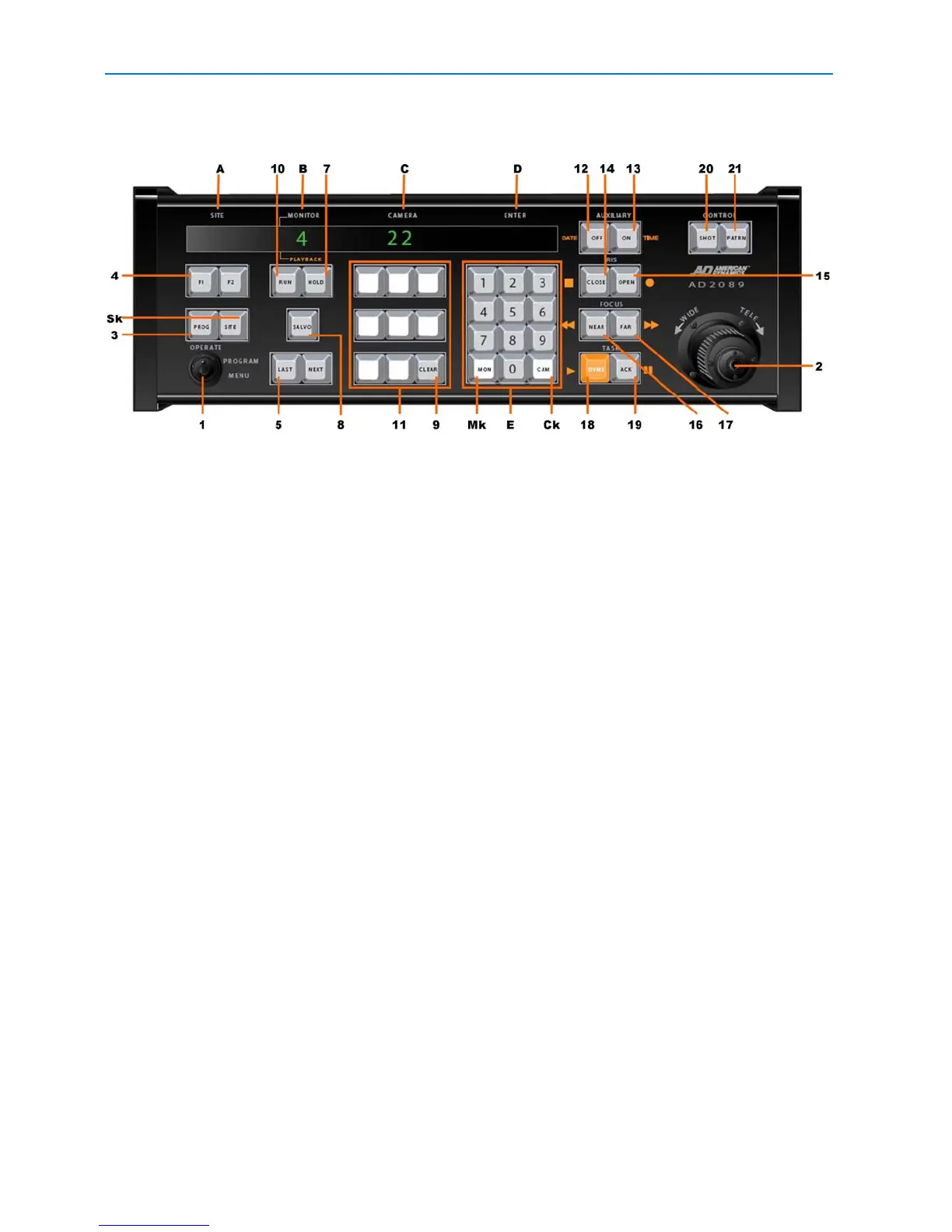
AD2089 Keyboard Controller
2 AD2089 Operator’s Manual
• selectable speaker volume - enables eight different volume levels
• auto focus/auto iris capability - supported when used with DeltaDome units
AD2089 Keyboard Overview
The AD2089 keyboard is comprised of the following elements:
ASite - shows the number of the site entered with the keypad when the SITE key (Sk) is
pressed.
B Monitor/DVMS - shows the number of the monitor or DVR entered when the MON (Mk) or
DVMS key is pressed.
CCamera - shows the number of the camera entered with the keypad when the CAM key
(Ck) is pressed.
DEnter - shows the number entered on the NUMERIC KEYPAD (E).
E Numeric Keypad - has keys ranging from 0 - 9 that enable the user to select specific
cameras, monitors, salvos, tours, presets, patterns, auxiliaries, recorders, sites and
macros.
1 Keyswitch - enables the user to switch the Operate, Program or Menu modes of operation.
When the keyswitch is set to Menu position, the page and cursor navigation functions of
the multi-function keys are activated.
2 Joystick - enables the user to pan, tilt, zoom and flip the camera under keyboard control.
3 PROG key - enables the user to set scratch-pad tours and patterns, as well as a number of
other switching system functions.
4 F1 & F2 keys - special functions keys used to implement basic system commands and
DeltaDome control F1 & F2 keys - special functions keys used to implement basic system
commands and DeltaDome control
5 LAST key - calls the prior camera displayed in a sequence (tour).
6 NEXT key - calls the next camera displayed in a sequence (tour).
7 HOLD key - Holds the current camera in a sequence (tour).
8 SALVO key - calls a specified salvo whose number is entered on the numeric keypad.
9 CLEAR key - clears data entered on the numeric keypad
10 RUN key - runs system and scratch pad tours.
11 MACRO keys – Each of the eight macro keys calls a specified macro whose number is entered
on the numeric keypad.



 To Next Page