EasyManua.ls Logo

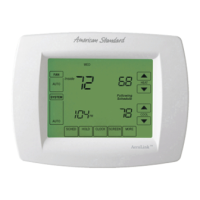
American Standard ACONT850 - User Manual

American Standard ACONT850
24 pages
Print Icon
To Next Page IconTo Next Page
Loading...
11-HD14D1-9-EN
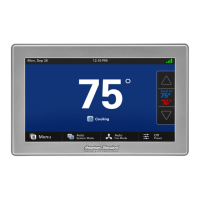
ACONT850 Installation Guide
AccuLink™ Platinum 850
Communicating Connected Control
ALL phases of this installation must comply with NATIONAL, STATE AND LOCAL CODES
IMPORTANT — This Document is customer property and is to remain with this unit.
These instructions do not cover all variations in systems or provide for every possible contingency to be met in connection with
the installation. Should further information be desired or should particular problems arise which are not covered sufficiently
for the purchaser’s purposes, the matter should be referred to your installing dealer or local distributor.
WORKS WITH

Questions and Answers

  • K
    Kristi DavisAug 19, 2025
    Why is my American Standard ACONT850 Thermostat heating not working?
    • W
      Wyatt CollinsAug 19, 2025
      Your American Standard Thermostat might not be initiating heat because the system mode isn't set to Heat/Auto, or the setpoint is too low. Set the mode to heat and raise the setpoint above the room temperature. It's also possible that the minimum off time delay is being enforced. Wait for 5 minutes and recheck heating equipment. If neither of these resolves the issue, your heating system may require service; consider checking or repairing the system.
  • M
    Matthew PhillipsAug 21, 2025
    Why won't the display turn on my American Standard ACONT850 Thermostat?
    • L
      lori37Aug 21, 2025
      If the display on your American Standard Thermostat will not come on, it could be due to a loss of 24VAC between R & B at the Control. Check the wiring between R & B to see if R & D, or B & D have been reversed. Also, check the transformer for 24VAC output, and inspect the thermostat wire for breaks or shorts.
  • A
    Amanda GarciaAug 23, 2025
    How to calibrate humidity on American Standard ACONT850 Thermostat?
    • N
      Norman JohnsonAug 23, 2025
      If the indoor humidity display on your American Standard Thermostat is incorrect, the humidity sensor likely needs calibration. Calibrate the humidity sensor from the Control menu.
  • D
    davidbeanAug 26, 2025
    What to do if my American Standard Thermostat screen is not responding?
    • C
      Crystal RomeroAug 26, 2025
      If the screen on your American Standard Thermostat does not respond properly to a button press, the screen may be out of calibration. Remove the Control from the sub base and reset it, then follow the calibration instructions when the Control reboots. Alternatively, there may be an internal Control fault. Remove the Control from the sub base and reset it.
  • Y
    youngbrianAug 27, 2025
    Why is my American Standard ACONT850 cooling not working?
    • Q
      qpotterAug 28, 2025
      Your American Standard Thermostat might not be initiating cooling because the system mode isn't set to Cool/Auto, or the setpoint is too high. Set the mode to cool and lower the setpoint below the room temperature. It could also be that the minimum off time delay is being enforced. Wait for 5 minutes and recheck cooling equipment. If the problem persists, the cooling system may require service; consider checking or repairing the system.
  • T
    Thomas WellsAug 30, 2025
    How to stop my American Standard Thermostat fan from running constantly?
    • R
      Russell HernandezAug 30, 2025
      If your American Standard Thermostat fan is running all the time, check the Control settings to see if the fan is set to On, Circulate, or Clean mode. If it is, change the setting. If the settings are correct, there may be a failure in the indoor unit. Check the indoor unit for failures, such as a tripped heating limit.
  • J
    Janice MartinSep 1, 2025
    Why is the temperature wrong on my American Standard ACONT850?
    • E
      Elizabeth MorrisSep 1, 2025
      There are several reasons why your American Standard Thermostat might be displaying the wrong temperature. First, the Control requires one hour to acclimate to the environment, so allow one hour before troubleshooting. Second, the temperature display may need calibration; calibrate the temperature sensor from the Control menu. Finally, heat from the touch screen may be trapped within the thermostat body. Move the thermostat away from any competing air streams or use a remote temperature sensor.
  • C
    Carrie StewartSep 4, 2025
    What to do if my American Standard ACONT850 Thermostat says it's heating or cooling, but there's no air coming out?
    • M
      Mr. Robert ScottSep 4, 2025
      If your American Standard Thermostat indicates heating or cooling but no warm or cool air is coming from the registers, there may be a fan delay as the heating or cooling equipment turns on. Wait a minute for blower delays and recheck registers. If there is still no air, the equipment is not working properly, and you should check/repair the system.
  • J
    Jared NicholsonSep 6, 2025
    Why does my American Standard ACONT850 have short or long cycles?
    • W
      Willie FloresSep 6, 2025
      If your American Standard Thermostat is cycling too fast or too slow, check the location of the Control for drafts. Seal any air leaks behind the Control, relocate it, or apply a remote indoor temperature sensor. Also, cycles per hour or aggressive recovery might be improperly set. Adjust cycle rates and aggressive recovery features in the advanced installer setup.
  • M
    Mike PayneSep 8, 2025
    Why is my American Standard Thermostat heat pump not turning on?
    • T
      tonyacrawfordSep 8, 2025
      If your American Standard Thermostat's heat pump isn't turning on and only the furnace or electric heat strips are running, the outdoor temperature may be below the compressor lockout temperature setting. Adjust the compressor lockout temperature setting if desired. Alternatively, compressor heating lockout may be enabled, and the outdoor temp sensor is out of calibration or has failed. Check or repair the outdoor sensor or wiring. Finally, the outdoor unit may not be reporting. Check the communication status of the outdoor unit.

Summary

Safety Information

Installation Guide

4.1 Location Selection

Details ideal placement of the 850 Control to ensure accurate temperature sensing and avoid interference.

4.2 Network Connectivity

Explains how to connect the 850 Control to the internet via wired or wireless connections.

4.3 Mounting the Control

Step-by-step instructions for physically mounting the 850 Control and its sub-base to the wall.

4.4 Wiring Connections

Provides instructions for connecting the thermostat control wires to the sub-base terminals.

4.5 Field Wiring Diagrams

Illustrates various wiring configurations for connecting indoor and outdoor units to the control.

System Setup Procedures

5.2 Guided Setup Wizards

Explains the Installation Wizard and User Setup Wizard for configuring the control.

5.4 Installer Setup Screens

Introduces the installer setup screens for configuring equipment and operational settings.

5.4.1 Group 1 Standard Settings

Configures standard settings like outdoor unit type, stages, and compressor type.

5.4.2 Group 2 Equipment Settings

Sets parameters like compressor cycles per hour and indoor heat cycles.

5.4.4 Group 3 Sensor Settings

Configures outdoor and indoor temperature and humidity sensors for accurate readings.

5.4.3 Group 4 Accessories Settings

Configures settings for accessories like humidifiers, ventilators, and UV lights.

5.4.7 Group 7 Lockout Settings

Configures lockout settings based on outdoor temperature to limit operation.

Basic Operation

Advanced Operation Features

7.4 Dual Fuel System Control

Explains how the 850 Control manages dual fuel systems without an external kit.

7.5 Lockout Settings

Lists various lockout settings based on outdoor temperature to limit operation.

Diagnostic Tools and Tests

8.1 Test Modes Overview

Accesses various test modes for diagnosing system components and operation.

8.1.1 Non-Variable Speed Tests

Details test modes for non-variable speed blower, cooling, heating, and humidifier.

8.1.2 Variable Speed Tests

Details test modes for variable speed systems like charging and checkout.

American Standard ACONT850 Specifications

General IconGeneral
Product TypeThermostat
BrandAmerican Standard
ModelACONT850
Wi-Fi ConnectivityYes
TouchscreenYes
Energy Saving FeaturesYes
Mobile AppYes
Voice ControlYes
DisplayColor Touchscreen
Programming7-day programmable
Hold FeatureYes
Filter Change AlertYes
BackupBattery backup
Warranty5-year limited warranty
TypeSmart
CompatibilityHVAC systems
Power Source24V
Temperature Range45°F to 99°F
Temperature Control±1°F

Related product manuals