Setting the Dialing Mode
Set the dial mode switch to T
(tone) if you have touch tone
service. Set the switch to P (pulse)
if you have rotary dialing.
Connecting for Desk or Wall Mount
For Desktop Use
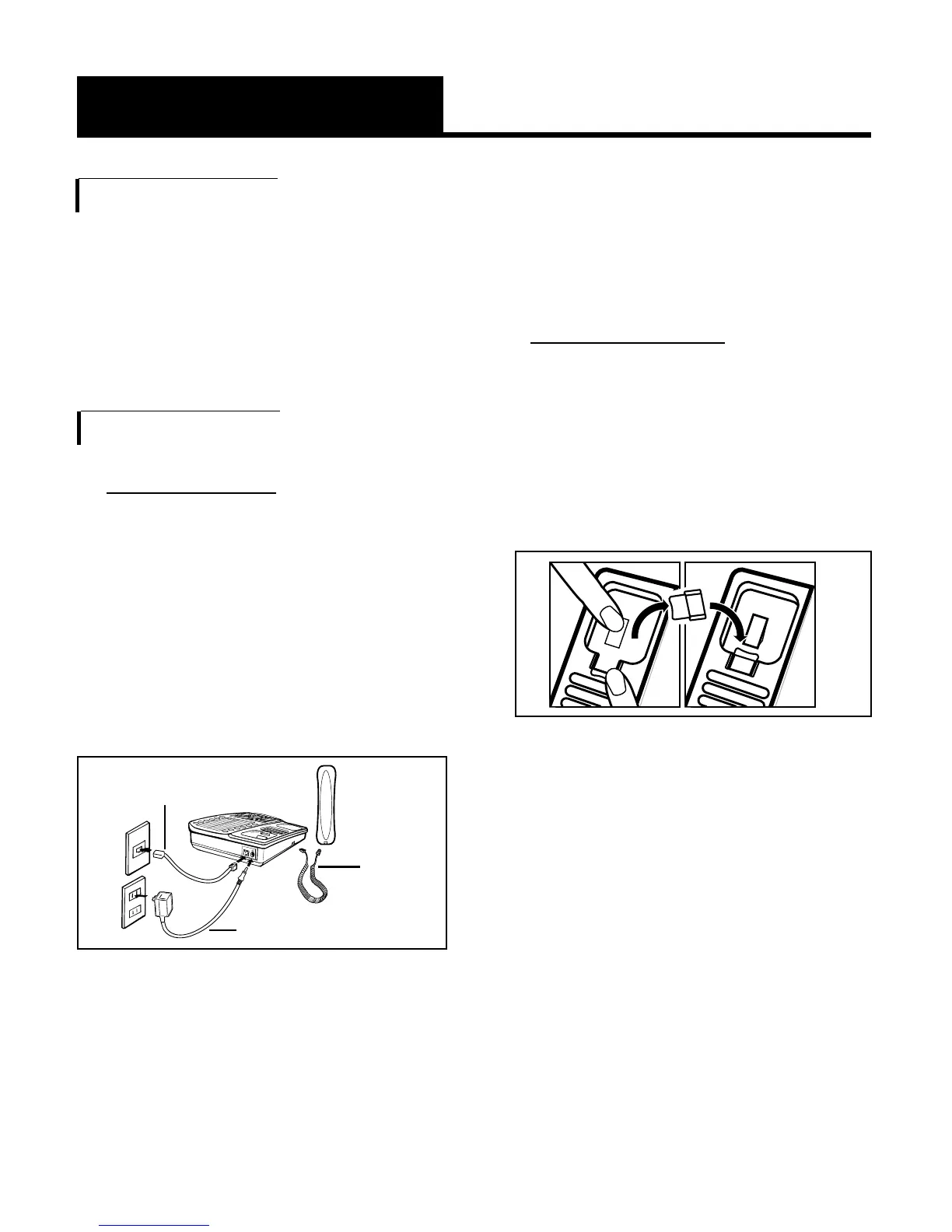
1.Connect one end of the
telephone line cord to the
“Line” jack on the back of
the XL-50 and the other end
to the phone outlet on your
wall. Connect the handset
cord to the telephone as
shown in Figure 5.
2.Plug the AC adapter into an
electric outlet and into the
AC jack on the telephone as
shown in Figure 5.
5
Setting up Your XL-50
(continued)
3.Lift the handset and listen for
a dial tone.
The phone is ready to use.
For Wall Mounting
1.Pull the handset hook out of
the base as shown in Figure
6 and reverse its position so
that the hook points up and
will hold the handset when
you hang up.
2.Insert the tabs of the phone
base into the slots in the
lower position of the base as
shown in Figure 7. Push the
mounting bracket in and
down firmly until it snaps into
place.


 To Next Page