Page 8 ;&(%$*4.8"4,7%<'*#$"&8#=%/7*,#*%4,77%>?@@@?@AA?BCDC1 Item 64014
EF;6GH IJ6KFGLIM NFLMG6MFMO6E6GPJ
I/*(,$"83%L8#$('4$"&8#
%K*,9%$.*%6MGLK6%LNJIKGFMG%EF;6GH%LM;IKNFGLIM%#*4$"&8%
,$%$.*%+*3"88"83%&2%$."#%5,8',7%"847'9"83%,77%$*Y$%'89*(%
#'+.*,9"83#%$.*(*"8%+*2&(*%#*$%'/%&(%'#*%&2%$."#%/(&9'4$1
67*4$("4,7%#.&4[%4,8%4,'#*%9*,$.%&(%"8_'(V`%M6!6K%GIPOX%
*Y/&#*9%4&89'4$&(#%&2%*7*4$("4"$V1
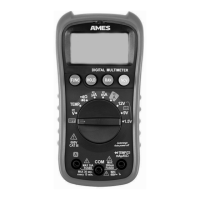
R*8*(,7%I/*(,$"&8
;PMO%S'$$&8
Press the ;PMO Button to switch between AC/DC or other functions.
U,$,%X&79%S'$$&8
The data XITU function keeps the current reading on the Display.
1. To activate hold, press the XITU
Button. The reading will be held on the
Display and the %symbol will appear.
2. Press XITU again to release the hold.
KFM%S'$$&8
The KFM function allows you to manually switch through different ranges.
1. Press the KFM Button to enable
manual selection. When
enabled, the FPGI indicator will
disappear from the Display.
2. Pressing the KFM Button will progress
the reading to the next higher range
and as you press it will move the
range up until the highest is reached.
3. When the highest is reached, the
next press of the KFM Button will
switch to the range to the lowest.
4. Hold down the KFM Button to
return to auto range. When in
auto range the FPGI indicator will
reappear on the Display and you
can release the KFM Button.


 To Next Page