EasyManua.ls Logo

AMF-BRUNS K70 - User Manual

AMF-BRUNS K70
100 pages
Print Icon
To Next Page IconTo Next Page
Loading...
Operating Instructions
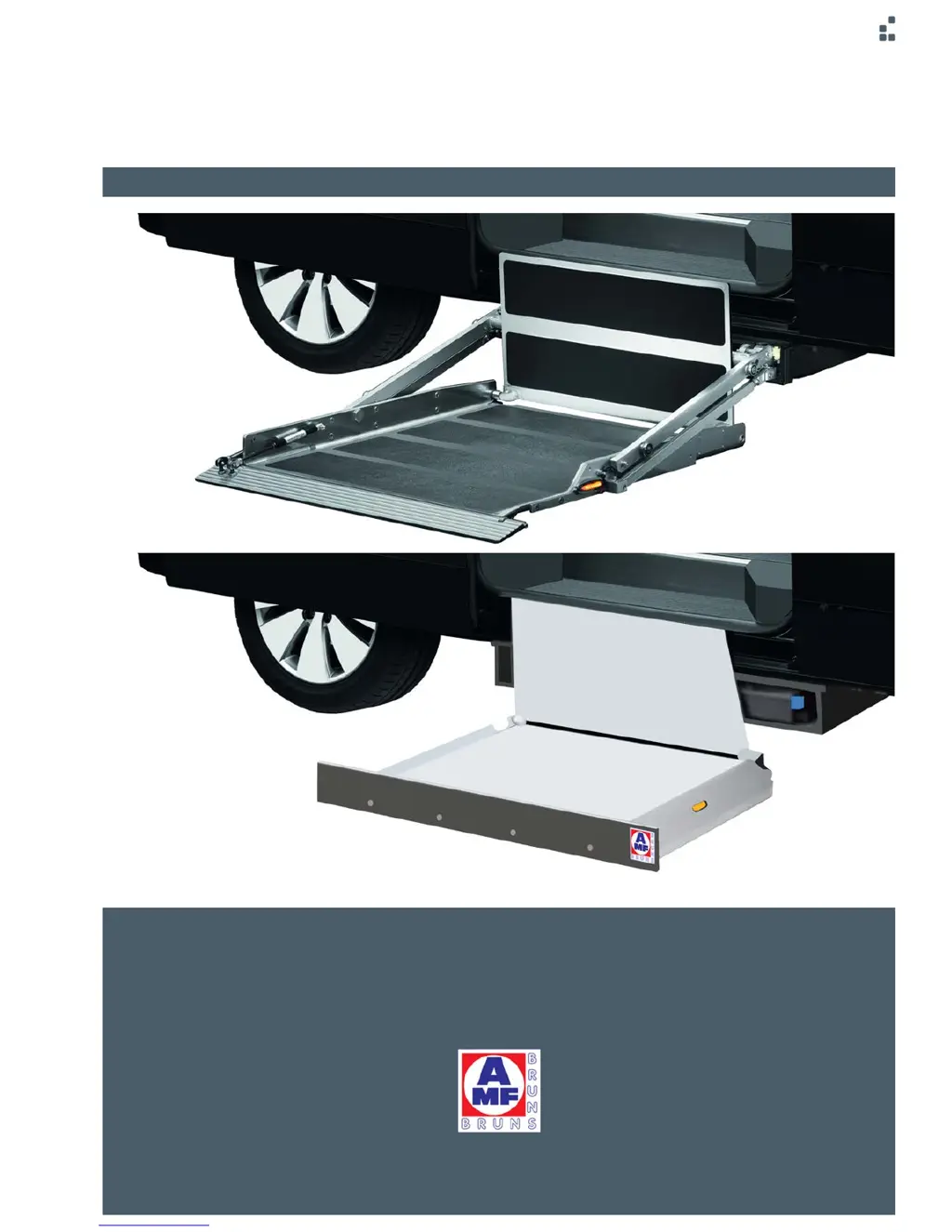
BACK-IN-BOX LIFT K70 K90 / K90 ACTIVE
www.amf-bruns.de

Table of Contents

Questions and Answers

  • J
    Jason FletcherSep 9, 2025
    Why is it not possible to operate AMF-BRUNS Cassette Lift using the Smartphone App?
    • D
      Daniel BlackburnSep 9, 2025
      There are several reasons why you might be unable to operate your AMF-BRUNS Cassette Lift using the Smartphone App: * First, check that the Bluetooth receiver is switched ON. Open the door above the cassette lift and ensure the switch is in the “ON” position. If there isn't a switch or the Bluetooth receiver has switched off, press the “Retract” button on the cable-connected remote control. * Second, make sure your smartphone is connected to the receiver. If not, connect it or reinstall the app. * Finally, if the Bluetooth control box is not installed, contact customer service.
  • N
    ncastilloSep 7, 2025
    What to do if AMF-BRUNS Cassette Lift extends but does not raise or lower?
    • S
      Sharon LopezSep 7, 2025
      There are a few potential reasons why your AMF-BRUNS Cassette Lift platform might extend but not raise or lower: * The platform may not be fully extended because the vehicle is parked on an incline or the platform is obstructed. Try fully retracting the platform using the remote or app and then park the vehicle on level ground with enough space for full extension. * There may be an issue with the lift's electrical or hydraulic system. In this case, have the cassette lift checked by a specialist workshop.
  • J
    Julia WatersAug 22, 2025
    What to do if AMF-BRUNS Lifting Systems extends but does not raise or lower?
    • M
      Marc MichaelAug 22, 2025
      If the platform of your AMF-BRUNS Back-in-Box-Lift extends but doesn't raise or lower, it might be because the platform isn't fully extended due to the vehicle being on an incline or an obstruction. Try retracting the platform using the cable-connected remote control, Bluetooth remote control, or Smartphone App, then park the vehicle on a level surface with sufficient space. If that doesn't work, the electrical or hydraulic system may be defective, and you should have it checked by a specialist workshop.
  • R
    reginascottSep 5, 2025
    Why does AMF-BRUNS K70 Lifting Systems platform jerk when retracting?
    • R
      Richard ChristianSep 5, 2025
      If the platform jerks when retracting into the cassette on your AMF-BRUNS Back-in-Box-Lift, it might not be adjusted correctly. For K70 / K90 models, adjust the switching point for the retract position or adjust the rollers. For K90 ACTIVE models, adjust the switching point for the retract position.
  • E
    Emily NguyenSep 4, 2025
    How to troubleshoot AMF-BRUNS K70 when the cable remote control doesn't work?
    • A
      Alexander WallSep 4, 2025
      If you are unable to operate the AMF-BRUNS Lifting Systems using the cable-connected remote control, check the remote control and its connections. If it is defective, replace it.
  • M
    Micheal TorresSep 2, 2025
    Why AMF-BRUNS K70 Lifting Systems lowers the platform slowly on its own?
    • M
      Michael WaltersSep 2, 2025
      If your AMF-BRUNS Back-in-Box-Lift lowers the platform slowly on its own, the lowering valve might be defective and needs replacement by a specialist. Also, check if the ball-cock is open and close it.
  • W
    warrenelizabethSep 1, 2025
    Why AMF-BRUNS Lifting Systems raises the platform abruptly after extension?
    • L
      Lindsey MaloneSep 1, 2025
      If your AMF-BRUNS Back-in-Box-Lift raises the platform slightly but abruptly after it has extended, the 2/2-way valve is defective. Have the 2/2-way valve replaced in a specialist workshop.
  • D
    Danielle MooreAug 31, 2025
    What to do if AMF-BRUNS K70 Lifting Systems platform is above retract position and won't lower?
    • C
      chelseaclarkAug 31, 2025
      If the platform is above the retract position and the AMF-BRUNS Back-in-Box-Lift doesn't lower when the "Retract Position" button is pressed, the end limit switch behind the transfer plate on the internal carriage might not be functioning. Try pulling the roller plunger out of the limit switch by hand and moving it in and out several times. If necessary, loosen the fastening nut slightly. You can also run to the retract position using the "Raise" and "Lower" buttons on the cable-connected remote control, the Bluetooth remote control or the Smartphone App.
  • P
    Patricia RomeroAug 30, 2025
    What to do if AMF-BRUNS Lifting Systems cannot be operated using the Smartphone App?
    • F
      Fernando WilsonAug 30, 2025
      If you can't operate the AMF-BRUNS Lifting Systems using the Smartphone App, ensure the app is connected to the lift's receiver or reinstall it. If the Bluetooth control box is not installed, contact customer service.
  • L
    Luis GreenAug 28, 2025
    Why is it impossible to operate AMF-BRUNS Lifting Systems using the Bluetooth remote control?
    • G
      Gary LoveAug 29, 2025
      If you can't operate your AMF-BRUNS Lifting Systems using the Bluetooth remote control, first ensure the remote is connected to the receiver by teaching it in again. If that doesn't work, charge the remote's battery. If problems persist, the remote itself may be defective and need checking or replacing. If the Bluetooth control box is not installed, contact customer service.

Summary

Foreword

Explanation of Symbols and Signs

Explains the meaning of various symbols and signs used in the manual.

Safety

Proper Use

The lift must only be used for lifting disabled persons in wheelchairs.

Danger Zone

Area within movement range of the platform posing risk of injury.

Safety Devices

Details on roll-off guards, signalling systems, and door contact switches.

Safety and Accident Prevention Regulations

Rules to prevent personal injury and material damage.

Description

Layout and Function

Overview of the lift's main components and how they work together.

Platform Details

Details on the platform design for K70, K90, and K90 ACTIVE models.

Operating Controls and Remote Options

Overview of lift operation controls, including remote options.

Technical Data

Specifications like weight, load capacity, dimensions, and speeds.

Transportation

Transportation Safety

Safety precautions and procedures for transporting the lift.

Installation; Commissioning

Installation and Commissioning

Guidelines for installing and commissioning the lift safely.

Operation

Safety Regulations for Operation

Essential safety rules to follow during operation.

Embarkation Procedure

Step-by-step guide for safely embarking a passenger.

Disembarkation Procedure

Step-by-step guide for safely disembarking a passenger.

Emergency Mode

Emergency Operation K70; K90

Manual operation steps for K70 and K90 models.

Emergency Operation K90 ACTIVE

Manual operation steps for the K90 ACTIVE model.

Maintenance and Repair

Safety Regulations for Maintenance and Repair

Crucial safety rules before performing maintenance or repairs.

Routine Maintenance Work

Schedule and activities for regular maintenance.

Functional Test of Safety Devices

How to test the functionality of safety devices.

Faults and Troubleshooting

Troubleshooting Common Faults

Identifies common faults and provides solutions.

Adjustments for Platform Jerking

How to adjust the lift to prevent jerking during retraction.

Charging Bluetooth Remote Battery

Steps for charging the battery of the Bluetooth remote control.

Inspection Log

Inspection Log Overview

Information on initial and periodic inspections by a technical expert.

Inspection List

List of items to be checked during a routine yearly inspection.

Electrical Circuit Diagrams

Electrical Circuit Diagram: K70

Electrical schematic for the K70 model.

Electrical Circuit Diagram: K90 ACTIVE

Electrical schematic for the K90 ACTIVE model.

Hydraulic Line Diagrams

Hydraulic Circuit Diagram: K70

Hydraulic circuit diagram for the K70 model.

Hydraulic Circuit Diagram: K90 ACTIVE

Hydraulic circuit diagram for the K90 ACTIVE model.

Customer Service

Customer Service Information

Contact information and services offered by AMF-Bruns.

Declaration of Conformity

EC Declaration of Conformity

Official declaration that the product meets EC Machinery Directive requirements.

AMF-BRUNS K70 Specifications

General IconGeneral
BrandAMF-BRUNS
ModelK70
CategoryLifting Systems
LanguageEnglish

Related product manuals