
 Need help?
Do you have a question about the AMI 205 and is the answer not in the manual?
High voltage warnings and precautions related to electrical hazards.
Explains various safety symbols and their meanings for operator awareness.
Details on input power, output ratings, and electrical characteristics.
Recommendations for fuses, conductors, and voltage for service.
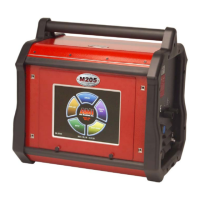
Physical size, width, depth, and weight of the power supply unit.
Lists single-entry and multi-level functions for weld parameter programming.
Identifies and explains symbols used on the Model 205 control interface.
Procedures for inspecting the power supply and accessories before use.
Step-by-step instructions for safely connecting the power supply to AC power.
Guidelines for connecting the arc shielding gas supply.
Detailed steps for connecting the power supply to M8/M9 weldheads.
Instructions for connecting the power supply to an EXEL rotor driver.
Guidance on connecting the power supply to an M21 weldhead.
Explains core system functions like Library, Travel, Pulsation, and Gas.
Steps to safely power on the unit and initiate the boot-up sequence.
How to configure date/time, passwords, and language settings.
Procedure for accessing the most recently used weld schedule.
How to find and load a weld schedule from the available library.
Instructions for editing parameters of an existing weld schedule.
Steps to duplicate weld schedules within the library or to USB.
Guide to creating new weld schedules manually or via automatic generation.
Procedure for calibrating the weldhead to a selected schedule.
Comprehensive guide on executing a complete weld sequence.
How to set up, record, and export weld data for analysis.
Routine cleaning and care instructions for the equipment.
Procedure for calibrating and verifying the welding current output.
Identifies common system faults and provides solutions.
Specifications and installation details for the optional cooling unit.
Instructions for connecting and using the optional remote pendant control.
 General
| Power Source | Inverter |
|---|---|
| Output Current Range | 5-200 A |
| Duty Cycle | 60% at 200 A |
| Protection Class | IP23 |
| Welding Process | TIG |
| Material Compatibility | Steel, Stainless Steel, Aluminum |
| Programmability | Yes |
| Shielding Gas | Argon |
| Weight | 48 lbs (21.8 kg) |

 To Next Page
