10 Amico Beds Corporation
Siderail Controls
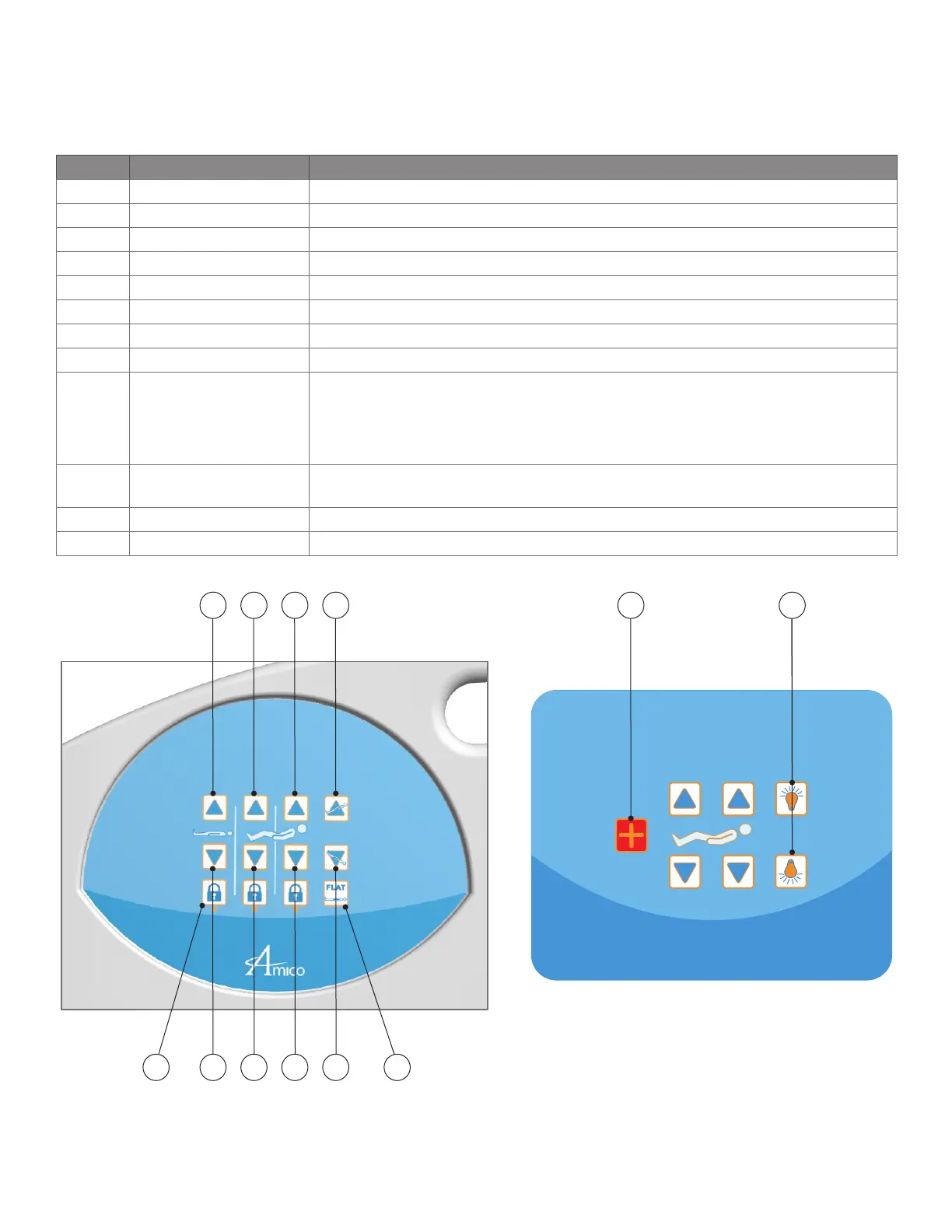
Button Name Function
A Bed Height Up Press on this button to raise height of bed to desired position.
B Bed Height Down Press on this button to lower height of bed to desired position.
C Knee Gatch Up Press on this button to raise knee gatch section to the desired angle.
D Knee Gatch Down Press on this button to lower knee gatch section to the desired angle.
E Fowler Up Press on this button to raise fowler section of the bed to desired angle.
F Fowler Down Press on this button to lower fowler section of the bed to desired angle.
G Reverse Trendelenburg Press on this button to place the bed in the desired reverse Trendelenburg position.
H Trendelenburg Press on this button to place the bed in the desired Trendelenburg position.
I Bed Flat
Press this button to achieve a flat position from any articulated position.
If a flat patient surface and level upper frame is desired, press and hold this button. After
30 seconds, the bed will move to the Low Height, thus attaining a level upper frame.
J Lock Out
Press this button to lock-out the movement functions directly above the button. Press it
again to unlock the functions.
N Nurse Call Press this button to call for nurse assistance.
P Under-Bed Light Press this button to turn ON/OFF the under Bed Light.
B D F H IJ
A C E NG
*NOTE: For the safety of the patient, only the Head UP/DOWN and Knee UP/DOWN motions are available on the interior
siderail controls. It is recommended that the Lock-Out feature be used to restrict these motions if articulation may cause
the patient further injury.
P


 To Next Page