20 Amico Beds Corporation
Troubleshooting
Item
No.
Problem Descriptions Troubleshooting Steps
1 Bed “beeps” when buttons are
pressed or the “Maintenance
Indicator” LED is ON.
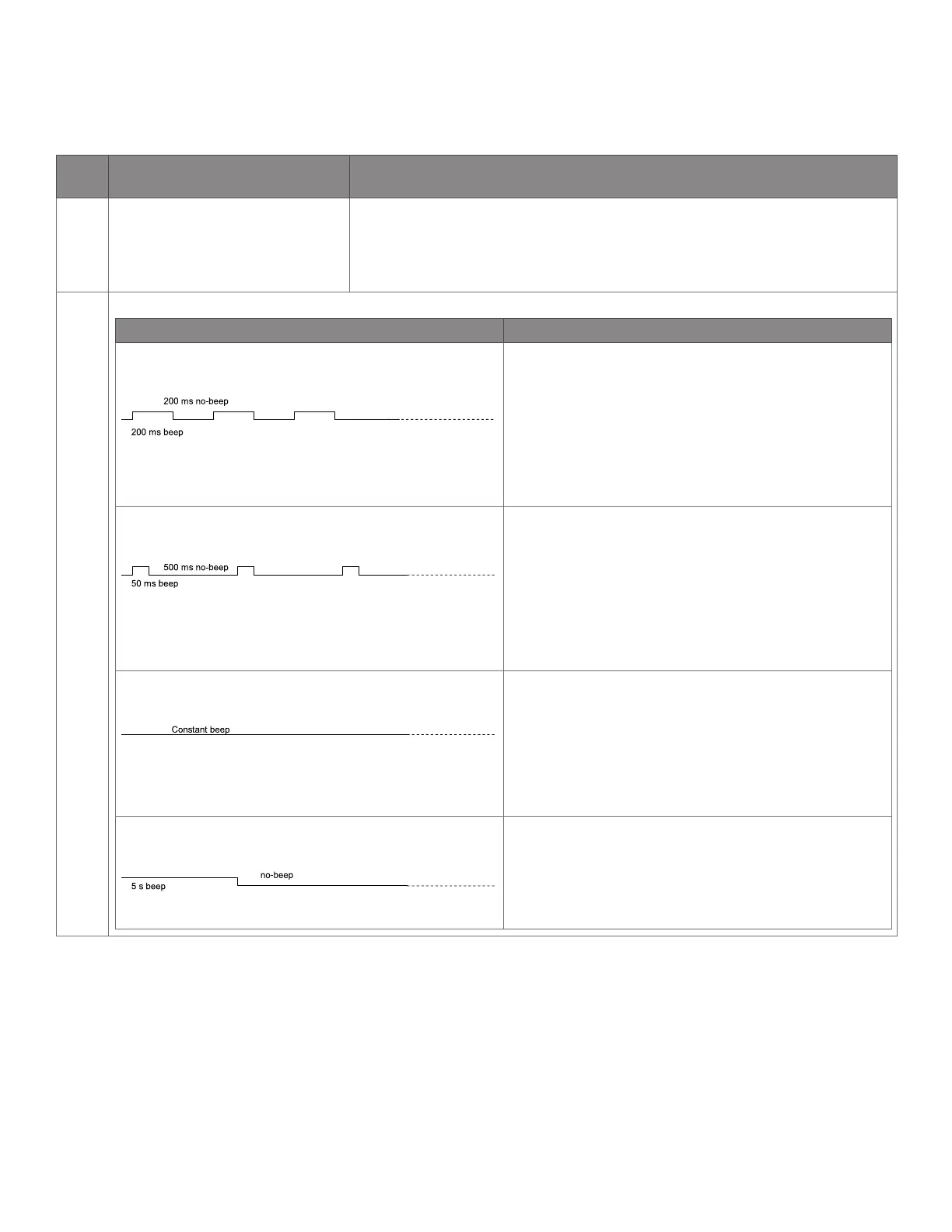
a. Press & hold any Bed Movement button. The Control Box will ‘beep’ with a
specific pattern.
b. Refer to the chart below to determine the Acoustic Error Signal that matches
the ‘beep’ coming from the Control Box.
Acoustic Error Reference Chart
Error Name & ‘Beep’ Pattern Solution
Position Lost in HI-LO Actuators • Make sure the bed is plugged into Mains Power.
• Press & Hold the “Bed Height DOWN” button to lower
the bed (it is normal for the Control Box to continue
to ‘beep’ while this happens).
• When the bed is completely lowered to its Low
Height, Press & Hold the “Bed Height UP” to raise the
bed and confirm that the ‘beeping’ has stopped.
Fatal Error • On any Bed Control Interface, Press & Hold the
“Fowler DOWN” and “Knee DOWN” buttons
SIMULTANEOUSLY.
• The Control Unit will “beep” several times (if there is
no “beeping”, repeat Step 1). Continue to hold the
buttons until the “beeping” stops.
• Release the buttons.
Battery Voltage Low • Plug the bed into Mains Power at the earliest
opportunity.
• Leave the bed plugged into Mains Power for at least
4 hours to charge the battery to 80% capacity.
• Refer to the “Batteries” section of the manual for
additional information.
Overheating • Refrain from using the bed functions for at least
20 minutes. This will allow the Control Box and the
Actuators to cool down.
• After 20 minutes, confirm that the overheating error
has stopped by resuming normal bed functions.


 To Next Page