This document is the user manual for Ampere Electric Bikes, specifically covering the "Alter / Mode" series of folding electric bikes. It provides comprehensive information on assembly, operation, maintenance, and warranty.
Function Description:
The Ampere Electric Bike is a folding e-bike designed for personal transportation, offering pedal assistance through an electric motor. It is equipped with a removable and rechargeable lithium-ion battery, allowing for electric-powered riding. The bike features a KT-LCD7 display that provides various riding data and controls for the electric assistance system. The folding design enhances portability and storage convenience.
Important Technical Specifications:
- Warranty: Main mechanical and electrical parts (frame, forks, seat, motor, controller, battery, charger) are covered by a one-year warranty. Consumables like bulbs, brake pads, inner tubes, tyres, chain, and cables are excluded.
- Battery: Removable, rechargeable lithium-ion battery. Charging should only be done with the provided or official Ampere charger.
- Display: KT-LCD7 E-Bike Display.
- Pedal Assistance (PAS): 0-5 levels of assistance, with level 0 being no motor assistance and level 5 being the highest power.
- Walk Assist: Provides assistance at approximately 4mph.
- Tyre Pressure: Recommended inflation to 40-50 PSI.
- Frame Serial Number: Located on the headtube, typically starting with "DL".
Usage Features:
- Assembly: The e-bike comes 95% assembled. Users need to insert the upper part of the folding stem into the lower part and attach the pedals. Detailed instructions with diagrams are provided.
- Pedal Assembly: Pedals are marked 'R' (right) and 'L' (left) and should be tightened towards the front wheel using a 15mm spanner. The right pedal is on the same side as the chain.
- Regular Checks (Before Riding):
- Ensure the quick release clamping lever on the seat post is secure.
- Verify brakes are working correctly.
- Check tyre pressure (40-50 PSI).
- Confirm all bolts are tight.
- Ensure the battery has sufficient charge.
- Verify the charging port is covered.
- Check front and rear lights are working.
- Charging the Battery:
- Plug the charger into a socket (power switch off), then into the battery charging port.
- Turn on the socket; the charger light will be red during charging and turn green when fully charged.
- Do not switch the e-bike on while charging.
- Cover the charge port after charging.
- Store the battery separately if storing the e-bike for long periods, at temperatures between 15°C (59°F) and 25°C (77°F).
- Keep the battery fully charged when not in use to prolong its life.
- KT-LCD7 Display Operation:
- Power ON/OFF: Hold the power button to turn on; hold again for a second to turn off. The bike automatically shuts down after 5 minutes of inactivity.
- Display 1 (Default): Shows current time, battery capacity, riding speed (metric/imperial), max speed, average speed, distance (metric/imperial), trip distance, total distance, and battery voltage.
- Backlight and Headlight: Press and hold the UP button to turn on/off the screen backlight and front light.
- PAS Control: Use UP or DOWN buttons to switch between 0-5 levels of pedal assistance.
- Walk Assist: Press and hold the DOWN button to activate 4mph walk assist mode.
- PAS Display: Appears on the screen during power-assisted riding.
- Single Data Display/Delete: After 5 seconds of power on, press and hold UP and DOWN buttons simultaneously to make TM (single trip riding time) and DST (single trip distance) flash. Press the power button to reset to 0. Press and hold the power button to return to the main menu.
- Display 2: Press the power button from Display 1 to show average speed.
- Display 3: Press the power button again from Display 2 to show max speed achieved.
- Error Code Display: Flashing fault codes indicate control system failures. Codes include:
- 01_info: Throttle Abnormality
- 03_info: Motor hall signal Abnormality
- 04_info: Torque sensor signal Abnormality
- 05_info: Axis speed sensor Abnormality
- 06_info: Motor or controller has short circuit Abnormality
- Contact dealer if an error code appears.
- Warranty Registration: Register online at www.ampereelectric.co.uk/register-warranty/ or by scanning the provided QR code. Requires the frame serial number.
- Extended Warranty Offer: Extend the standard 12-month warranty by an extra 30 days by completing a Trustpilot review within 7 days of purchase. Instructions for this process are provided, including scanning a QR code for the review page.
Maintenance Features:
- Servicing:
- Spokes: Should be tensioned/adjusted every 300 miles. Contact a dealer for this.
- Full Service: Recommended every 6 months, even if the bike is not used frequently.
- Cleaning:
- Use a recommended e-bike cleaner or warm soapy water.
- Dry with a soft cloth after washing.
- Keep mechanical parts lubricated.
- Storage:
- Store in a dry place, away from rain or damp conditions.
- Dry immediately if it gets wet.
- Avoid direct sunlight for long periods to prevent overheating of electrical components.
- If storing for long periods, remove the battery and store it separately in a dry area between 15°C and 25°C.
- Keep the battery fully charged when not in use.
- Battery Care:
- Do not charge below 0°C (32°F).
- Switch off the battery before charging (if it has a switch).
- Can be charged on or off the e-bike.
- Charge on a flat, solid surface with airflow.
- Do not cover the battery or charger during charging.
- Only use the supplied charger.
- Contact the dealer if the battery overheats or emits strange odours.
- Modifications: Do not attempt to modify, repair, or replace any electrical parts, as this will invalidate the warranty. All repair work must be done by an approved repair center. Contact the local dealer or enquiries@ampereelectric.co.uk for repair services.
- Parts and Servicing: Ampere provides a one-year return-to-base warranty on key electrical parts. Specialist spare parts and batteries are stocked. Specialist parts can be ordered via enquiries@ampereelectric.co.uk, while other parts can be purchased at a local bike shop. Technical support is available via the same email address.

 Need help?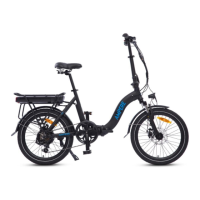

 To Next Page
 General