6 7
CONTENTS
Putting the Telephone into Operation.................................................7
Check box contents..................................................................................7
Connecting the base unit..........................................................................7
Wall installation.........................................................................................8
Telephoning..........................................................................................9
Making a call.............................................................................................9
Redialling..........................................................................................9
One-touch dialling.....................................................................................9
Removing the covers from the one-touch dialling buttons....................9
Saving one-touch dialling numbers.......................................................10
Dialling with the one-touch dialling buttons...........................................10
Quick dialling..........................................................................................10
Programming quick dial buttons..............................................................10
Dialling using quick dial buttons...............................................................10
Increasing the receiver volume to +40 dB..............................................11
Setting the receiver volume...................................................................11
Tone control............................................................................................11
Ringing volume.......................................................................................11
Ringing tone...........................................................................................11
Sending loudness rating.........................................................................11
PABX / Supplementary Services............................................................11
R button on private branch exchanges.................................................11
Dialling pause.........................................................................................12
Insert a dialling pause.............................................................................12
R-button and supplementary services...................................................12
Setting the Flash time...........................................................................12
In Case of Problems..............................................................................12
Service Hotline.......................................................................................12
No telephone calls possible..................................................................12
Maintenance / Guarantee.......................................................................13
Maintenance.....................................................................................13
Guarantee.......................................................................................13
Declaration of Conformity.....................................................................14
Putting the Telephone into Operation
Attention: It is essential to read the Safety Information before
starting up.
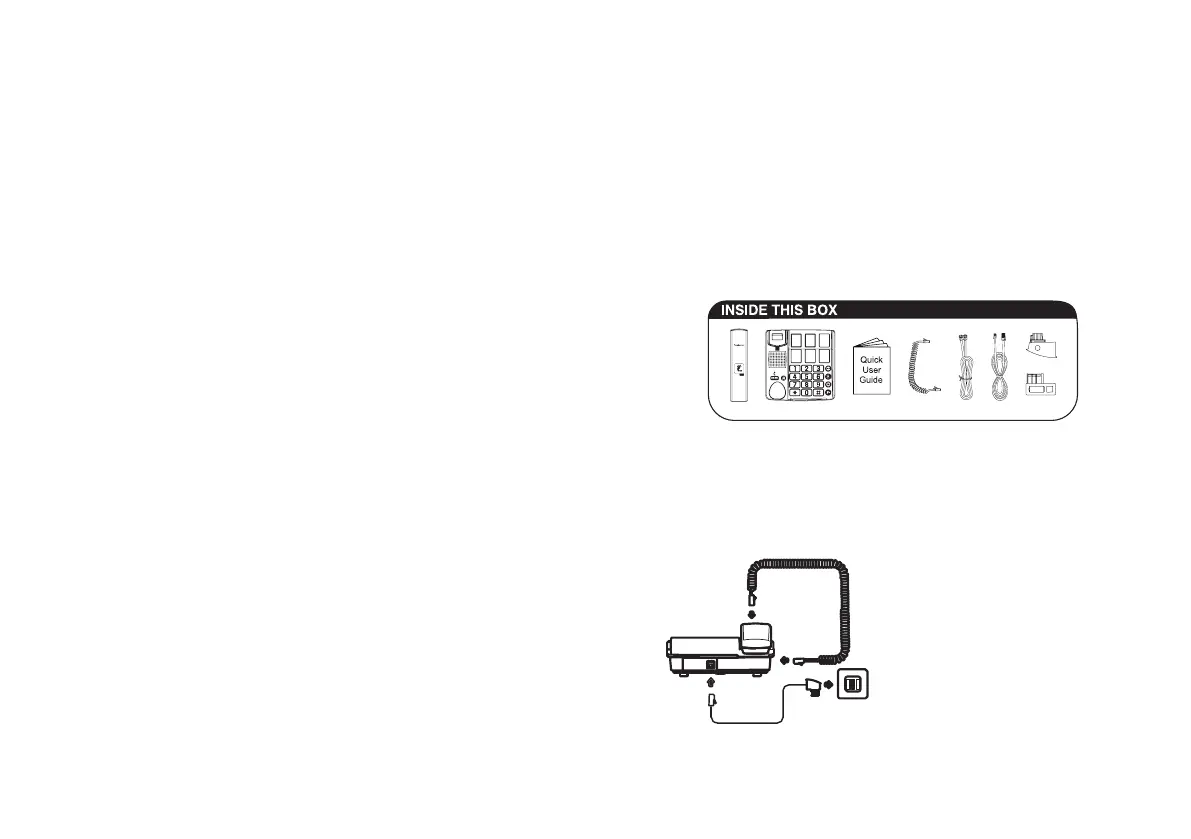
Check box contents
• 1 Telephone
• 1 Premium receiver
• 1 Helix cable for receiver
• 2 Telephone connection cables
• 1 Wall installation bracket
• 1 User manual
Connecting the base unit
Connect the telephone as illustrated in the diagram. Only use the
telephone cable supplied because the equipment may not function if an-
other telephone cable is used.
Telephone wall socket















 To Next Page