USB232U/485Ui
Page 20
4.3.2 The Loop Back Connections
The USB232U/485Ui can be separated from external serial interface influences such as the
signal cables, other devices and the applications program by performing a loop-back test. For
both RS232 and RS422/485 tests, it is necessary to make up a wrap connector using a 9-way
D-type free socket that mates with the port under test. Then run a terminal emulator such as
Hyper-Terminal.
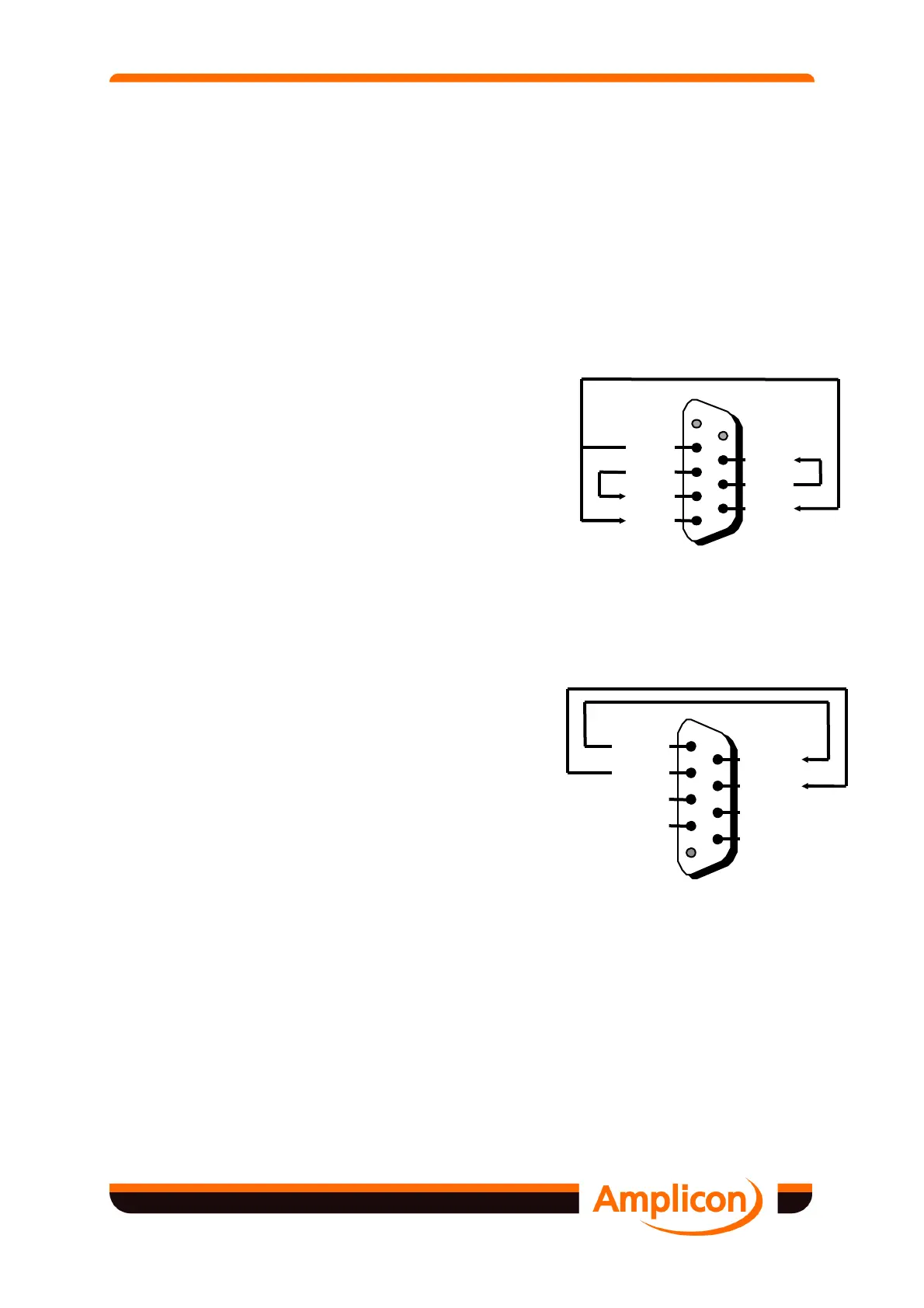
Figure 4.4 shows the 9-way D-type connector wired for RS232 loop back testing. No
connections need to be made to the ground pin.
Signal Function 9-way
From To Pin Pin
TxD RxD 3 2
RTS CTS 7 8
DTR DSR and DCD 4 6 and 1
Figure 4.4 RS232 Loop-Back Test Connections
Figure 4.5 shows the 9-way D-type connectors wired for RS422/485 loop back testing. The
connections to be made are summarised in the following table. No connection needs to be
made to the ground pin.
Signal Function 9-way Amplicon
From To Pin Pin
Tx-A Rx-A' 4 8
Tx-B Rx-B' 5 9
Figure 4.5 RS422/485 Loop-Back Test Connections
Loop-back testing is only appropriate to full duplex operation of the RS422/485 ports. See
Figure 2.1 for jumper settings.
4.3.3 Loop-back Testing Using A Terminal Emulator
Windows 98, 2000 and XP come supplied as standard with a Terminal Emulation package
called Hyper Terminal. This can be used for simple loop-back testing and is found in the
Accessories section from the START button.
Start Hyper-terminal and when prompted, enter a meaningful name such as Port 2 for COM2 or
Port 4 for COM4 etc. The software will not let you use COM2 etc, as these are reserved words.
Tx-B
Rx-B'
Tx-A
Rx-A'
RTS-A
CTS-B'
RTS-B
CTS-A'
GND


 To Next Page