18
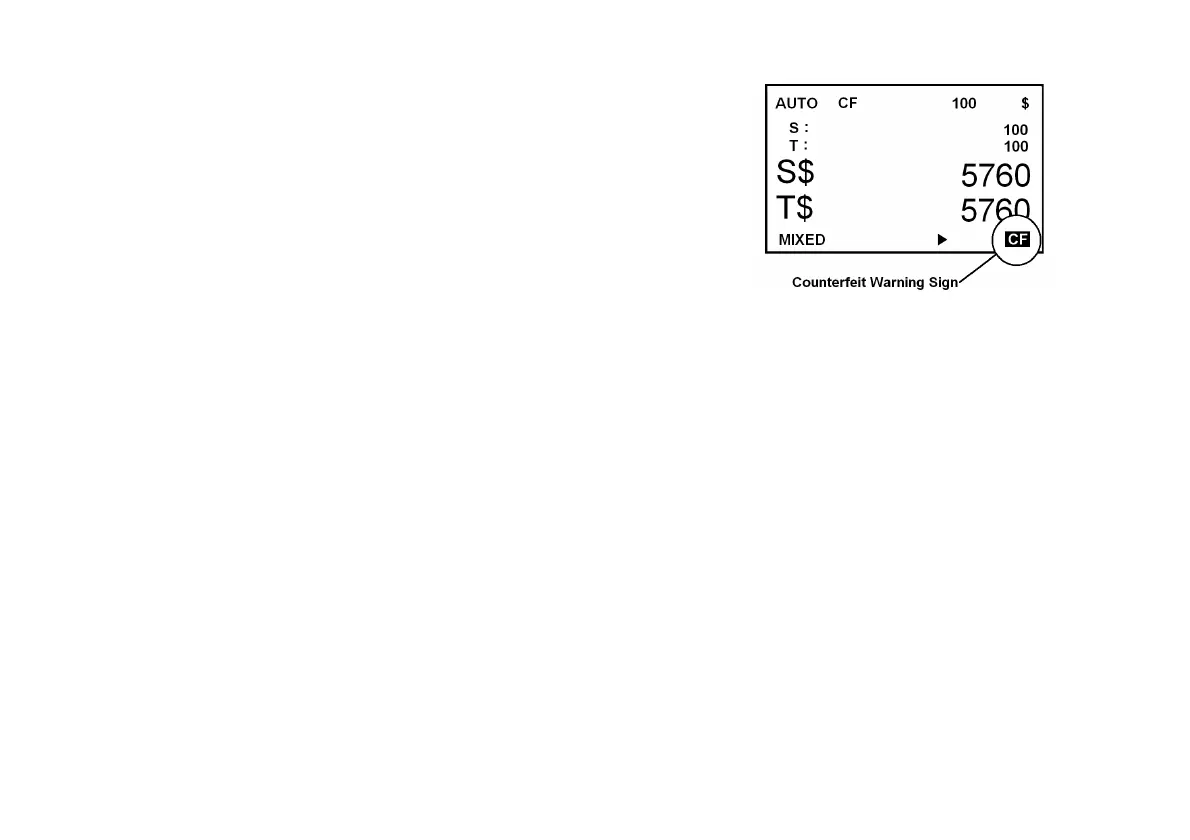
If a banknote is determined as suspect, CF sign indicates on LCD screen as
illustrated below and the banknote then delivers to the Reject Pocket. In
addition, the machine beeps warning sound once counting is completed. The
CF sign disappears when the Reject Pocket is emptied out.
ADD (Accumulation) On/Off
To turn On/Off ADD function, press ADD key. ADD function accumulates a
single deposit count (a stack) or multiple deposit counts (multiple stacks), if activated. For example, if ADD is turned On,
the counting result of a stack count added to the next stack count and accumulated to the total count. It is a useful
function when an operator has to count lot of Stacks of banknotes and accumulates them to Total count or Grand total.
BATCH On/Off
To turn On/Off BATCH function, press BATCH key on the control panel. Display will show 100 as default batch setting.
To enter a variable batch number (1-200), use numeric keys (0-9) on the keypad and then press START / ENTER key
on the right side of the control panel to confirm the input. While in batch mode, the machine halts when the number of
counted bills reaches to preset batch number, even though more banknotes may still remain in the Hopper. To
deactivate the batch function, simply press BATCH key. Operator’s preset batch number will disappear from the LCD
screen ensuring deactivation of the batch function.


 To Next Page