UK-2
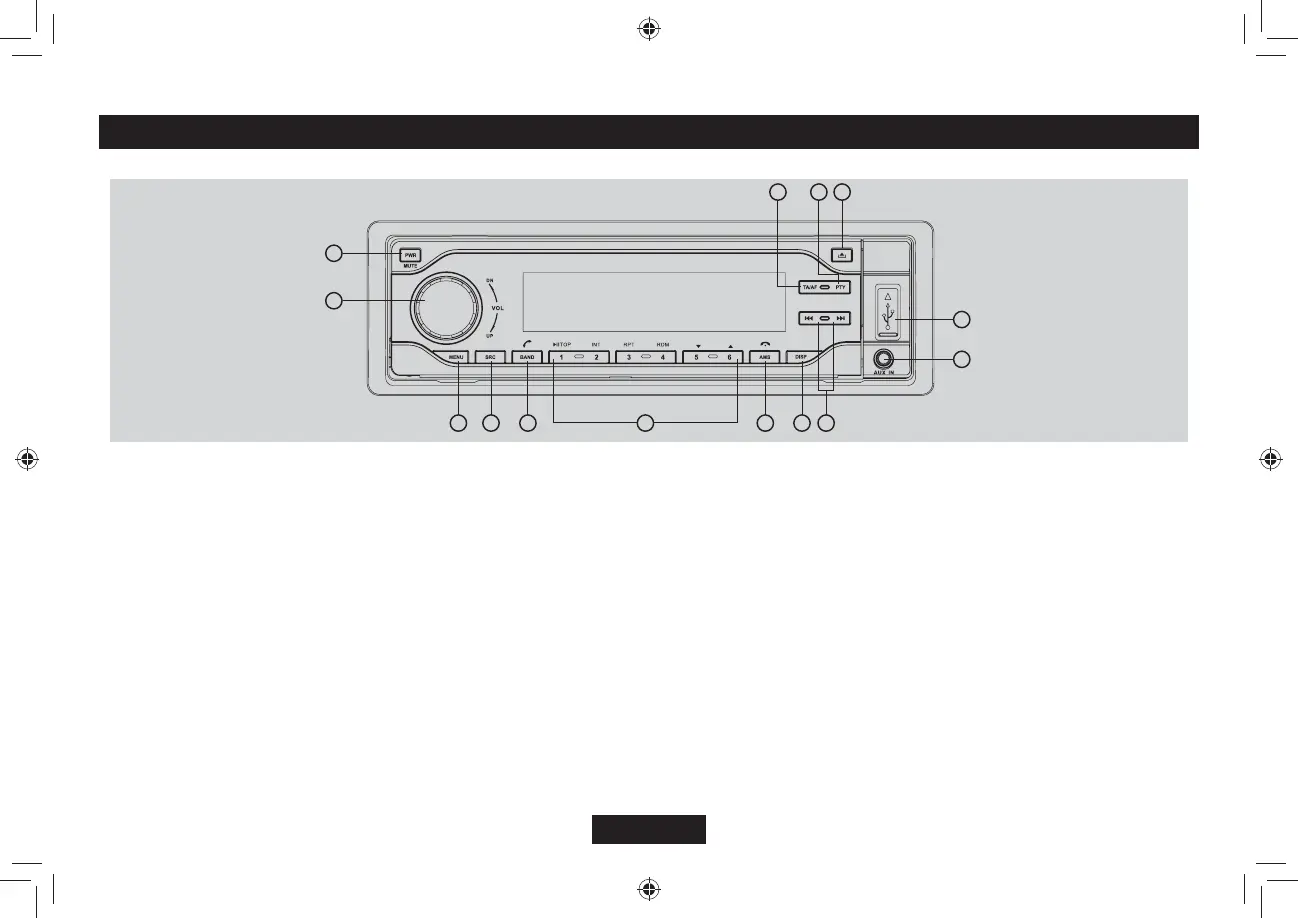
Panel Controls
Press PWR button to turn on the unit.
1. - Mute
- Press more than 2 seconds to power off.
2. - Rotate to adjust volume.
3. - Press to select EQ/BALANCE/FADER/
.17&TQVCVGVJGMPQDVQCFLWUV
- Long press to enter system menu.
4. - Radio
&KUERNC[YJGPFKUEKUKP
5&//%ECTFYJGP5&//%KPUGTVGF
75$FTKXGYJGP75$KPUGTVGF
- Aux
$6/75+%YJGP$6EQPPGEVGF
KP&#$OQFGNCWPEJOCPWCN&#$UECP
5. - Radio band switch:
FM1->FM2->FM3->MW1->MW2->LW
- Dial/Receive call
- Long press to re-dial.
9JKNGVCNMKPIRTGUUVQVTCPUHGTVJGECNN
#WVQOGOQT[UVQTGNQPIRTGUU
- MP3/WMA search
- Ending / rejecting a phone call
- Long press disconnect/reconnect
bluetooth phone.
KP&#$OQFGNCWPEJOCPWCN&#$UECP
8. - Display switch
6KOGCFLWUVNQPIRTGUU
9. Radio tune
- Track skip/seek
10.- Aux-in jack
11.- USB connector
12.- Panel open
13.- Press to enter RDS PTY mode.
14.- Press to turn RDS TA on/off.
- Long press to turn RDS AF on/off.
6. - Disc playback
Button 1: - Play/Pause
6QRRNC[RTGUUOQTGVJCPUGE
$WVVQP+PVTQRNC[UGE
Button 3: - Track repeat play
- Folder repeat play
Button 4: - Track random play
Button 5: - MP3 folder down (If there are
OQTGVJCPHQNFGTU
/2VTCEMFQYPNQPIRTGUU
Button 6: - MP3 folder up (If there are more
VJCPHQNFGTU
/2VTCEMWRNQPIRTGUU
Radio preset 1~6
- Press to tune in a preset station.
- Hold for more than 2 seconds to store
station.
7. - Radio preset scan
1
2
3
4
5
11
13
12
7
14
8
10
9
6
F
F



 To Next Page