
 Need help?
Do you have a question about the AMS TDC-GP30 and is the answer not in the manual?
This document is a Quick Start Guide for the TDC-GP30 DEV-KIT, identified by ordering codes GP30-DEV-KIT and GP30-DEV-KIT-F01, with version v2-00, dated 2019-Feb-26. It provides essential instructions for setting up and using the evaluation kit, focusing on initial steps to get the device operational.
The TDC-GP30 DEV-KIT is an evaluation kit designed to facilitate the development and testing of applications based on the TDC-GP30, a Time-to-Digital Converter (TDC) integrated circuit. Its primary function is to provide a platform for users to experiment with the TDC-GP30 in a practical environment, allowing for the measurement of time-of-flight (TOF) and other related parameters. This kit is particularly useful for applications requiring high-precision time measurements, such as ultrasonic flow meters, distance measurement, and other industrial or scientific instrumentation.
The core function of the TDC-GP30 DEV-KIT revolves around enabling users to interact with and evaluate the TDC-GP30 chip. This involves providing the necessary hardware interfaces and software tools to configure the chip, acquire data, and analyze measurement results. The kit is designed to simplify the process of integrating the TDC-GP30 into custom applications by offering a ready-to-use development environment.
At its heart, the kit allows for the precise measurement of time intervals. This is crucial for applications like ultrasonic flow metering, where the difference in time-of-flight of ultrasonic pulses traveling with and against the flow is used to determine the fluid velocity. The TDC-GP30 chip itself is capable of very high resolution time measurements, and the DEV-KIT provides the means to harness this capability.
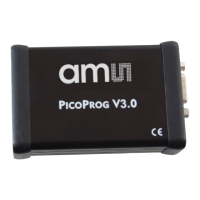
The kit includes a PICOPROG V3.0, which serves as both a programmer and an interface between the development kit module and a personal computer. This programmer is essential for flashing firmware onto the TDC-GP30 and for establishing a communication link for data exchange and control. The GP30-DEV KIT MODULE, based on the TDC-GP30 in a QFN32 package, is the central component where the actual time measurements are performed. It provides the necessary circuitry and connections to interface with external transducers, such as piezoelectric elements used in ultrasonic applications.
The software accompanying the kit, referred to as the GP30 Frontpanel software, is a critical part of its functionality. This application allows users to configure the TDC-GP30 chip's various parameters, initiate measurements, and visualize the results. It provides a graphical user interface (GUI) that simplifies complex register settings and data acquisition processes. The software also handles the loading of initial configurations, ensuring the chip operates correctly for specific applications, such as those involving 1MHz transducers.
The TDC-GP30 DEV-KIT is designed for ease of use, guiding developers through a straightforward setup process.
Out-of-the-Box Experience: The kit contents are clearly defined, including the PICOPROG V3.0 programmer, the GP30-DEV KIT MODULE, and a USB cable. This ensures users can quickly identify all necessary components. A detailed User Guide (UG000292) is referenced for comprehensive information, indicating that this Quick Start Guide focuses on immediate operational steps.
Software Installation: A crucial first step is the installation of the provided software. The guide emphasizes installing the software before connecting the hardware to prevent potential driver conflicts with the operating system. The installation process involves downloading and unzipping the software package, then running a setup.exe file. The software package includes necessary files like bin, license, supportfiles, and setup.ini.
Firmware Management: The software plays a vital role in managing the PICOPROG's firmware. Upon initial connection to the USB port, the PICOPROG may be listed as an "unprogrammed" device. Starting the GP30 Frontpanel software automatically downloads a special firmware (e.g., PicoProgFW_GP30_v21.hex or higher) into the PICOPROG, which then re-identifies as "UNIPRO." This automated firmware update ensures compatibility and proper communication between the programmer and the development kit.
Hardware Connection: The guide provides clear instructions and schematic representations for connecting the hardware components.
Application Startup and Configuration:
GP30Y_config_default_03.cfg). This file contains predefined settings for the TDC-GP30, tailored for specific applications (e.g., 1MHz transducers). Users can locate and open this file from the installation folder.Measurement Execution and Data Display:
While the Quick Start Guide primarily focuses on initial setup and usage, it implicitly touches upon aspects that contribute to the kit's maintainability and troubleshooting:
.cfg) allows users to easily restore known good configurations or switch between different application setups. This is a valuable maintenance feature for managing complex projects and ensuring consistent device behavior.In summary, the TDC-GP30 DEV-KIT is a robust and user-friendly platform for developing and evaluating applications based on the TDC-GP30 chip. It provides a complete ecosystem of hardware and software tools, designed to streamline the development process for high-precision time measurement applications. The guide ensures that users can quickly get started, configure their device, and begin acquiring meaningful data, while also providing pathways for troubleshooting and ongoing support.
 General
| Type | Time-to-Digital Converter |
|---|---|
| Manufacturer | ams |
| Interface | SPI |
| Package | QFN-32 |
| Number of Channels | 4 |
| Operating Temperature | -40°C to 125°C |

 To Next Page
