EasyManua.ls Logo

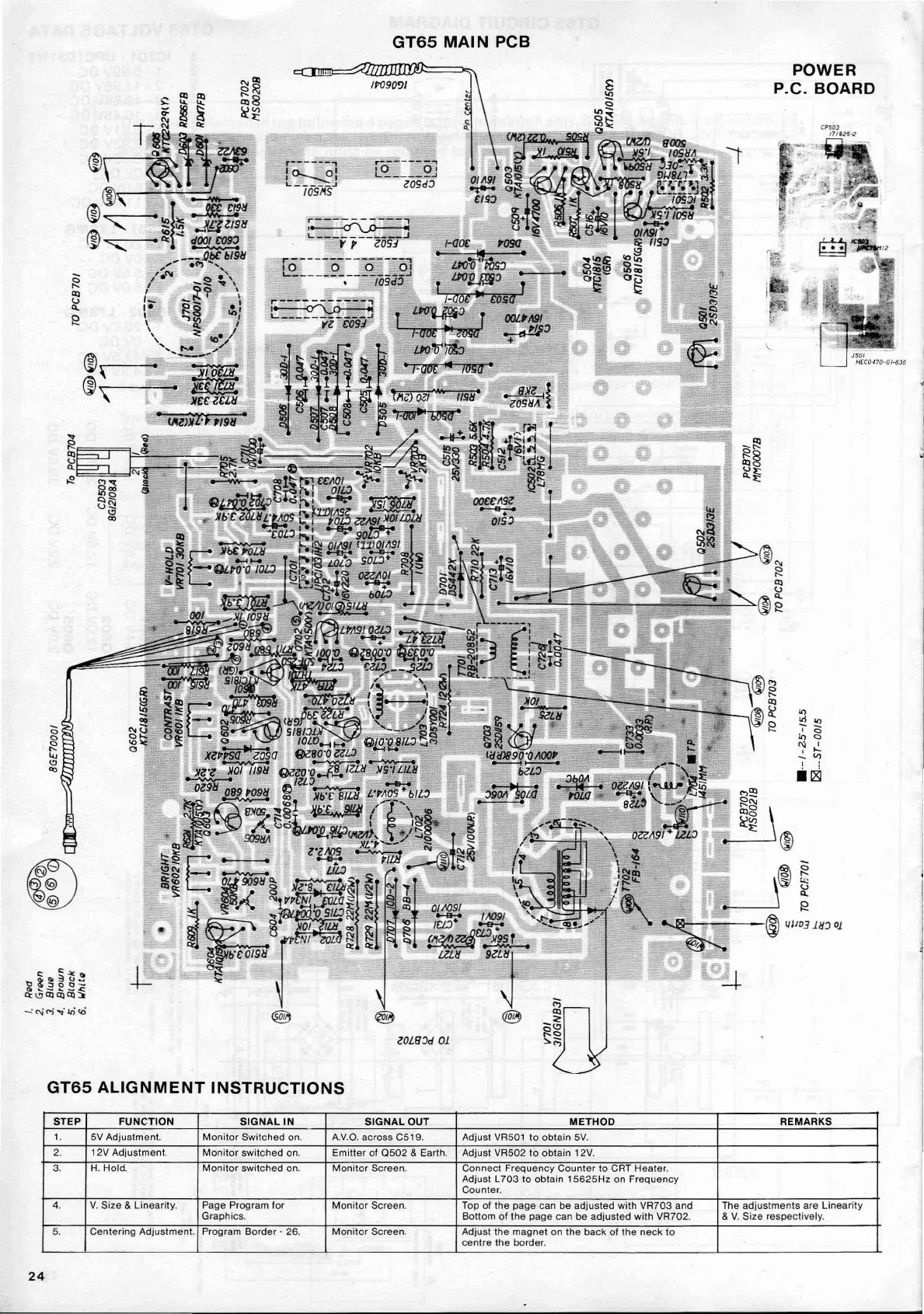
AMSTRAD CTM644 - GT65 Main Printed Circuit Board Layout; GT65 Monitor Alignment Guide

Default Icon
31 pages
Print Icon
To Next Page IconTo Next Page
To Previous Page IconTo Previous Page
Loading...
GT65
MAIN
PCB
POWER
P.C. BOARD
'"
ltl
'"
0
,.
(5
<>
10
<>
<>
N
I
r-.
I
.....
'"
'"
<'l
, :
00
Ii~
C:Qt~ti.!
~~2E.3~
C>:<'lCllCllCll::'
-:C\jM ...
lOCO
lOUDcf
01
GT65
ALIGNMENT
INSTRUCTIONS
STEP
FUNCTION
SIGNAL
IN
SIGNAL
OUT
METHOD
REMARKS
1.
5V Adjustment.
Monitor
Switched
on.
A.V.O.
across C519. Adjust VR501
to
obtain
5V.
2.
12V
Adjustment.
Monitor
switched
on.
Emitter
of
Q502
& Earth.
Adjust VR502 to
obtain
12V.
3.
H.
Hold.
Monitor
switched
on.
Monitor
Screen.
Connect
Frequency
Counter
to CRT Heater.
Adjust L
703
to
obtain
15625Hz
on
Frequency
Counter.
4.
V.
Size & Linearity.
Page Program
for
Monitor
Screen. Top
of
the
page can be
adjusted
with
VR703
and The
adjustments
are
Linearity
Graphics.
Bottom
of
the
page
can
be
adjusted
with VR702. &
V.
Size respectively.
5.
Centering
Adjustment. Program
Border
- 26.
Monitor
Screen.
Adjust
the
magnet
on
the
back
of
the
neck
to
centre
the
border.
24

Related product manuals