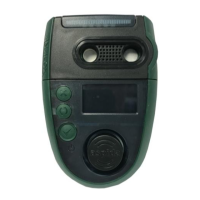
5.2 Switching the device on/off
To switch the Analox Aspida on, press the button.
After a few seconds, the main gas display screen will be shown. If multiple user-names are registered
to the device then the user-name selection screen will be shown instead. See the section ‘User
registration’ for further instructions.
On start-up, the sensors have a short warm-up period. Live gas values will not be displayed until the
sensors have completed their warm-up. Typically, for oxygen, the warm-up takes 15 seconds and for
carbon dioxide, the warm-up takes 30 seconds. Sensor warm-up will be shown on the display.
To switch off the device, from the main display press and hold the button until the screen goes blank
then release the button.
To return to the main display from the menu system, press and release the button as required to exit
the menus
NOTE: The device cannot be turned off when powered from USB.
5.3 User registration
The Analox Aspida allows for registration of up to two usernames. This allows users to share use of the
device. On start-up, a username is selected, and all subsequent gas information is logged internally
against the selected user ID. Users can be registered to a device using the Aspida configuration
software. See the Aspida configuration software for instructions.
On device power up, if a single user is registered, the username will be displayed for a few seconds,
after which the device will operate normally.
If 2 users are registered, both usernames will be displayed in a menu for the user to select. Pressing the
button will cycle between highlighted usernames. The button will select the highlighted user.
NOTE: If a user is not selected within 2 minutes of start-up, a ‘no user’ ID will be selected automatically
and the device will proceed to run normally. During these two minutes, a reminder beep will be
sounded to prompt the user to select an ID.


 To Next Page