20
AD610 Plus ABS & Airbag Reset Tool Manual_English_V1.02
5.2 Diagnostic Operations
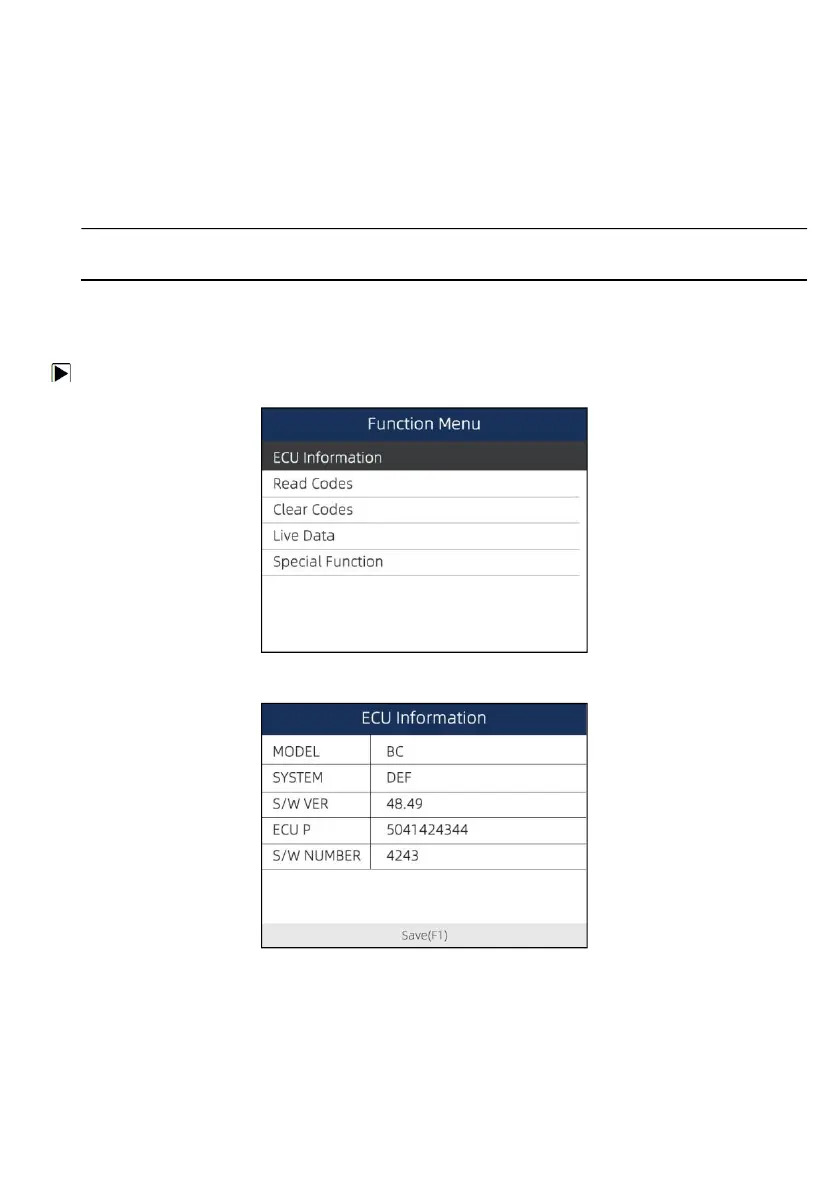
After a system is selected and the scanner establishes communication with the vehicle, the Function
Menu displays. The menu options may include:
● ECU information
●
Read Codes
●
Clear Codes
● Live Data
● Special Functions
NOTE
Not all function options listed above are applicable to all vehicles. Available options may vary by the
year, model, and make of the test vehicle.
5.2.1 ECU Information
ECU Information screen displays the identification data of the control module under test, such as the
control module identification string, the control module coding, and Work Shop Code.
To read ECU information:
1.
Select ECU Information from the menu and press the ENTER key.
Figure 5-8 Sample Function Menu Screen
2.
A screen with detailed information of the selected control moduledisplays.
Figure 5-9 Sample ECU Information Screen
3.
Press function key Save to store ECU information. Or use the BACK key to exit.
5.2.2 Read Codes
Read Codes menu lets you read trouble codes found in the control unit.
Typical code status include:



 To Next Page