APPENDICES
63
ACCESSING SERVICE MODE ON THE WATER HEATER DISPLAY (FOR SERVICE PERSONNEL ONLY)
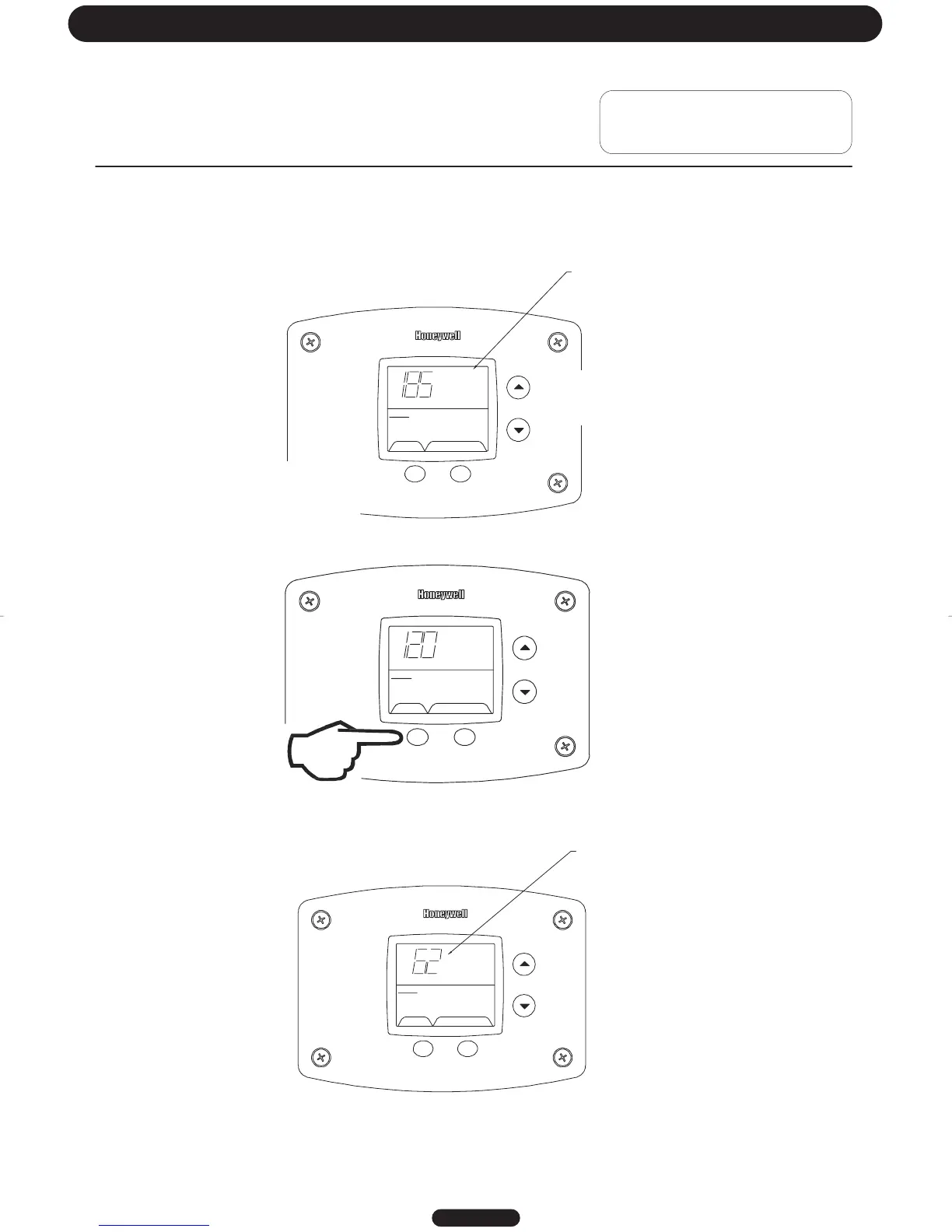
The display has a “service mode” for changing the maximum setpoint and accessing i nformation in aiding servicing of the
water heater. This procedure is for service and installation personnel only. To enter the Service Mode, follow the steps
illustrated below:
Step 1: Press “Select” and “Temperature Up” buttons together and hold for 3 seconds until “Max Setpoint” is shown in the
display.
Step 2: Pressing “Select” button will change display to next mode
SELECT SET
Status
°F
idl
Operational
Wate
Temp
The following is the sequence of modes available in “Service Mode” by pressing the “Select” button:
Error Code Number (Display/Reset). This is only shown if there is an operating error in the “User Mode”.
"Max Setpoint”
SELECT SET
Statu
s
idle
Operational
next to Temperature
Setpoint value.
Max
Setpoint
SELECT Lockout RESET
Status
Servi ce Needed
Error Code Shown
in Water Heater Display
Page 9
Troubleshooting
Using Control Display for Servicing the
Water Heater




 To Next Page