Step 15: Signal Strength & Out of Range Indicator
The Signal Strength Indicator shows the strength of signal between the
Parent Unit and Nursery Unit. The Out of Range Indicator will alarm when
the two units have lost connection and the Out of Range Icon will be
visible in the Parent Unit screen.
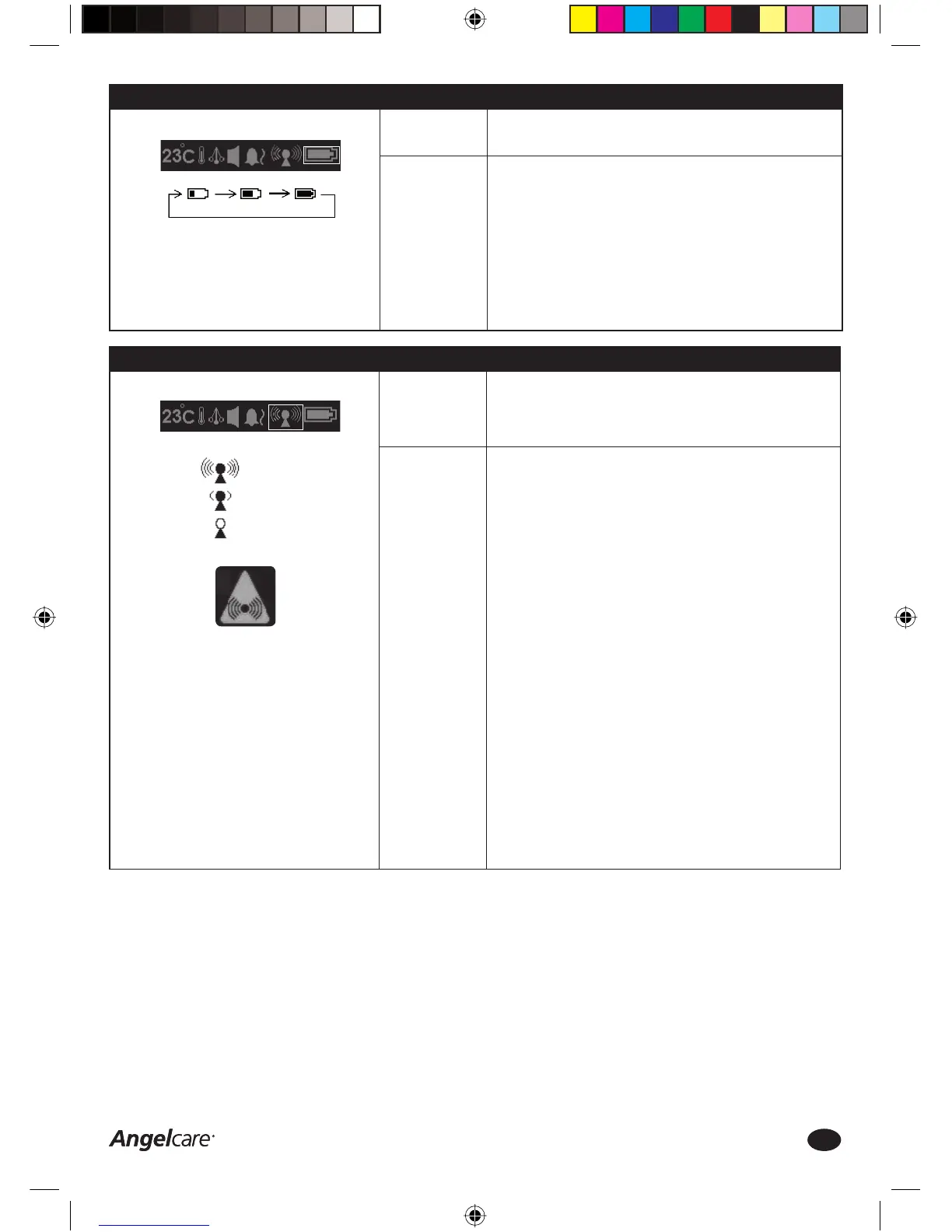
1. The Signal Strength Icon in the Parent Unit Settings Bar will show the
actual signal strength between the Parent Unit and Nursery Unit
2. The maximum range between the two units is up to 100 metres
indoors and up to 200 metres outdoors
3. An Out of Range alarm will sound when the connection between the
two units is lost
4. Out of Range situations can be caused by (e.g.) too much distance or
thick walls between the two units
5. When the units are Out of Range you will hear a Triple Beep and/or the
Parent Unit will vibrate every 5 seconds and the Out of Range Icon will
be displayed on the Parent Unit screen
6. When the Out of Range alarm sounds move the units closer together
until communication has been (re)established.
HOW TO RECONNECT THE PARENT AND NURSERY UNIT
In the unlikely event that the connection between the Nursery Unit and
the Parents Unit is completely lost, please follow these steps to restore
the connection:
1. Turn both the Parents Unit and the Nursery Unit OFF
2. Turn the Nursery Unit ON
3. Press and release the left wing 4 times. The nightlight will fl ash.
4. Turn the Parent Unit ON. A blue screen will appear with the NO SIGNAL
icon in the Parent Unit Settings Bar
5. While pressing the TALK BACK button on the right hand side of the
Parent Unit, press and release the POWER button on the left hand side
of the Parent Unit
6. If successful, the video capture will appear on the Parent Unit’s screen
again. The connection was successfully restored
Function:
How to use this
function:
PARENT UNIT SETTINGS BAR:
Step 14: Battery Level Indicator
The Battery Indicator shows the remaining battery level of the
rechargeable batteries of the Parent Unit.
1. Install and charge the rechargeable batteries in the Parent Unit as
instructed in Step 3a
2. If possible, keep the Parent Unit in the Charging Cradle at all times
3. If using battery power, always ensure the minimum battery level is
25% full to maintain optimal performance of the monitor
4. If the battery level goes below 25%, recharge immediately
5. The Battery Level Icon in the Parent Unit Settings Bar will show the
actual battery level and will move from left to right whilst charging
6. Fully charged batteries will last up to 6 hours based upon normal
usage, but considerably less if the video screen is turned ON
constantly
Function:
How to use this
function:
PARENT UNIT SETTINGS BAR:
SIGNAL STRENGTH OPTIONS:
OUT OF RANGE ICON:
Good Signal
Low Signal
No Signal
Charging the batteries
Consumer Helpline: 0845 009 1789 | www.angelcare-uk.co.uk
11
AC1100_Manual.indd 11AC1100_Manual.indd 11 19/5/11 2:39:19 pm19/5/11 2:39:19 pm



 To Next Page