EasyManua.ls Logo

Anglecare AC1100 - User Manual

Default Icon
16 pages
Print Icon
To Next Page IconTo Next Page
Loading...
Video, Movement & Sound Monitor
AC1100
The Angelcare Baby Monitor is a Personal Care Product.
Please DO NOT return it to the store, but contact us initially for advice and assistance:
Angelcare Helpline 0845 009 1789; Monday to Friday, 10am - 3pm
Website: www.angelcare-uk.co.uk; Email: helpline@angelcare-uk.co.uk
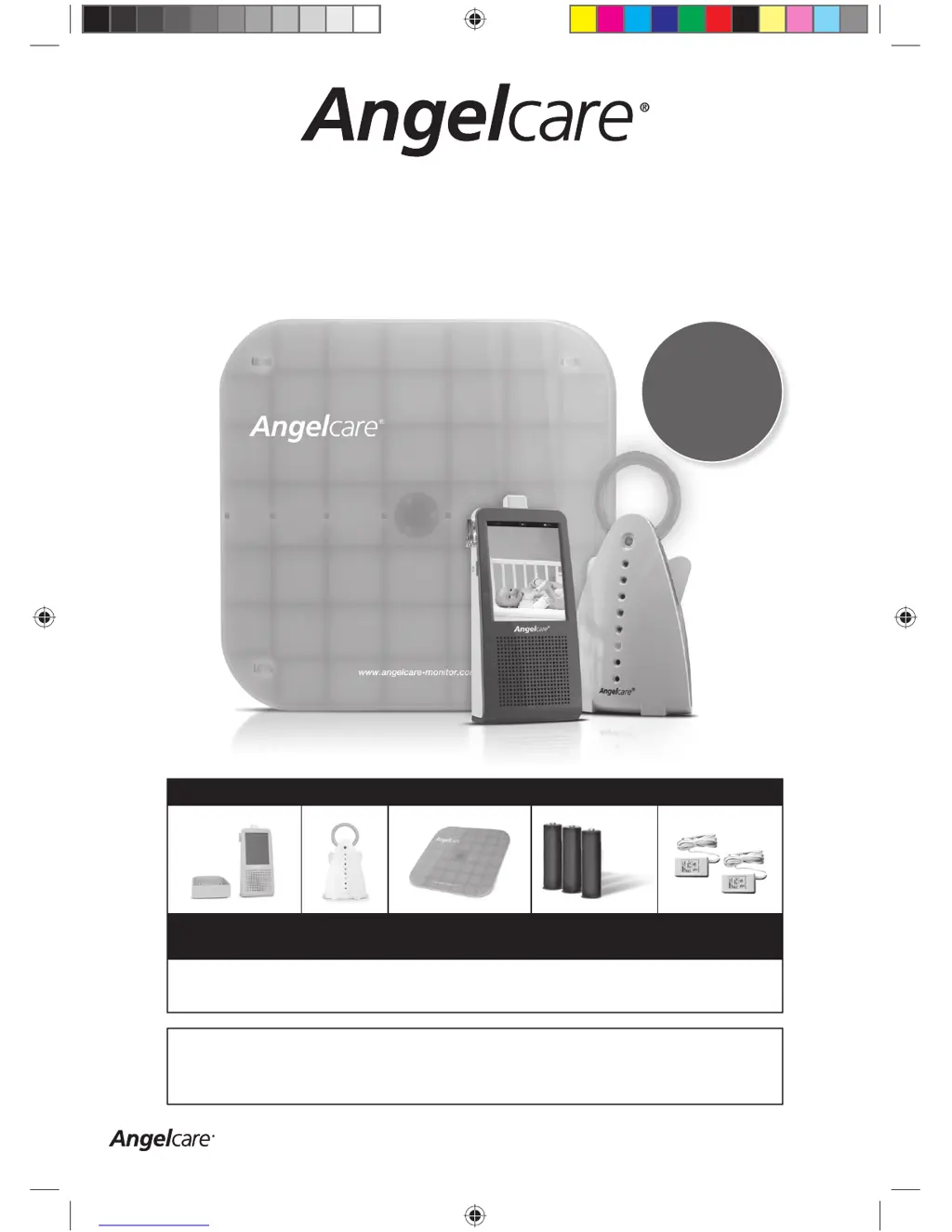
Please check if all parts are present before installing the Angelcare Baby Monitor
1 x Parent Unit with
Charging Cradle
1 x Nursery Unit 1 x SensorPad 3 x AAA rechargeable
batteries
(for Parent Unit)
2 x AC Adaptors 7.5v
You will also need:
• 3 x AAA standard batteries for Nursery Unit power back-up (see Step 2a)
• Piece of plywood to support SensorPad (see Step 1)
Consumer Helpline: 0845 009 1789 | www.angelcare-uk.co.uk
P
re
-p
ro
g
ra
m
m
e
d
to
m
o
n
ito
r s
o
u
n
d
a
n
d
m
o
v
e
m
e
n
t.
S
e
n
s
o
rP
a
d
w
ill a
la
rm
if
n
o
m
o
v
e
m
e
n
t is d
e
te
c
te
d
.
R
e
fe
r to
M
a
n
u
a
l to
c
h
a
n
g
e
s
e
ttin
g
s
.
AC1100_Manual.indd 1AC1100_Manual.indd 1 19/5/11 2:38:49 pm19/5/11 2:38:49 pm

Questions and Answers

  • K
    kweaverJul 26, 2025
    What to do if my Anglecare Baby Monitor SensorPad is giving false alarms?
    • E
      Emily MorganJul 26, 2025
      False alarms on the Anglecare Baby Monitor SensorPad can occur for several reasons. First, ensure you turn off the Nursery Unit when the baby is removed from the bed. Check the SensorPad connection to the Nursery Unit, unplugging and reconnecting it. Make sure there is no bedding between the mattress and SensorPad, and that the SensorPad rests on a flat, rigid surface; consider placing a 6mm thick piece of plywood under it. Also, verify that the sensitivity setting isn't too low; the standard setting is level 3, adjustable on the Nursery Unit. Finally, never use the SensorPad with adult mattresses, memory foam, or hollow frame mattresses.
  • C
    cmorseAug 9, 2025
    Why is there no sound being transmitted on my Anglecare Baby Monitor?
    • R
      Richard RodriguezAug 10, 2025
      If you're not hearing any sound from your Anglecare Baby Monitor, here are a few things to check: 1. If the sound transmission is set to ‘Voice Activated’, the sound in the baby’s room might not be loud enough. You can increase the microphone sensitivity or switch to Continuous Sound transmission. 2. Make sure that both units are powered ON and have sufficient power. Check or replace the batteries in both units, and ensure the Parent Unit is charged. 3. Verify that the AC adapters are correctly connected and the mains switch is turned ON. 4. Also, check that the volume level on the Parent Unit isn't set to OFF; increase it using the UP/DOWN buttons.

Summary

Angelcare Baby Monitor Installation Guide

Installation of the SensorPad

Install the SensorPad correctly under the baby's mattress for movement detection.

Nursery Unit Setup & Functions

Covers installation and overview of the Nursery Unit's features.

Parent Unit Setup & Functions

Covers installation, overview, and main screen navigation of the Parent Unit.

Testing Your Baby Monitor

Test the sound and movement functions to ensure the monitor is working correctly.

Movement & SensorPad Settings

Configuring movement detection, sensitivity, and tic function.

Monitor Maintenance & Care

Safety Warnings

Troubleshooting Guide

SensorPad False Alarms

Troubleshoot false alarms caused by SensorPad placement or sensitivity.

Anglecare AC1100 Specifications

General IconGeneral
BrandAnglecare
ModelAC1100
CategoryBaby Monitor
LanguageEnglish

Related product manuals