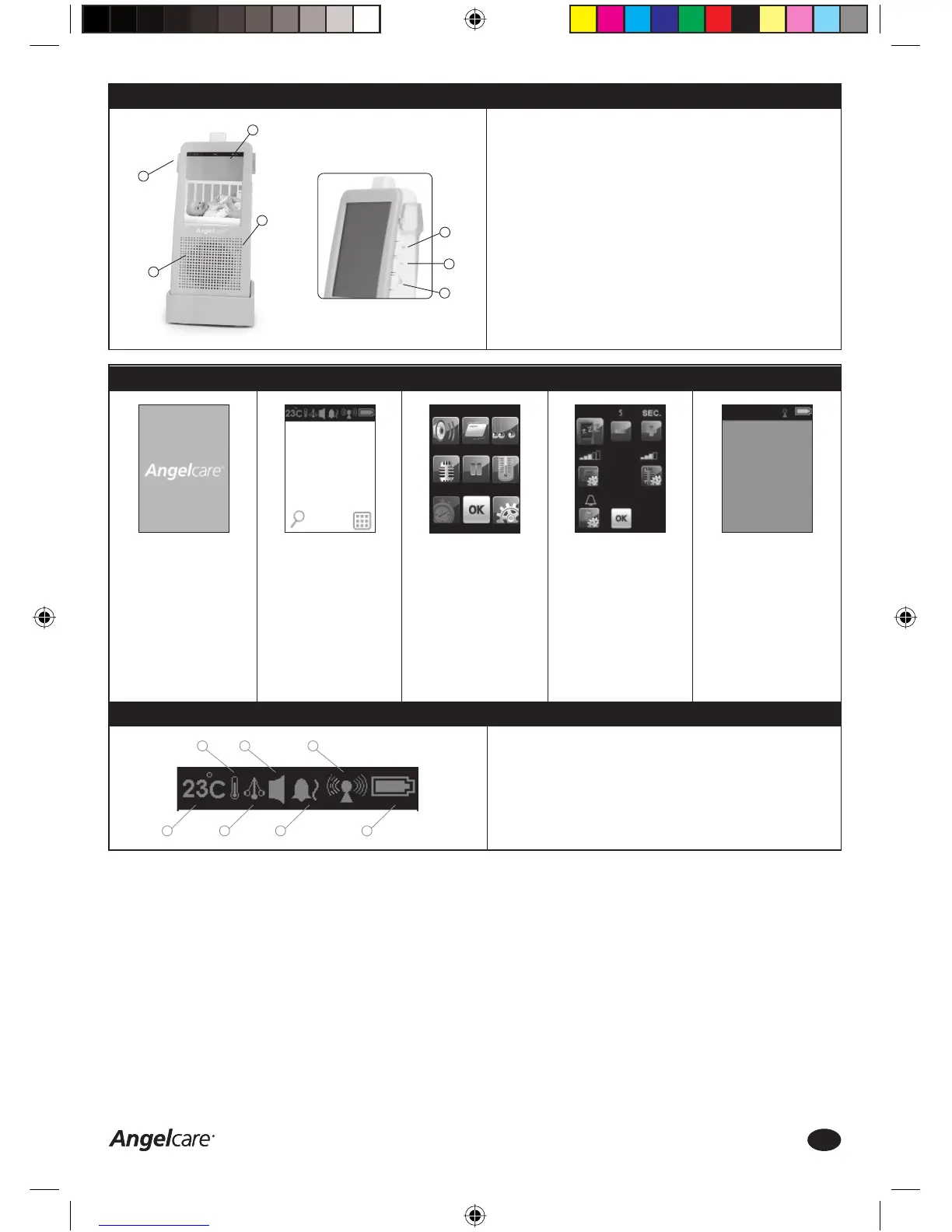
1. Temperature Indicator (see Step 12)
2. Temperature Control ON/OFF (see Step 12)
3. Pendulum - Movement Indicator (see Step 8)
4. Sound Setting (see Step 6)
5. Alarm Setting (see Step 10)
6. Transmission Signal Strength (see Step 15)
7. Battery Level (see Step 14)
Step 3b: Parent Unit - Overview Functions
FRONT
1. LCD Full Colour Touch screen
2. Microphone
3. Loudspeaker
LEFT SIDE
4. Power ON/OFF
RIGHT SIDE
5. Loudspeaker Volume UP(+)
6. Loudspeaker Volume
DOWN(-)/MUTE Function
7. Talk Back Function
TALK BACK FUNCTION
Press and hold the Talk Back
button to talk directly to your
baby. Please talk clearly in the
microphone on the Parent Unit,
whilst holding the Talk Back
button. Release the Talk Back
button to stop the communication.
Step 3c: Parent Unit - Main Screen
4
3
2
1
7
6
5
A. Press and hold the
POWER button on the
Parent Unit until a blue
screen with the Angelcare
logo appears
B. The Parent Unit screen
will show the video
capture from the Nursery
Unit in the baby’s room,
if the Nursery Unit is
turned ON
Press the MENU Icon on
the bottom right of the
touch screen to access
the (sub) MENU screen
C. Press any of the
FUNCTION Icons to
change the settings.
Press the SETTINGS Icon
on the bottom right of the
MENU screen to access
the SETTINGS screen or
press OK to save changes
D. Press any of the specifi c
FUNCTIONS Icons to
change the SETTINGS or
press OK to save changes
E. If the Nursery Unit is OFF
when the Parent Unit
is turned ON, a blank
screen will appear and
the Parent Unit will turn
OFF automatically after
1.5 minutes
Parent Unit - Setting Bar
1 3 5 7
2 4 6
Consumer Helpline: 0845 009 1789 | www.angelcare-uk.co.uk
4
AC1100_Manual.indd 4AC1100_Manual.indd 4 19/5/11 2:39:02 pm19/5/11 2:39:02 pm



 To Next Page