Press Movement Alarm Icon on Parent Unit
or top button on Nursery Unit to stop alarm
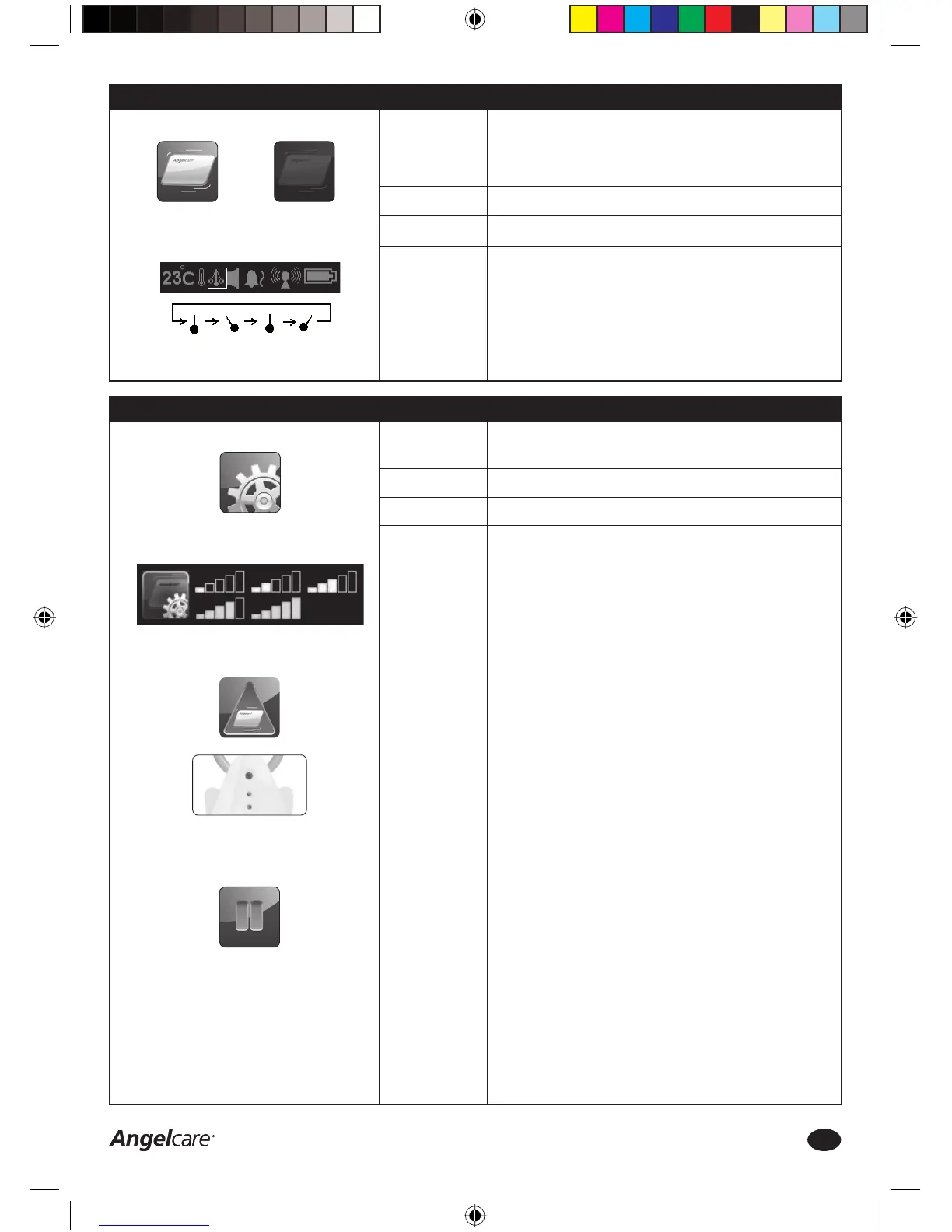
MOVEMENT ALARM ICON:
HOLD FUNCTION ICON:
Step 8a: Movement Function - Settings
Function:
Factory Settings:
Options:
How to change
this setting:
Movement Function: Activates the SensorPad. It will detect your baby’s
movements and sound an alarm when there is no movement detected
after 20 seconds. Please ensure the SensorPad has been installed and
tested according to the instructions in Step 4.
ON
ON or OFF
Movement Function
1. Press the MENU Icon on the Parent Unit touch screen
2. Press the Movement Function Icon ON or OFF
3. Press OK to save changes and return to the video capture screen
4. The Movement Icon (pendulum) in the Parent Unit Settings Bar will
show the activated setting
5. When the Movement Function is activated and movement is being
detected, the Movement Icon (pendulum) will swing from left to right
PARENT UNIT SETTINGS BAR:
MOVEMENT FUNCTION ICON:
Movement ON
Movement icon will swing when
movement is being detected
Movement OFF
Step 8b: Movement Function - Sensorpad Sensitivity
Access to SETTINGS screen
SENSORPAD SENSITIVITY ICON:
SensorPad Sensitivity Level
SETTINGS ICON:
SensorPad Sensitivity: To adjust the sensitivity of the SensorPad to
ensure optimal performance of the Movement Function.
ON
1 (low sensitivity) to 5 (high sensitivity)
SensorPad Sensitivity Adjustment
1. Press the MENU Icon on the Parent Unit touch screen
2. Press the SETTINGS Icon in the MENU screen
3. Press the SensorPad Sensitivity Icon until the preferred level (1 to 5
bars) is selected
4. Press OK twice to save changes and return to the video capture screen
IMPORTANT
The factory setting (level 3) is suitable for most bed sizes and types of
mattress. DO NOT ADJUST UNLESS NECESSARY!
The sensitivity of the SensorPad can be increased (highest level 5,
suitable for larger beds or thicker mattresses) or decreased (lowest
level 1, suitable for smaller beds and if there a possibility of external
vibrations).
By increasing the sensitivity the SensorPad will cover a larger area (e.g.
bigger beds or thicker mattresses), BUT it could also detect vibrations
from outside the baby’s bed, e.g. mobiles, etc.
It is important to fi nd the right balance for your situation to ensure
optimal performance of the SensorPad.
ALWAYS test the performance after moving and reinstalling the Angelcare
Monitor in a different place or when the bed or mattress has changed.
NEVER USE THE SENSORPAD WITH A MEMORY FOAM OR HOLLOW
FRAME MATTRESS!
See Steps 1 to 4 for correct installation and testing of your Angelcare
Baby Monitor.
MOVEMENT ALARM
• This alarm is triggered when no movement is detected by the
SensorPad for 20 seconds
• The Parent Unit and Nursery Unit will sound a loud audible alarm
• The Parent Unit screen will show the Alarm Icon
• IF THIS ALARM SOUNDS, CHECK YOUR BABY IMMEDIATELY!
• To stop the Movement Alarm: press the Movement Alarm Icon on the
Parent Unit screen or press and hold the top button of the Nursery
Unit. This activates the HOLD Function, which deactivates both the
Sound & Movement Function temporarily (see Step 11 for further
details)
• Press the HOLD Icon on the Parent Unit screen to reactivate the Sound
& Movement Function
Function:
Factory Settings:
Options:
How to change
this setting:
Consumer Helpline: 0845 009 1789 | www.angelcare-uk.co.uk
7
AC1100_Manual.indd 7AC1100_Manual.indd 7 19/5/11 2:39:09 pm19/5/11 2:39:09 pm


 To Next Page
 Loading...