Step 7: Sound Transmission
ON - Sound activated
transmission
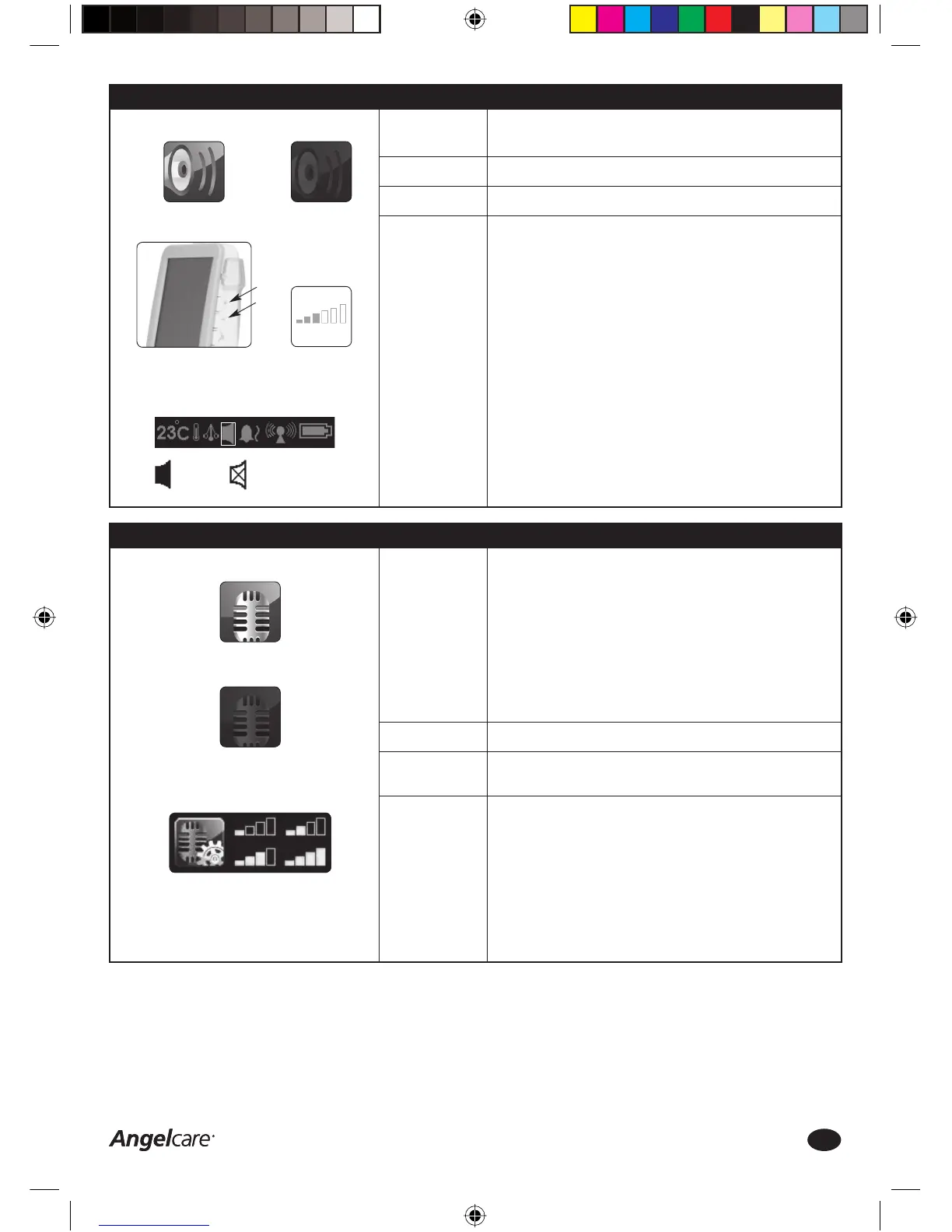
SOUND TRANSMISSION ICON:
OFF - Continuous
sound transmission
Function:
Factory Settings:
Options:
How to change
this setting:
The sound transmission can be set either to CONTINUOUS SOUND (OFF)
or SOUND ACTIVATED (ON).
Continuous Sound: the sound transmission between Nursery Unit and
Parent Unit is always active and open, so all sounds in the baby’s rooms
are transmitted.
Sound Activated: the sound transmission between the Nursery Unit
and Parent Unit is only activated if the Nursery Unit registers a certain
volume level of sound, e.g. crying. The sound transmission will turn
itself off again if no continuous sound is registered. The sensitivity of the
microphone is adjustable.
OFF – Continuous sound transmission
ON – Sound activated transmission
OFF – Continuous sound transmission
Sound Transmission
1. Press the MENU Icon on the Parent Unit touch screen
2. Press the Sound Transmission Icon ON or OFF
3. Press OK to save changes and return to the video capture screen
Microphone Sensitivity Adjustment
1. Press the MENU Icon on the Parent Unit touch screen
2. Press the SETTINGS Icon in the MENU screen
3. Press the Microphone Sensitivity Icon until the preferred level (1 to 4
bars) is selected
4. Press OK twice to save changes and return to the video capture screen
MICROPHONE SENSITIVITY ICON:
Adjust Microphone
Sensitivity Level
Step 6: Sound Function
Sound ON
Sound Volume
Level Indicator
Adjust Sound Volume
Level
PARENT UNIT SETTINGS BAR:
Sound ON
Sound OFF or MUTE
(blinking)
SOUND FUNCTION ICON:
Sound OFF
Function:
Factory Settings:
Options:
How to change
this setting:
Activates the sound transmission between the Parent Unit and the
Nursery Unit.
ON
ON, OFF or MUTE
Sound Function
1. Press the MENU Icon on the Parent Unit touch screen
2. Press the Sound Function Icon ON or OFF
3. Increase Sound Volume Level by pressing the UP(+)/DOWN(-) buttons
on the right side of the Parent Unit
4. The Sound Volume Level Indicator will appear in the Parent Unit screen
5. Press OK to save changes and return to the video capture screen
6. The Speaker Icon in the Parent Unit Settings Bar will show the
activated setting
Mute Function
1. Press and hold the DOWN(-) button for at least 2 seconds to MUTE
(deactivate) the Sound transmission
2. Press and hold DOWN(-) button for at least 2 seconds again to
reactivate the Sound transmission
Consumer Helpline: 0845 009 1789 | www.angelcare-uk.co.uk
6
AC1100_Manual.indd 6AC1100_Manual.indd 6 19/5/11 2:39:06 pm19/5/11 2:39:06 pm



 To Next Page