CNC Motion Setup/Testing Utility
P/N 70000498B
All rights reserved. Subject to change without notice.
31-January-05
2
Activating the MST Screen
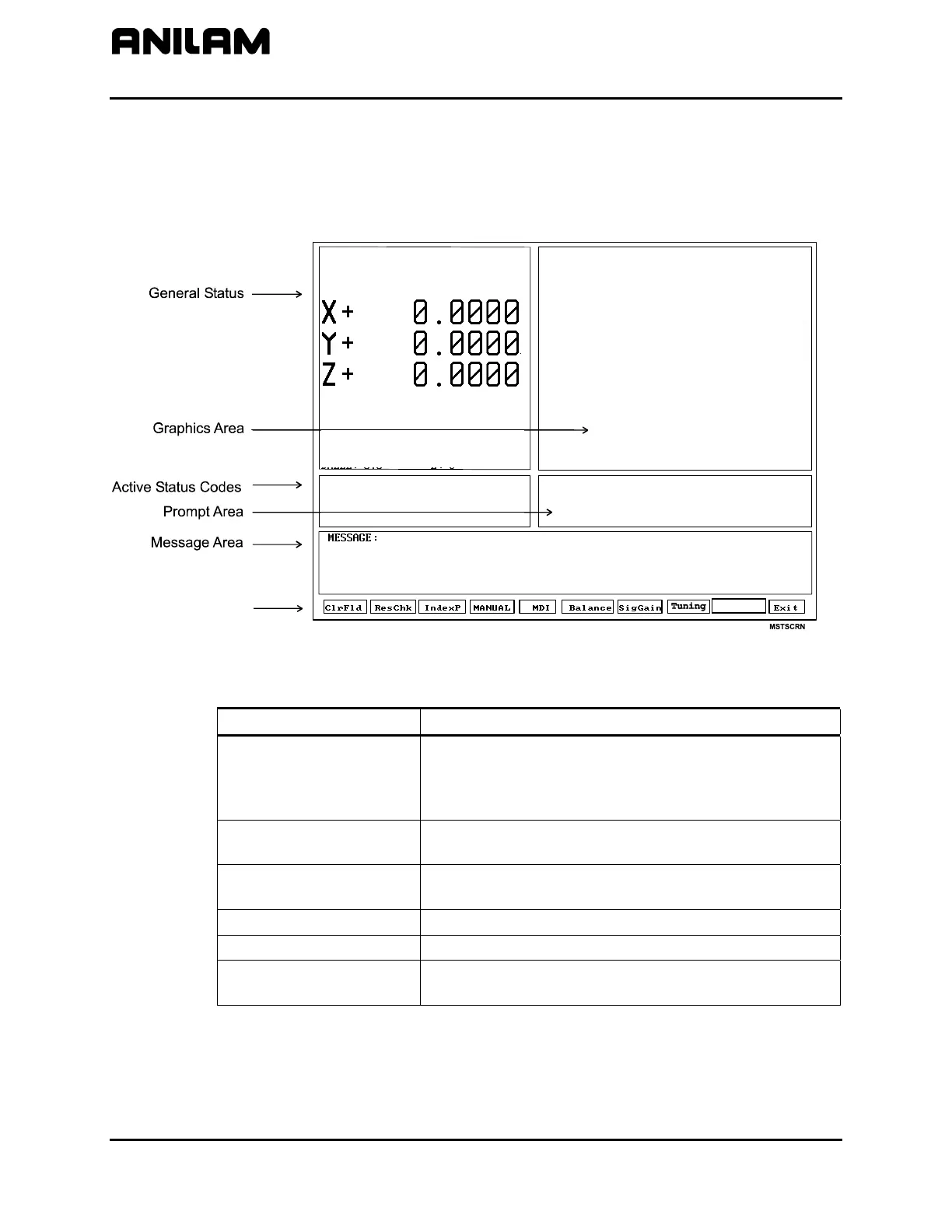
The axis positions displayed correspond to the current position. The
Graphics Area displays step responses for the Signal Gain and Tuning
functions. Refer to Figure 1 and Table 1.
Figure 1, CNC Motion Setup/Testing Screen
Table 1, MST Screen Areas and Explanations
MST Screen Area Explanation
General Status
Shows Active Modes, Machine Position for each
axis, RPM, Dwell, Spindle Speed and Feedrate,
Active Axis, and other information regarding the
status of the CNC.
Graph Area
Displays step responses for the Signal Gain and
Tuning functions.
Prompt Area
Displays messages regarding information that must
be entered.
Active Status Codes
Displays currently active status codes.
Message Area
Displays error messages.
Soft Keys Function keys (F1–F10) located below the LCD on
the console to activate the functions, as labeled.
Soft Keys
Misc
CNC Ver 3.70H DSP Ver 0.00C
ctive Axis : X
SPINDLE : OFF INCH
COOLANT : OFF ABS
JOG : RAPID FEED
FEED : 0.0 % : 100
RPM : 0 % : 100
DWELL : 0.0 LOOP : 0


 To Next Page