03 EN
Setting Up the Video Bar
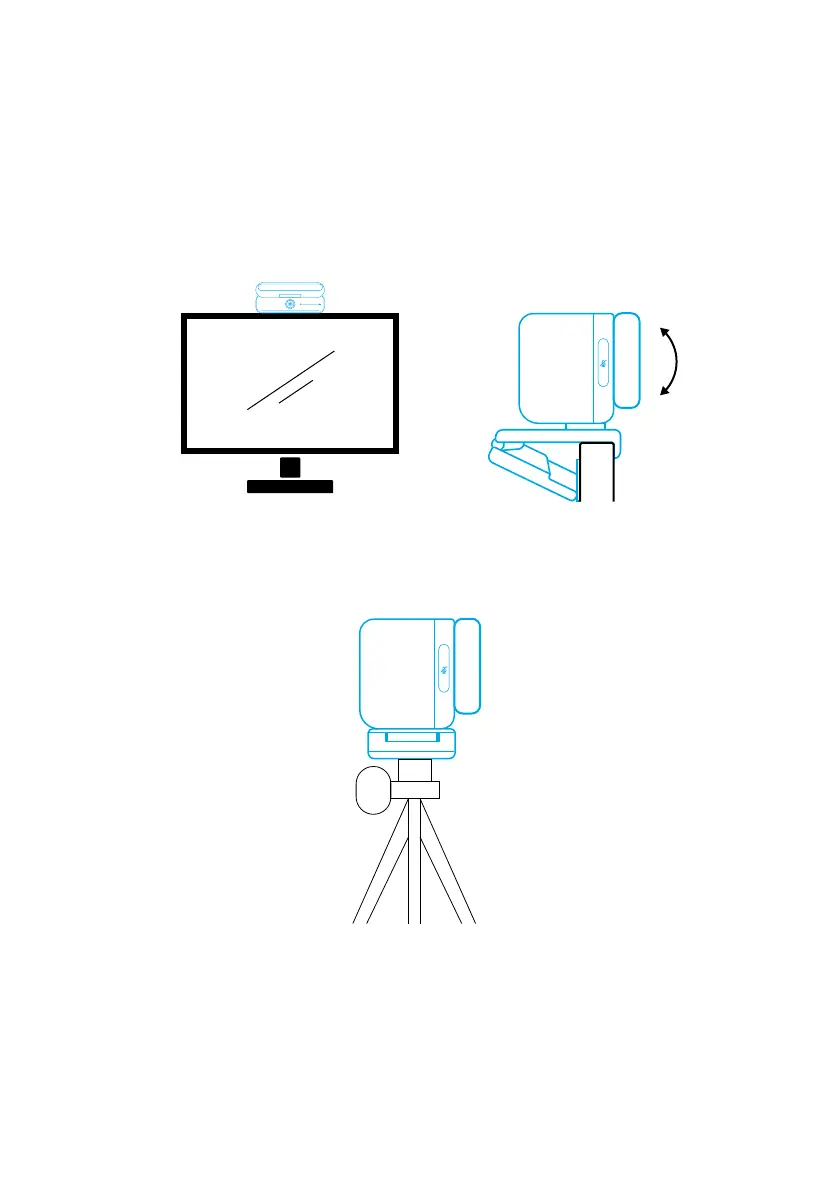
Option A: On Top of Your Monitor
1. Unfold the clip so it ts over the top of your monitor. For a secure t, adjust the
clip by pressing it against the back of your device.
2. Adjust the video bar up or down, or rotate it to the optimal position to frame.
• If the joint between the video bar and the clip is not tight enough, tighten
the screw with the built-in handle at the base or a at-blade screwdriver (not
provided).
Option B: On a Tripod on Your Desk
With the clip folded in, mount the video bar onto a tripod (not provided) with the ¼
inch thread.
Connecting to a Computer
1. Connect the video bar to a computer using the provided USB-C to USB-C cable
(or other Anker's USB-C to USB-C cable with a transfer speed of 480 Mbps and
that is less than 2 m long).
2. Connect the video bar to a power supply using the provided power adapter.
3. Open the software you want to use with the video bar.
• The LED indicator will turn blue when the video bar is in use by any instant


 To Next Page