EN 04
communication software, such as Zoom.
• Plug-and-play support will allow your computer to instantly recognize the video
bar.
• If your computer does not instantly recognize the video bar, ensure correct
connection, try re-plugging the power adapter into the power port, or use a
different USB port on your PC.
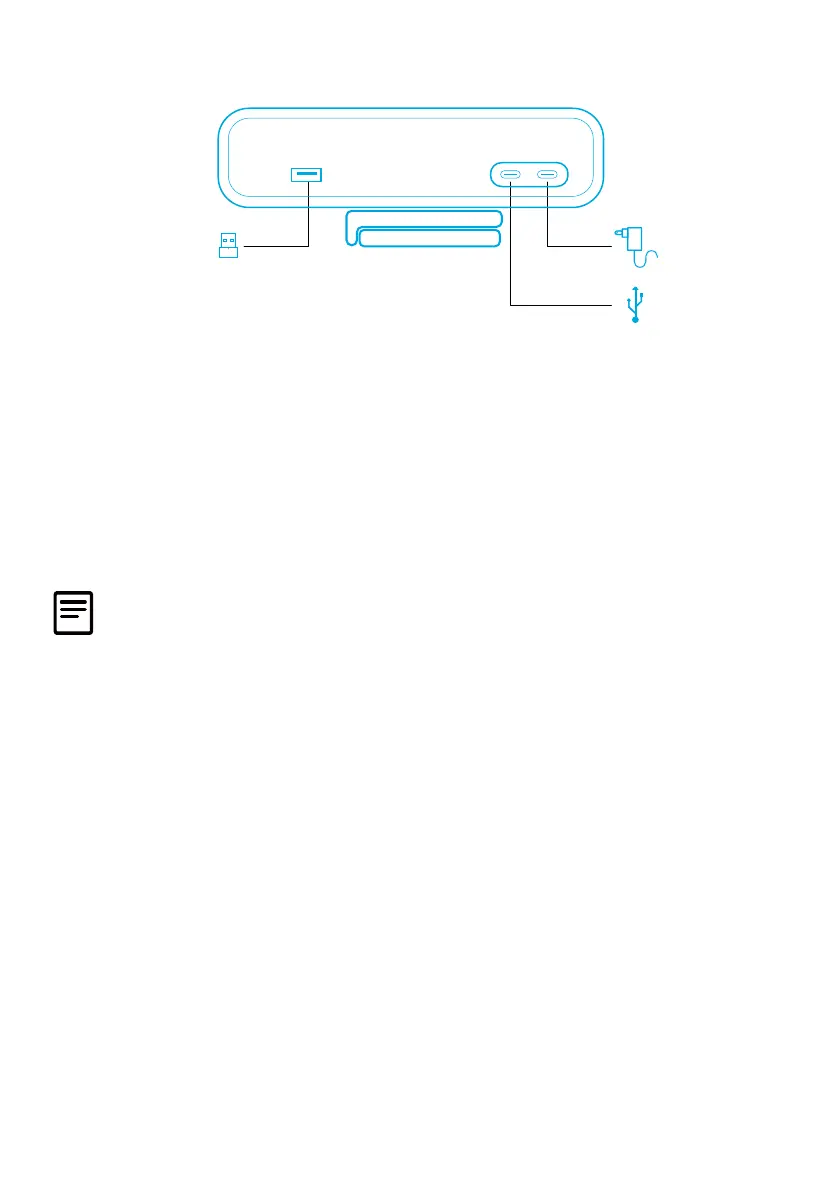
• The USB-A port can only support Anker's wireless headphones with a USB
receiver. You can pair your headphones with the video bar for best experience.
• Do not connect the power adapter to the data port by mistake, otherwise the
LED indicator will ash red.
You may need to manually select AnkerWork B600 Video Bar for your PC system or
software.
A) Windows
• Audio:
Right-click on the sound icon > Open Sound settings > Choose your output device /
Choose your input device
• Microphone:
1. Go to Settings > Privacy > Microphone and turn on "Allow apps to access your
microphone".
2. Turn on each of the listed apps where you want to use the microphone.
• Camera:
1. Go to Settings > Privacy > Camera and turn on "Allow apps to access your
camera".
2. Turn on each of the listed apps where you want to use the camera.
B) macOS


 To Next Page