

EasyManua.ls Logo

Anker AnkerWork B600 - User Manual

Anker AnkerWork B600
166 pages
Print Icon
To Next Page IconTo Next Page
Loading...
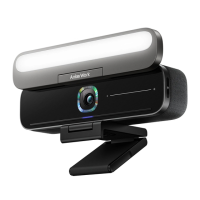
AnkerWork B600 Video Bar
USER MANUAL
Question and Answer IconNeed help?

Do you have a question about the Anker AnkerWork B600 and is the answer not in the manual?

Summary

Whats Included

At a Glance

Assembling the Power Adapter

Setting Up the Video Bar

Option A: On Top of Your Monitor

Instructions for mounting the video bar securely on the top edge of your monitor.

Option B: On a Tripod on Your Desk

Instructions for mounting the video bar on a tripod using the 1/4 inch thread.

Connecting to a Computer

Windows Configuration

Steps to configure audio, microphone, and camera settings for Windows.

macOS Configuration

Steps to configure audio, microphone, and camera settings for macOS.

Controls

Microphone Mute Control

How to mute or unmute the microphone using the touch button.

Edge Light Control

How to turn the edge light on or off by touching the control bar.

Brightness Adjustment

How to adjust the brightness by sliding the touch control.

Privacy Cover Control

How to open or close the privacy cover by rotating the device.
LED Light Guide

Edge Light Operation

Using AnkerWork Software

Product Specifications

Summary

Whats Included

At a Glance

Assembling the Power Adapter

Setting Up the Video Bar

Option A: On Top of Your Monitor

Instructions for mounting the video bar securely on the top edge of your monitor.

Option B: On a Tripod on Your Desk

Instructions for mounting the video bar on a tripod using the 1/4 inch thread.

Connecting to a Computer

Windows Configuration

Steps to configure audio, microphone, and camera settings for Windows.

macOS Configuration

Steps to configure audio, microphone, and camera settings for macOS.

Controls

Microphone Mute Control

How to mute or unmute the microphone using the touch button.

Edge Light Control

How to turn the edge light on or off by touching the control bar.

Brightness Adjustment

How to adjust the brightness by sliding the touch control.

Privacy Cover Control

How to open or close the privacy cover by rotating the device.

LED Light Guide

Edge Light Operation

Using AnkerWork Software

Product Specifications

Anker AnkerWork B600 Specifications

General IconGeneral
BrandAnker
ModelAnkerWork B600
CategoryCamcorder
LanguageEnglish