Rev 9/20/18 pg. 63
Productivity Enhancement
Start a new procedure while a previous one is in progress
To enhance the productivity of your instrument, you can begin the digestion process (run in the IDF part of the instrument) of a
new procedure (IDF/SDF or TDF) while the precipitation process (run in the SDF part of the instrument) of a previous
procedure (IDF/SDF or TDF) is still running.
This feature is NOT available if the precipitation time has been extended beyond 60
minutes.
When starting a new run, the ANKOM
TDF
Dietary Fiber Analyzer must have bags
installed at all stations (a total of twelve bags). If you are starting a digestion
process while a precipitation process is running, you must install IDF or IDF Flow-
Thru bags at all six IDF stations.
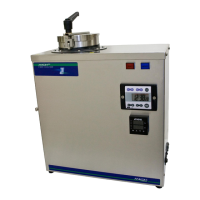
When a digestion process completes, the following screen is displayed showing that the process in the top bags is complete. The
Method & Procedure shown in the top right corner will be the one that is currently in progress in the bottom bags.
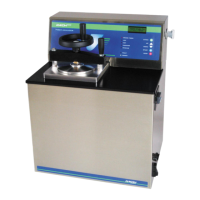
At this time you can remove the IDF or IDF Flow-Thru bags from the instrument; then press the Start New Procedure button
on the screen. The following screen will be displayed.
Vacuum xx.x
cur: - x.x
max: - x.x


 To Next Page