Step 8. Press the Impedance soft key and choose 75W or 120W. Press Back to return to
the previous menu.
Step 9. Select the
More soft key to access more menu selections.
Step 10. Press the
Clock Source soft key and select External clock. Press Back to return
to the previous menu.
Step 11. Press the Setup Error Insert soft key and select Bit, BPV, Framing Bits, RAI or
AIS as appropriate for the measurement.
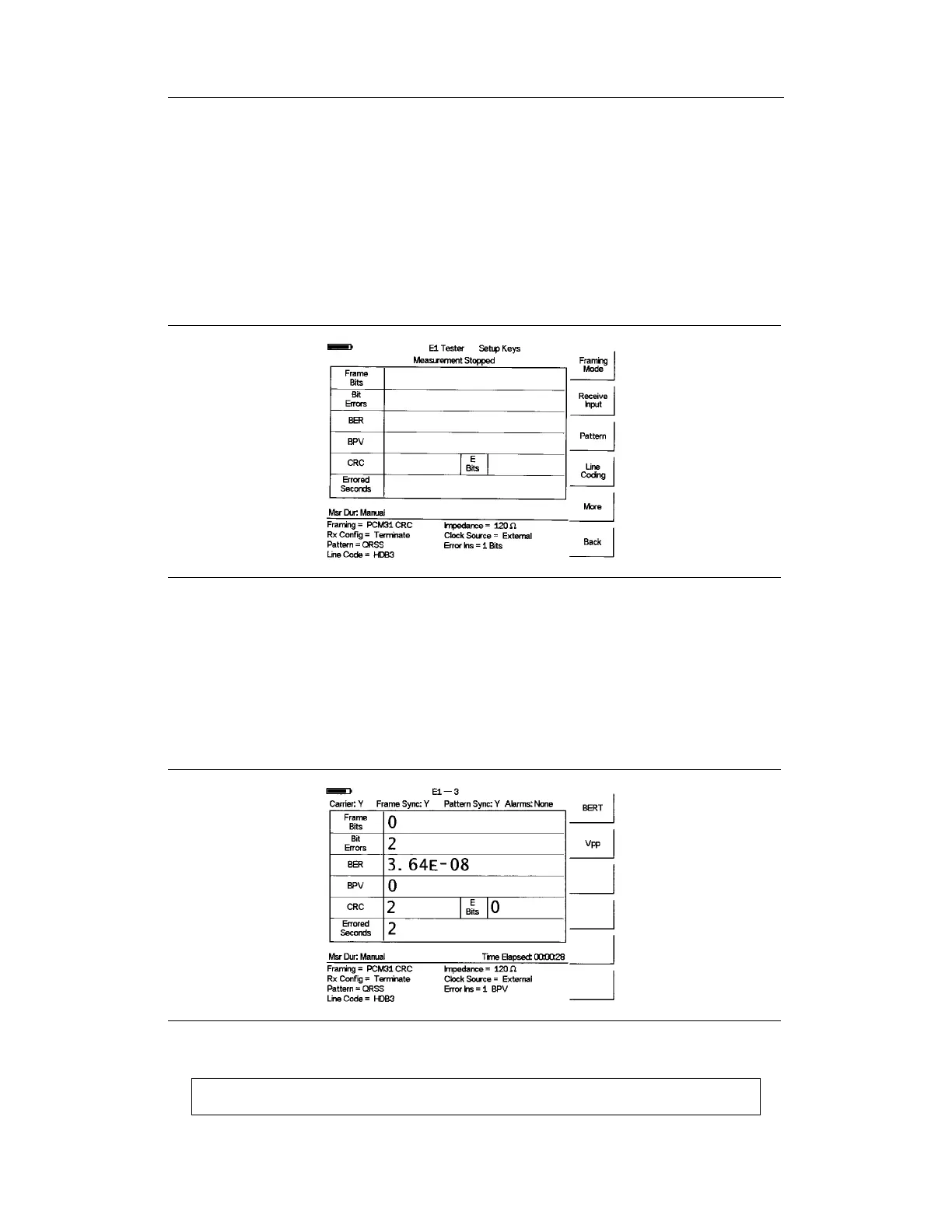
Figure 8-6 illustrates some of the key information of the E1 measurement Setup.
BERT Measurement
Step 1.
Press the MEAS/DISP key, select
BERT and then the Measure BERT soft key.
Step 2. Press the
Measure Duration soft key and use the Up/Down arrow key to select
the duration of the measurement, and press ENTER. Figure 8-7 illustrates an E1
measurement in raw data mode.
NOTE: The RUN/HOLD key can also be used to start or stop the measurement.
Chapter 8 E1 Measurements
8-9
Figure 8-6. Key Information of the E1 Measurement Setup
Figure 8-7. E1 Measurement Display













 To Next Page