6 7
The Basics
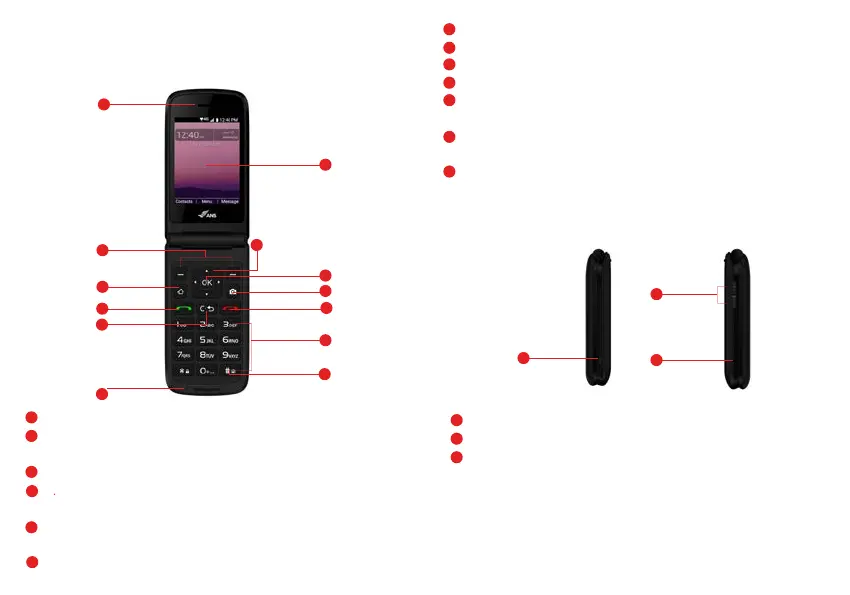
Phone Overview -- Open View
Home key - Access the home screen.
Side View
14
USB/Charger Port - Connects the phone to the USB charger, or other compatible accessories.
15
Volume Key - Allows you to adjust the volume.
16
Headset Jack - Allows you to plug in an optional 3.5mm headset for convenient, hands-free
conversations or other compatible listening devices.
Earpiece
HOME
Send
Menu/OK
END/PWR
Camera
Numeric
Keypad
Home screen
Navigation
Clear
Microphone
Soft Keys
2
1
3
4
5
6
7
8
13
9
10
11
Vibrate
Mode Key
12
Charger
Port
14
Volume
Keys
15
16
Headset
Jack
3
Navigation Key - To scrol
l through menu items and highlight fields or objects.
Menu/OK - To select options and menu options
End/Power key - Turns the power on/off, ends calls and exits menus. Also returns to home screen.
Camera - Allows you to access the camera.
Numeric Keypad - From the home screen pressing numeric keys allows to access to default
shortcuts.
Keys will also allow entering phone numbers and alphabetical text.
Vibrate mode key - Allows you to set Vibrate mode from standby mode (the Home screen), press
and hold for about 3 seconds.
Home screen - Displays messages, indicator icons and active functions.
7
8
9
10
11
12
13
Earpiece - Allows you to hear the caller and automated prompts.
Soft Keys - Allows you to select the corresponding command at the lower left or right displayed in
the screen.
Send Key - Allows you to m
ake and answer calls. Press from standby mode to access your call history
(all calls, missed calls, dialed calls and received calls).
Clear Key - Quick press deletes spaces and characters | hold to delete entire text entry | press to back
out of menus, one level at a time.
Microphone - Transmit your voice to caller or for voice activated functions (e.g., Voice commands).
4
5
6
2
1



 To Next Page