10 11
Installing the battery
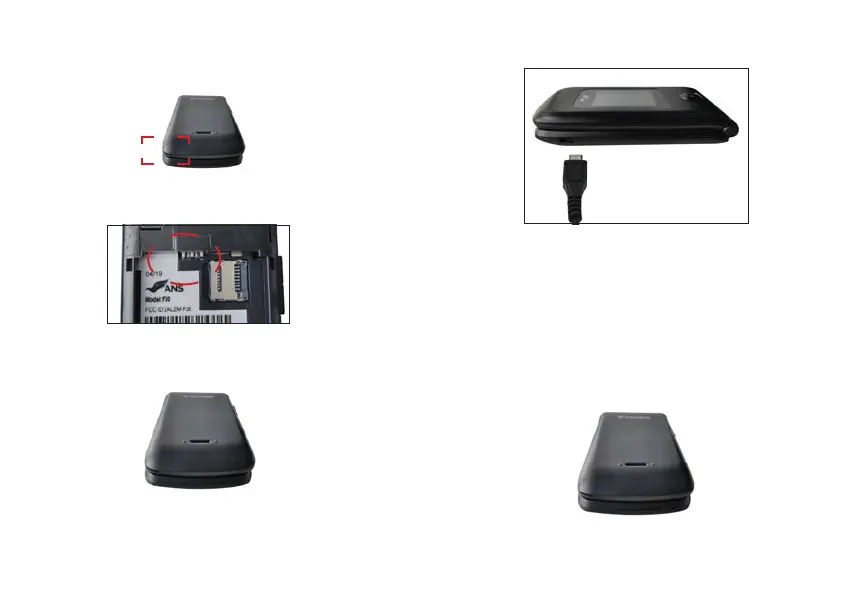
Step 1. Remove the back cover
With the phone facing down, insert your fingernail into the cutout located on the bottom of the back
cover and gently lift the cover.
Step 2. Insert the battery
Insert the battery, making sure the gold contacts line up. Push in and press down gently to secure.
Step 3. Replace the back cover
Place the back cover over the back of the phone and then press down along the edges to secure.
Step 4. Charge the phone
Before turning on your phone, charge it fully. Insert the small end of the USB cable into the phone.
Insert the larger end into the charger and plug the charger into an outlet.
WARNING! Use only approved chargers with your phone. Incompatible chargers or tampering
with the charging port could damage your phone and void the warranty.
TIP: Extend your battery’s life:
Conserve battery power by adjusting the settings on select applications:
Lower Screen brightness.
Reduce Backlight time.
Removing the Battery and SIM Card
1. With the phone facing down, insert your fingernail into the cutout located on the bottom of the
back cover and gently lift the cover.



 To Next Page