14 15
2. The USB/Charger port is located at the right side of the phone. Correctly orient the cable’s plug
with the port before plugging it in.
3. Plug the charger adapter into a power outlet to begin charging.
Turning your phone on and off
To turn your phone on or off, press and hold the End/Power key.
Home Screen
The Home screen is your starting point to access all of the features on your phone using simple key
presses.
Customizing the Home screen
You can customize your Home screen wallpaper and clock format using the Settings app. From the
Home screen, press the OK key Menu, Tools & Settings, OK, press the 2 key, then press the 4 key
to select Display settings.
Wallpaper: Press the 2 key to select Wallpaper, select a background image from pre-loaded images
or your own pictures, pr
ess Select, Done.
Clock Format: Press the 6 to select Main clock, select On or Off, then press OK.
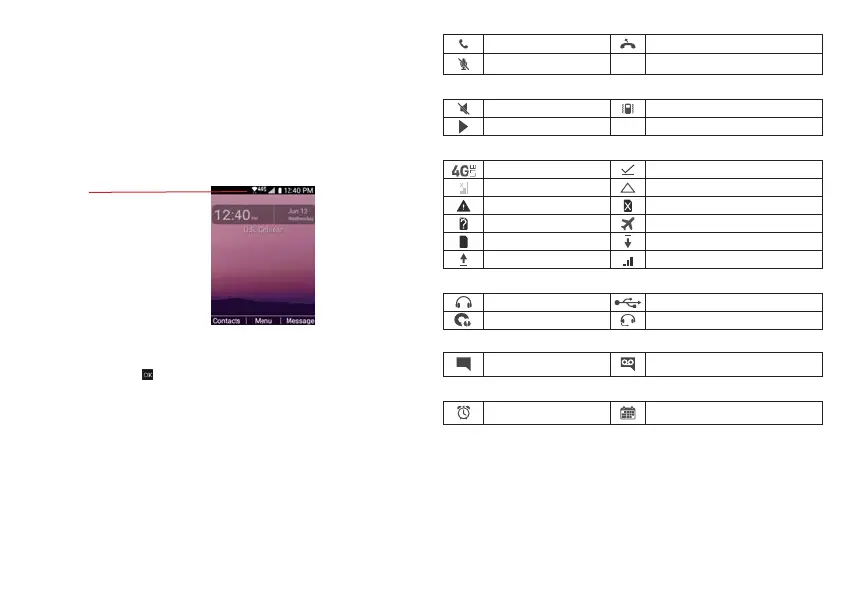
The Status Bar appears at the top of every screen. It displays icons indicating that you’ve received
notifications (on the left) and icons indicating the phone’s status (on the right), along with the current
time.
The following icons may appear in the Status Bar.
Call icons
Call Missed call
Microphone muted
Sound icons
Silent mode Vibrate mode
Music playing
Network icons
4G LTE connected Download successful
No signal Roaming
Emergency Alert No SIM card
Unknown SIM card Airplane mode
SIM card activated Downloading
Uploading
Connectivity icons
USB connected
Headset connected
Headset with microphone connected
Internal storage full
Messaging icons
Message New voicemail
Alarm and Calendar icons
Alarm set Calender
Status Bar
Shows phone status information,
including the time, signal strength,
battery status, and notification icons.
Signal strength
Phone’s status icons



 To Next Page