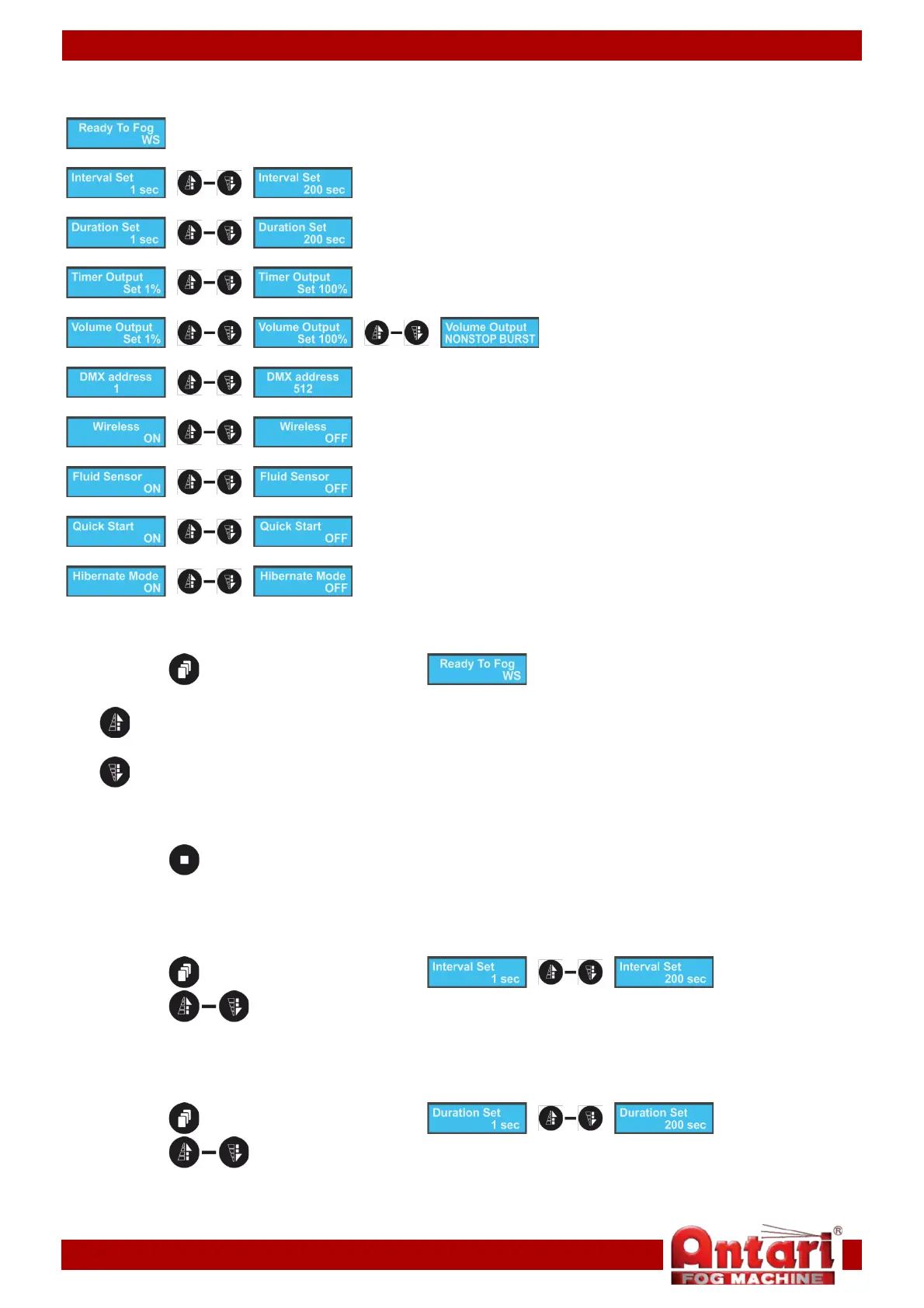
Main Menu Options
Control modes
Interval settings
Duration settings
Timer output volume settings
Continuous output volume settings
DMX settings
Wireless settings
Fluid sensor
Quick start
Hibernation mode
1. Control modes
With this menu, you can set the desired control mode.
01) Press the button until the display shows .
02) Press one of the 2 buttons to activate the desired control mode:
Timer mode
Continuous mode
03) Once you have chosen the desired control mode, the device will start fog output, using the settings
below.
04) Press the button to stop output.
2. Interval settings (Timer mode)
With this menu, you can set the intervals between particular fog outputs in Timer mode.
01) Press the button until the display shows .
02) Press the buttons to increase/decrease the interval. The adjustment range is between 1-
200 seconds.
3. Duration settings (Timer mode)
With this menu, you can set the duration time of a single fog output in Timer mode.
01) Press the button until the display shows .
02) Press the buttons to increase/decrease the length of a single output. The adjustment
range is between 1-200 seconds.
12


 To Next Page